Page 24 of 110
Rev. G
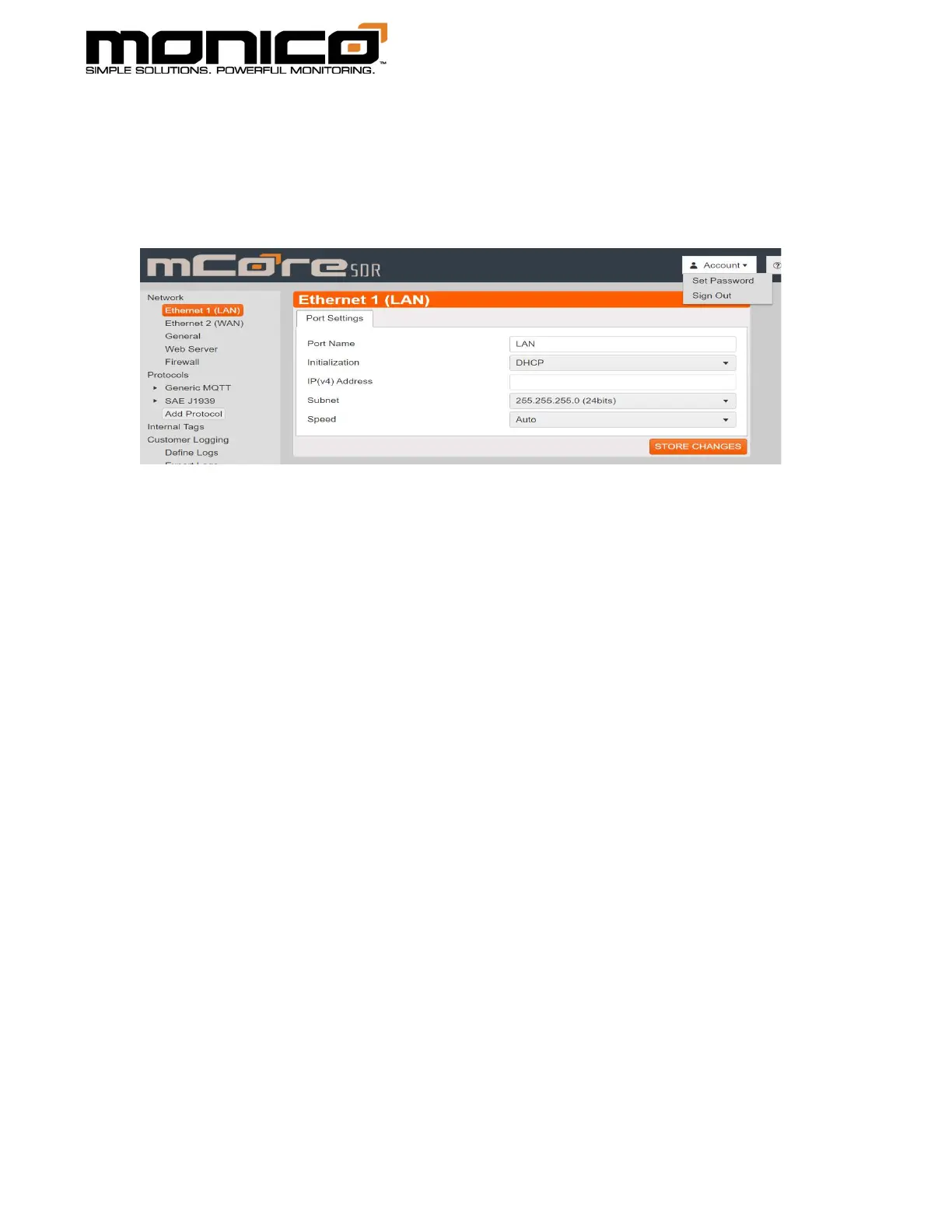
Section 6.4: Account Sign Off
Account Sign Off allows you to log off the mCore and requires you to re-enter
your login username and password to log back in.
1. To Sign Off, click the Account button in the top right, then click the Sign Out
button as shown in the following picture.
2. After clicking the Sign Out button, a pop box will appear. Click Ok to continue.
3. Once you have clicked Ok, you will be signed out and brought back to the Login
screen.
Section 6.5: General Setting
The General Setting tab is used to set several options:
Gateway: Enter the IP of the default gateway. This is normally the address of
the primary router on your network.
DNS Servers: Enter IP addresses of up to two DNS servers. If your device is not
connected to the Internet, these servers must be reachable from mCore.
Time Servers: Enter the IP addresses or names of up to two NTP servers that
mCore will use to set its Real-Time Clock. Leaving both at Automatic will result
in mCore using the NIST servers. If your device is not connected to the
Internet, these servers must be reachable from the mCore.



 To Next Page