Page 13 of 110
Rev. G
Section 3.3: Grounding
After mounting and connecting mCore, the unit must be grounded in compliance
with local and national electrical codes. It must be externally grounded using a
customer-supplied ground wire before any power is applied. Contact the
appropriate electrical inspection authority if you are uncertain that suitable
grounding is available.
Tools Required:
QTY: 1 Grounding Lug (included)
QTY: 1 6-Gauge Ground Wire (not included)
QTY: 1 Nut Driver (not included)
QTY: 1 Pliers or Crimping Tool (not included)
1. Use the Pliers or Crimping Tool to crimp the 6-Gauge Ground Wire to the
Grounding Lug.
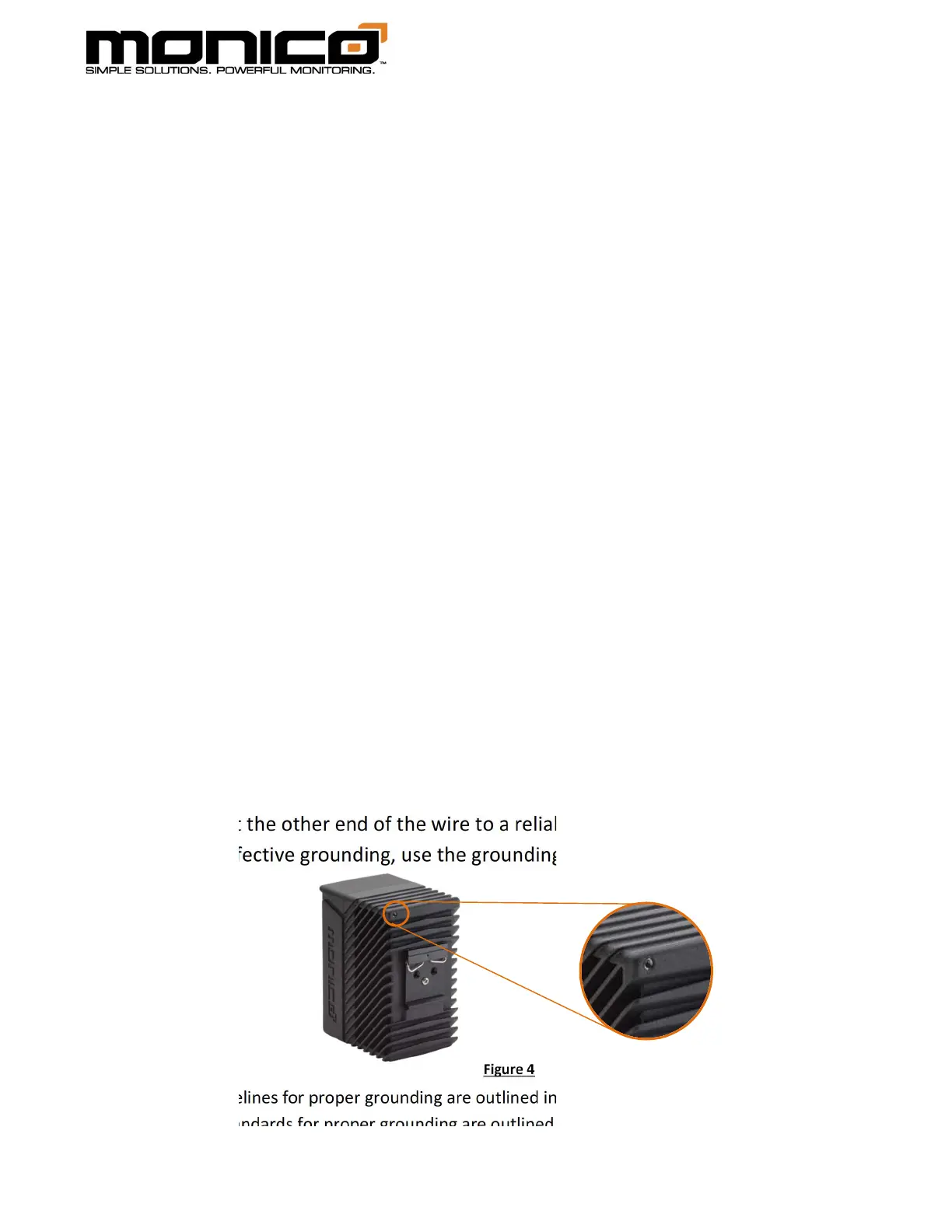
2. Connect the Grounding Wire to the mCore’s Grounding Lug connection point,
shown in Figure 4 below.
3. Place the Grounding Wire over the Grounding Lug and tighten these
components using a nut driver. Tighten to 9.6 in-lbs.
4. Connect the other end of the wire to a reliable earth ground if possible. For
most effective grounding, use the grounding standards listed below.
*Safety guidelines for proper grounding are outlined in OSHA Standard 1926.962.
*National standards for proper grounding are outlined in IEEE Standard 142.
Figure 4



 To Next Page