Page 51 of 110
Rev. G
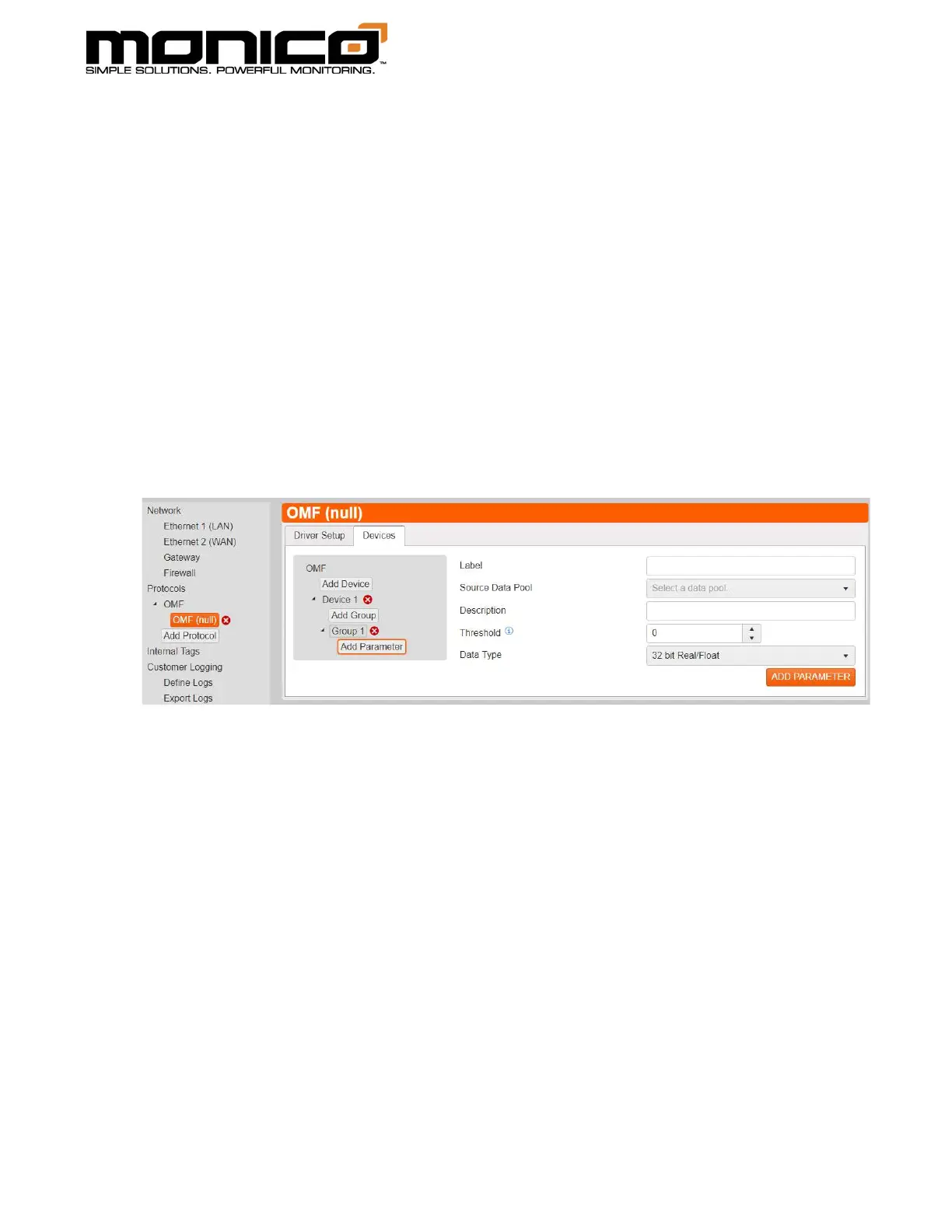
15. Next click Add Parameter in the center menu. The following screen will appear.
Choose from the Source Data Pool drop down menu the tag previously created
from other protocols that you would like to send to the PI Server. The Label
will autofill with the same name as the Source Data Pool but can be changed if
desired. A description is not required but can be added. The threshold is used
as plus or minus the data value.
For example: if the value is 10 and the threshold is 5, that means only values
that are either ≥ 15 or ≤ 5 will trigger the entire group to send all data values. If
there is only 1 tag per group, then only that tag’s value gets sent. If there are
10 tags in the group, then 1 tag exceeding its threshold will trigger all 10 tags’
values to be sent at the same time.
16. Click Add Parameter when done.
17. Repeat Steps 11 through 15 until you’ve added all tags and groups desired.
Click Commit All Changes in the left menu toward the bottom when done and
ready to start feeding data to the PI Server.
Note: The most efficient mapping method when using On Change is 1
parameter per 1 group. This keeps each tag independent and will only send 1
data point when triggered versus all tags in the entire group.



 To Next Page