Mooltipass Mini BLE User Manual – 2021/08/25
If you're not using a web browser and need to
log in, you can use Manual Login to “type” the
credentials.
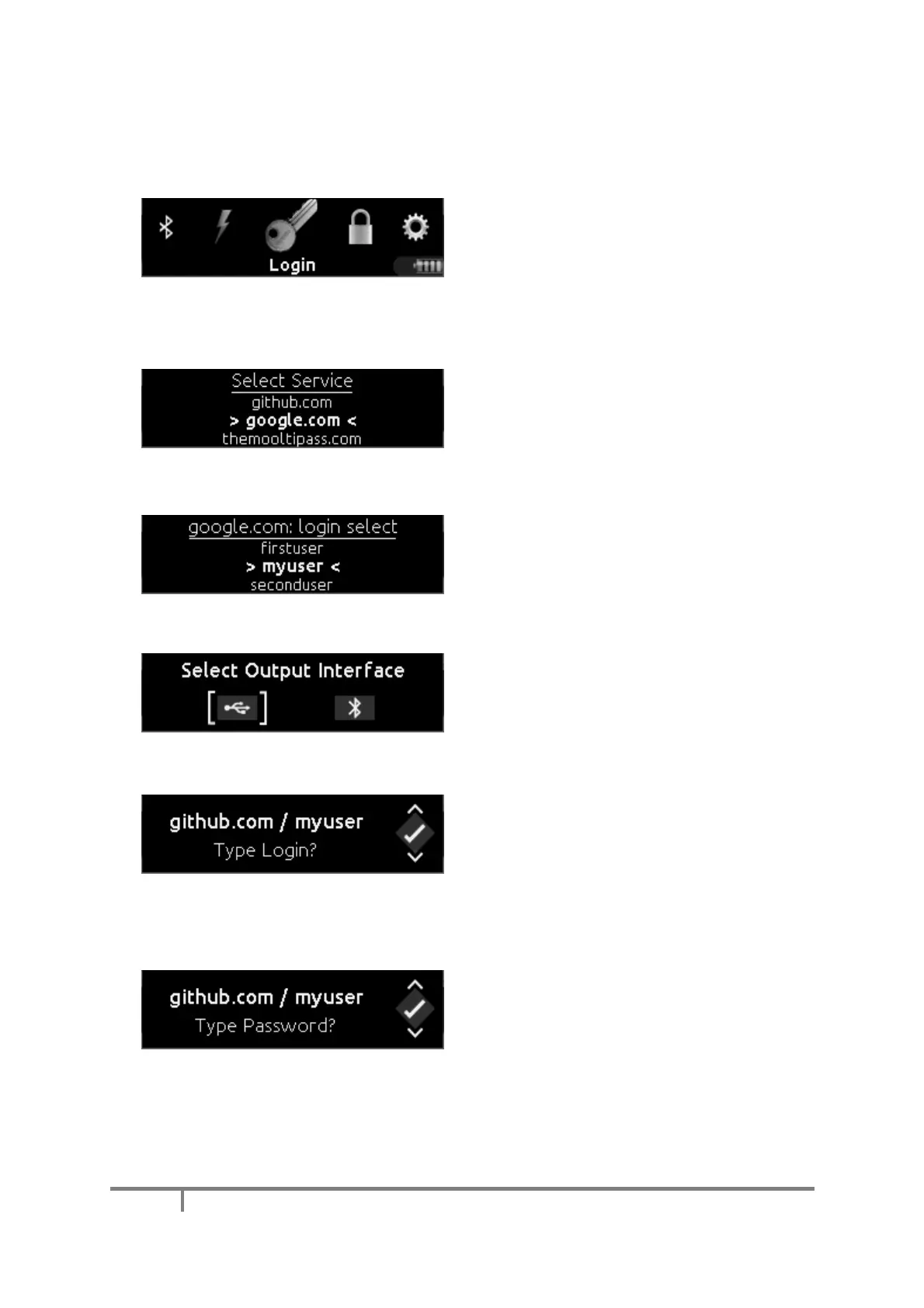
Position the typing cursor on the connected
device so that you could type the username then
select “Login” on the Mooltipass main menu.
Use the wheel interface to scroll to the service
you want to log into and click the wheel to select
it.
To scroll more quickly through the list, push and
hold the wheel while scrolling. This scrolls by the
first letter of the names of the services.
If more than one credential set is stored for a
given website, you will be prompted to select
which login to use.
If the Mooltipass Mini BLE is connected to
different devices, one over Bluetooth and the
other over USB, you’ll be prompted to select the
output interface.
The Mooltipass Mini BLE then prompts you for
permission to send your username to the device.
If the typed username doesn't appear correctly,
make sure your keyboard layout is selected
appropriately in the ‘Device Settings’ tab of the
Moolticute app (see Keyboard Output).
Next the Mooltipass prompts for permission to
enter your password. Reposition the typing
cursor on the connected device, if necessary, and
click the wheel.


 To Next Page