▪ Automatically lock your device whenever USB connection is removed
▪ Switch off your device upon USB disconnection
▪ Disable Bluetooth when the user card is removed from the device
▪ Disable Bluetooth when the device is locked
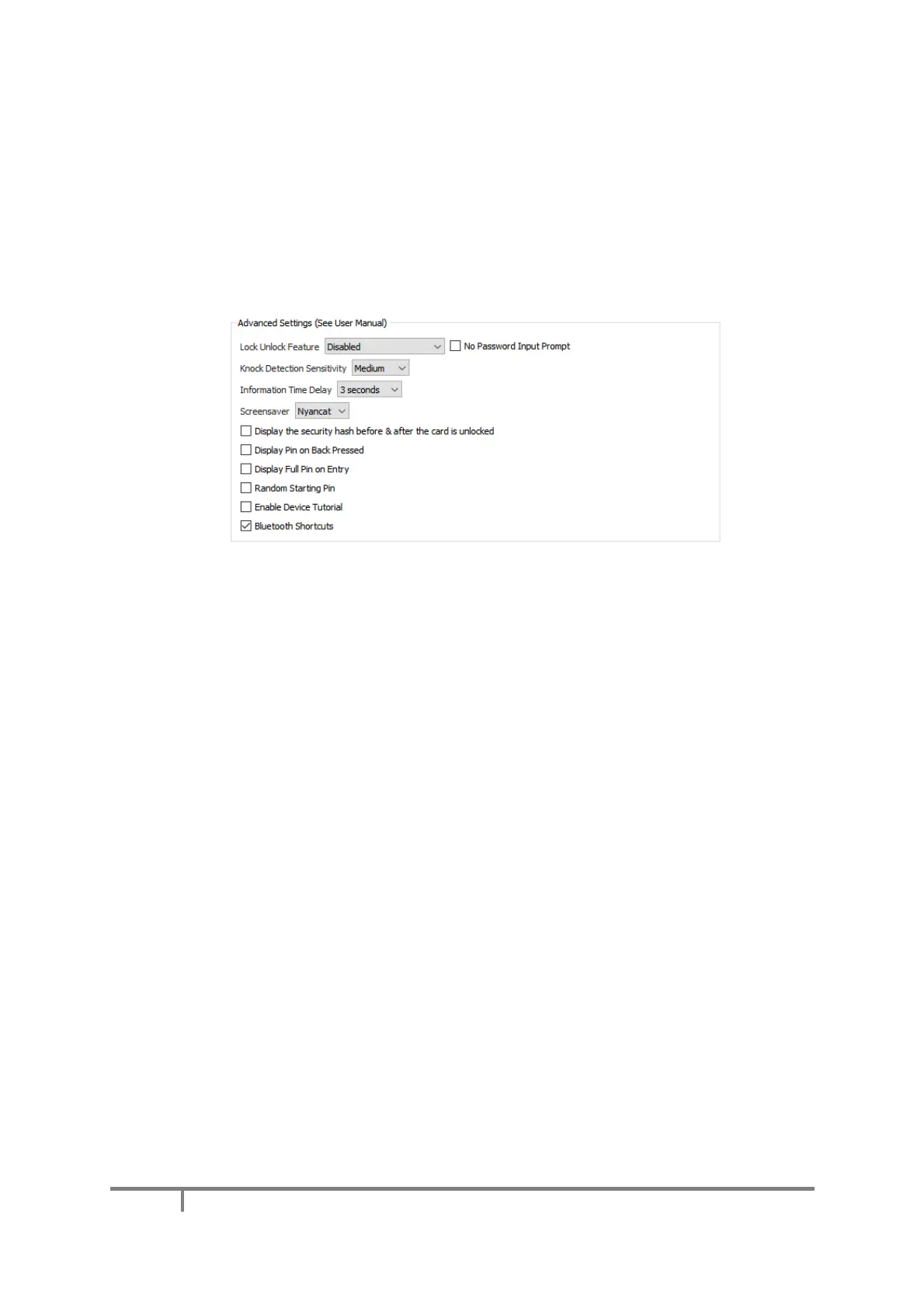
d) Advanced Settings
This subsection allows you to
▪ Adjust the knock detection sensitivity. When this feature is enabled inside the device menu (see
Knock Detection), knocking twice approves a credentials sending request
▪ Select for how many seconds information should be displayed on the mini BLE screen
▪ Display a screen saver when the device is going to sleep when connected through USB
▪ Enable Hash Display Feature: when enabled, the device will display one hash string before and after
unlocking your smartcard. By checking that these hashes do not change over the life of your device,
you can make sure no one has tampered with your Mooltipass.
▪ Display your last entered PIN digit when going back one digit during PIN entry
▪ Display your full PIN on screen during PIN entry
▪ Start with a random PIN value at PIN entry screen
▪ Make the Mooltipass display its tutorial the next time you plug it in
▪ Enable Bluetooth shortcuts inside the main device screen:
- While pressing the wheel, scrolling down, up, down toggles Bluetooth on/off
- While pressing the wheel, scrolling up, down, up triggers a disconnection from the host to
enable connection to a new host


 To Next Page