I. Mooltipass Mini BLE Device
A) Introduction
The Mooltipass Team would like to thank you for purchasing the Mooltipass Mini BLE, the third
device in the Mooltipass family. We’ve worked hard to make it the most usable and secure
authenticator in the market and we hope you’ll feel that way too.
This manual presents the different features offered by the Mooltipass Mini BLE. It will be
updated as new ones are added. The latest version is always available at
https://www.themooltipass.com/setup.
B) Important Concepts
When using the Mooltipass, it is useful to keep the following points in mind in order to use all
features that the Mooltipass Mini BLE offers:
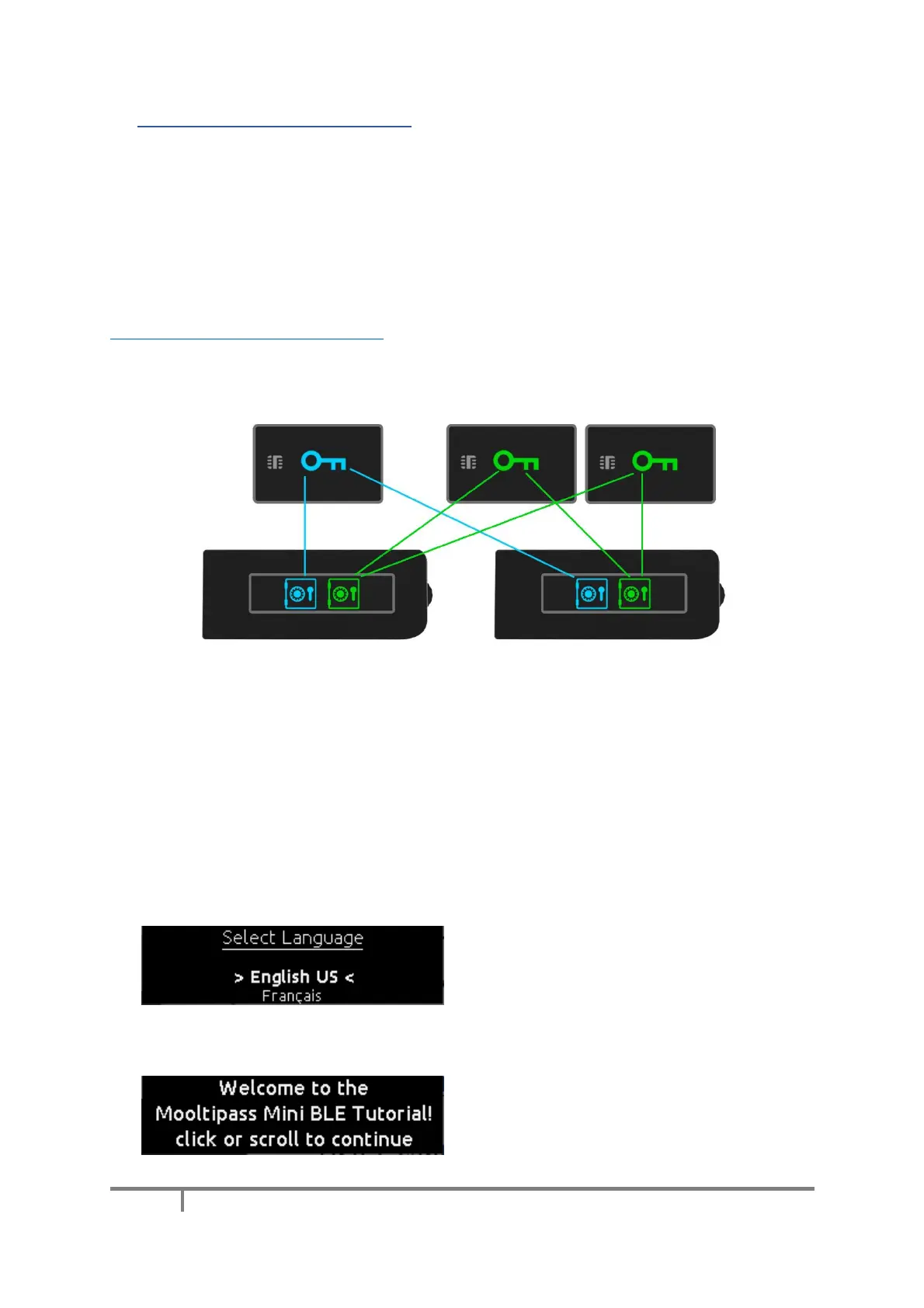
1) Each user is identified to the Mooltipass by a personal card or one of its clones
2) Multiple users can share one Mooltipass device
3) User password databases are stored on the device and can be exported for backup or cloning
4) By cloning the database, a user can use multiple devices
C) Getting Started
The Mooltipass Mini BLE is battery powered.
To switch it on, click on the wheel or connect a
plugged in USB-C cable to it.
When it’s first powered on, you’ll be invited to
select the device default language. Simply scroll
to the desired language and click to approve.


 To Next Page