Mooltipass Mini BLE User Manual – 2021/08/25
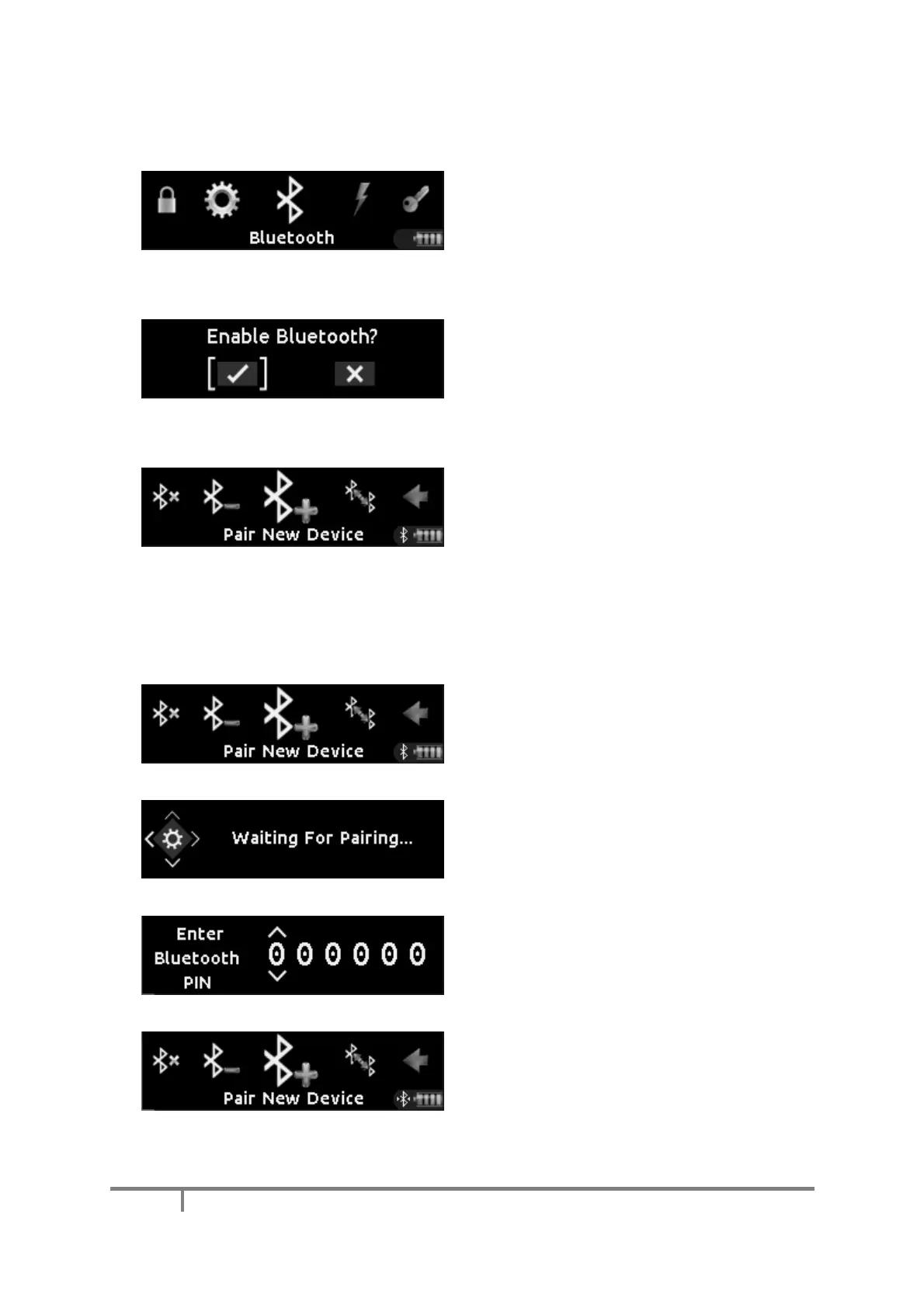
To enable Bluetooth on the Mooltipass Mini BLE,
scroll to and then select the ‘Bluetooth’ item in
the main menu.
You’ll be prompted to enable Bluetooth on the
Mooltipass if it isn’t already active.
When Bluetooth is active, the Bluetooth icon will
appear in the device tray in the lower right
corner of the screen.
a) Connecting to a New Device
To connect to a new device such as a phone or a
computer, select the menu item shown here.
Then use that device’s Bluetooth user interface
to pair with the Mooltipass Mini BLE.
The Mooltipass Mini BLE will display this screen
while waiting for your device to pair with it. Your
device will generate and display a pairing PIN.
When the device has generated the PIN, the
Mooltipass Mini BLE will prompt you to enter it.
Enter the PIN and the Mooltipass Mini BLE will
connect to your device.
When wirelessly connected to your device, the
Bluetooth logo will display arrows around it.


 To Next Page