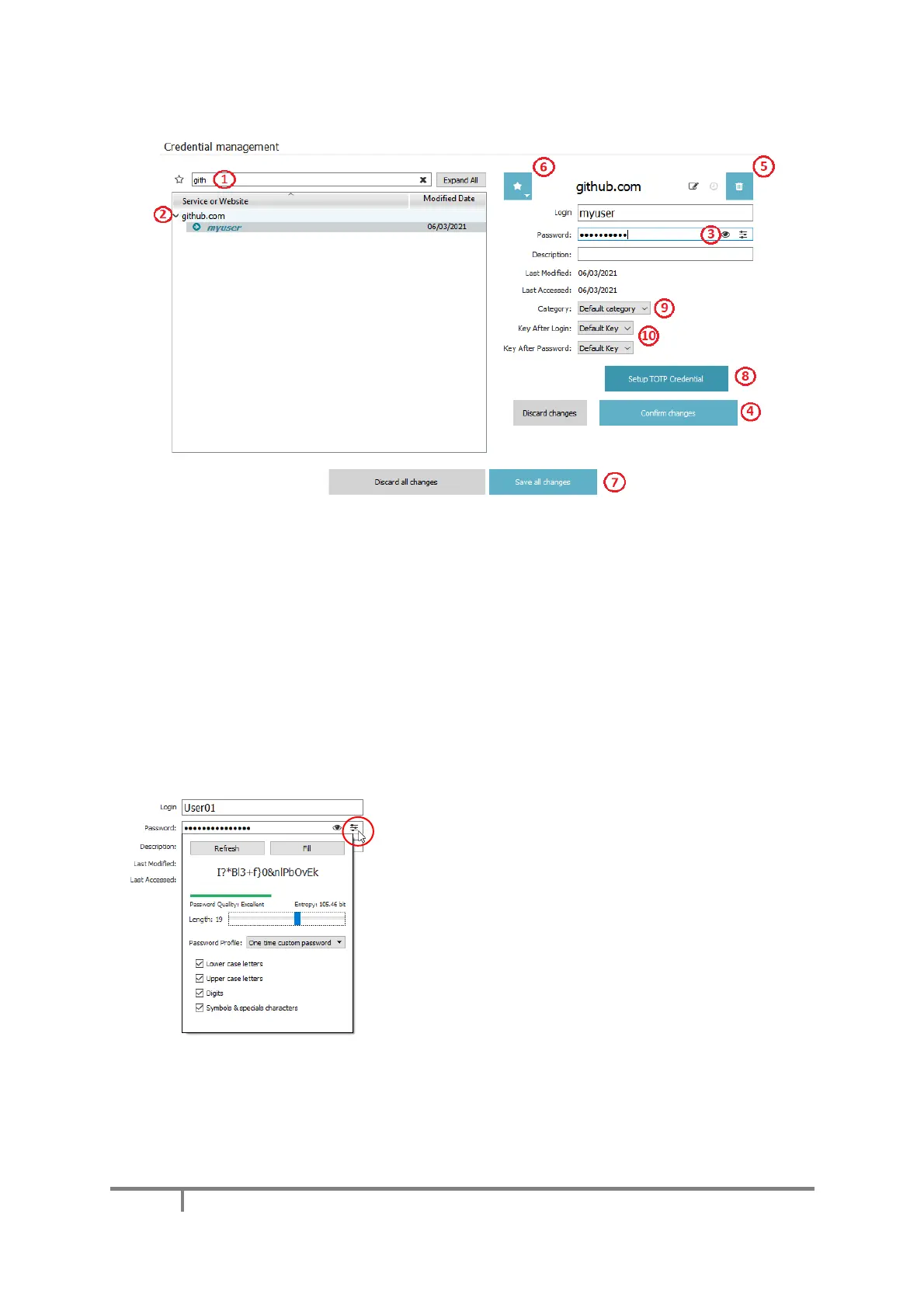
The ‘Filter credentials…’ search bar (1) can help you navigate through your credentials more easily.
Single clicking on a credential line (2) shows its details. To display the password, click on the eye
icon (3) and use the wheel on the Mooltipass Mini to confirm the request. You can edit the displayed
credential. To save changes: click on the 'Confirm changes' button. To cancel the credential
modification: click and hold the ‘Discard changes’ button (4).
You can delete a credential by clicking on the bin icon (5) or set a credential as favorite by clicking
on the star icon (6) and choosing a slot in the list. If advanced mode is enabled on your device, you
may select the credential category (9) and override which keys (10) are pressed after login &
password typing during manual credential recalls.
To setup a TOTP credential, click on the ‘Setup TOTP Credential’ button (8) to bring up a window
that allows you to enter your TOTP secret.
The second icon in the password bar gives you access to a
password generator. This feature can help you set random,
more secure passwords.
When you are done editing your credentials, click on the ‘Save all changes’ button and approve
the modification requests on the Mooltipass. Otherwise, hold the ‘Discard all changes’ button to
cancel (7).


 To Next Page