• Step 6: Test communications.
In the following sections we describe two test methods that can be used to ensure that a network
connection has been established.
Communication Testing
After installing the TAP-125-U-W-X-Z (YYYYYYYY) you can run a sample test to make sure the TAP-125-U-W-
X-Z (YYYYYYYY) and wireless connection are functioning normally. Two testing methods are described below.
Use the first method if you are using only one TAP-125-U-W-X-Z (YYYYYYYY) device, and use the second
method if you are using two or more TAP-125-U-W-X-Z (YYYYYYYY) units.
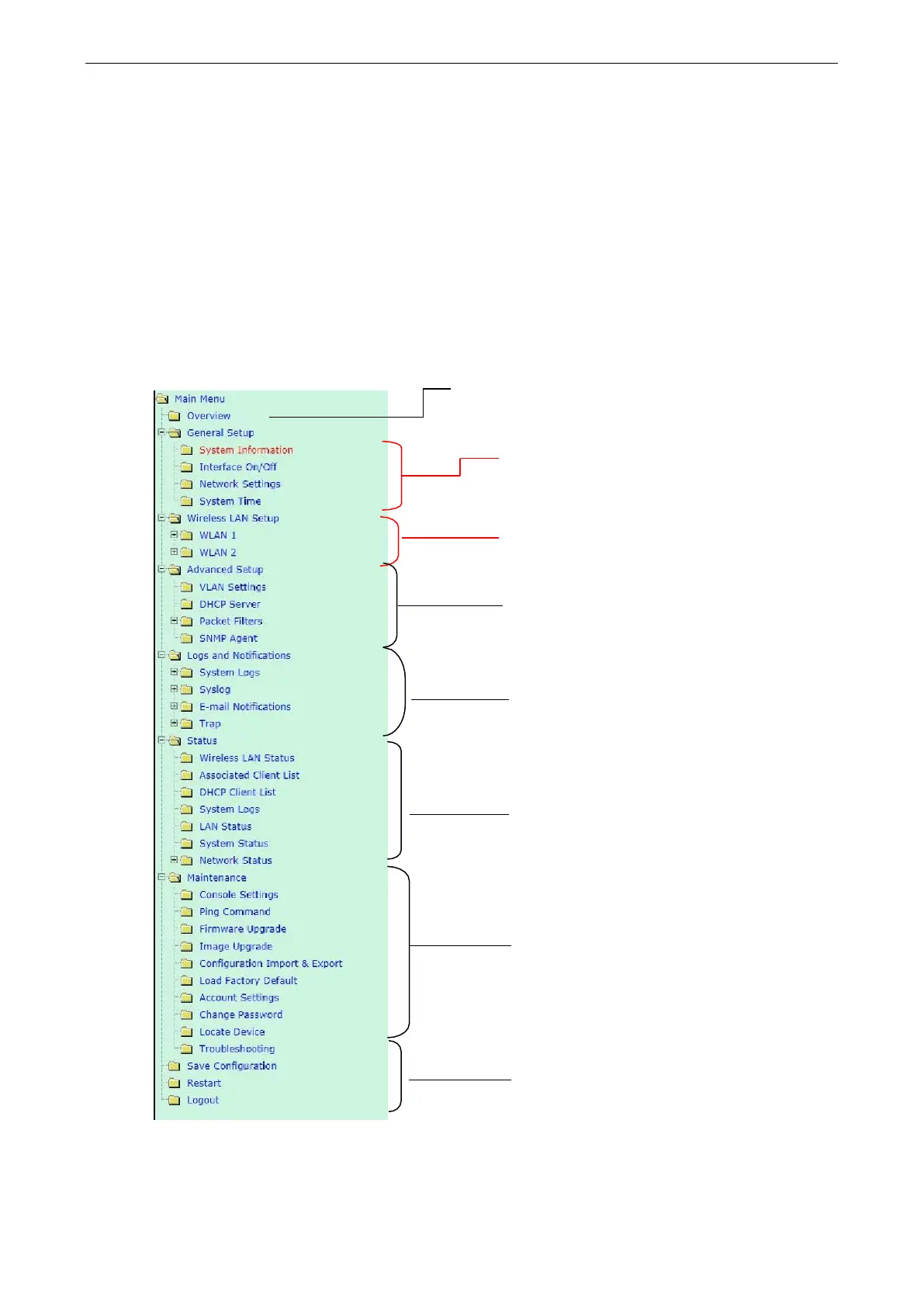
Function Map
Quick overview of the TAP-125-U-W-X-Z (YYYYYYYY)’s status
Basic settings for administering the
TAP-125-U-W-X-Z (YYYYYYYY)
Essential settings related to establishing a
wireless network
Advanced features to support additional network
management and secure wired and wireless
communication
Note: These advanced functions are all optional
Application-oriented device management functions
to set up events, traps, and reactions via relay
warning, e-mail, and SNMP notification
Note: These functions are all optional
Current status information for monitoring
wired/wireless network performance, advanced
services, and device management functions
Functions for maintaining the TAP-125-UN-CT-T
(TI), and for diagnosing the network



 To Next Page
 Loading...

