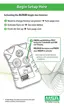
b. Press and hold the TEST button to increment the low
alarm value:
• Once the maximum setpoint allowed is reached, this
value rolls over and begins again at the lowest
value.
c. Once the correct value displays, release the TEST button
and wait three seconds to continue.
• HighAlarmSetpointfor three seconds
• "HI" and "ALARM" icons turn ON
a. To change the high alarm setpoint, press the TEST button
when "HI" "ALARM" displays:
• "HI" "ALARM" "SET" "?" displays.
b. Press and hold the TEST button to increment the high
alarm value.
• Once the maximum setpoint allowed is reached, this
value rolls over and begins again at the lowest
value.
c. Once the correct value displays, release the TEST button
and wait three seconds to continue.
6. The instrument now performs a 99-second activation countdown.
• Once activated, the instrument remains active until a Low
Battery error occurs.
• The Months Remaining counter begins at 24 months
and counts down.
2-5



 To Next Page