CalibratingtheToxicGasInstruments
(COandH
2
S)
To enter the calibration mode, make sure you are in fresh,
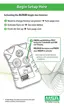
uncontaminated air. See FIGURE 4-1 for more details.
1. In normal operating mode, press the TEST button.
• "TEST" "GAS" "?" displays.
2. Press and hold the TEST button for three seconds when the
"TEST" "GAS" "?" displays.
• "TEST" "CAL" screen displays
• After three seconds, "FAS" "?" displays asking the user if a
fresh air setup/calibration is desired.
3. Press the TEST button to enter zero calibration.
NOTE: Otherwise, the instrument will return to the normal
operating mode.
4. During zero calibration:
• the hour glass and "FAS" display
• If the instrument successfully calibrates:
• "OK" displays
• If the instrument does not successfully calibrate:
• "ERR" displays
• instrument returns to normal operating mode after five
seconds.
5. Once the instrument successfully calibrates and the "OK" displays,
press the TEST button to enter calibration.
• "CAL" "?" displays.
6. While the "CAL" "?" displays, press the TEST button to enter the
Gas Calibration mode.
• The current expected test gas is shown (in ppm).
4-2



 To Next Page