29
6.2 Windows Based Computer System Example
Hardware and Network Setup
We assume you have already setup and turned on your home network and:
Your PC can access the internet and is hard-wired to the home network
Your wireless device (Pad, Phone, Tablet), which will run the Controller, has access to
your network and the internet via WiFi
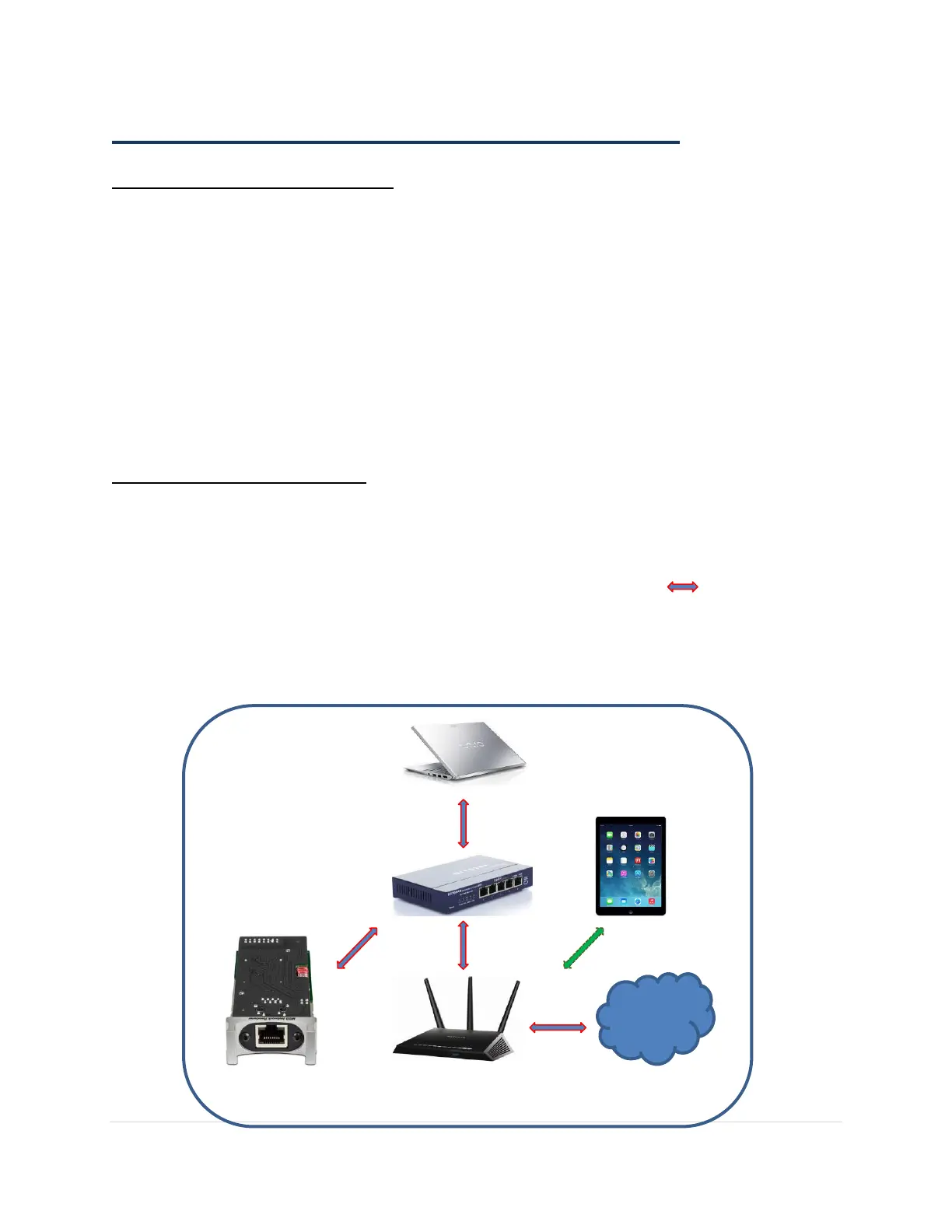
The MSB Network Renderer is connected to the Windows computer via a Gigabit switch
and is hard-wired with quality Ethernet cables
Your MSB DAC has the latest firmware, the MSB Renderer module installed in the DAC
and is turned on
Hardware used in this example:
1. Sony Vaio laptop with Windows 8.1 running JRMC in UPnP/DLNA mode
2. iPad Air with 16GB memory running JRemote connected through WiFi
3. Small gigabit switch from Netgear, the ProSafe GS105
4. Certified Ethernet Cat6a cables from Blue Jeans Cable (Shown as in Diagram 4)
5. Netgear Nighthawk AC1750 (R6700) Wireless Dual Band Gigabit Router
6. MSB Network Renderer
Diagram 4: Windows Based Network Audio Example



 To Next Page