44
6.6 Internet Radio on JRMC
Internet Radio is a great way to listen to streaming audio. Using JRMC it is relatively easy to
access an internet radio station and set it up as a Playlist for future use. Below are the steps to
follow once you know the URL of your radio station.
Step 1. Find the URL of your radio station
The easiest way is to use google to find the radio station URL. There are a few different
playback formats, and not always are the URLs made readily available, nor do they always work.
A bit of trial and error is required to find the correct URL. Luckily there are a few websites
available that have collected many of the popular URLs.
For example:
http://wiki.slimdevices.com/index.php/Internet_radio_URLs
http://www.mikesradioworld.com/
http://www.shoutcast.com/
More information can be found on Jriver’s website as well:
http://wiki.jriver.com/index.php/Web_Media_(Radio)
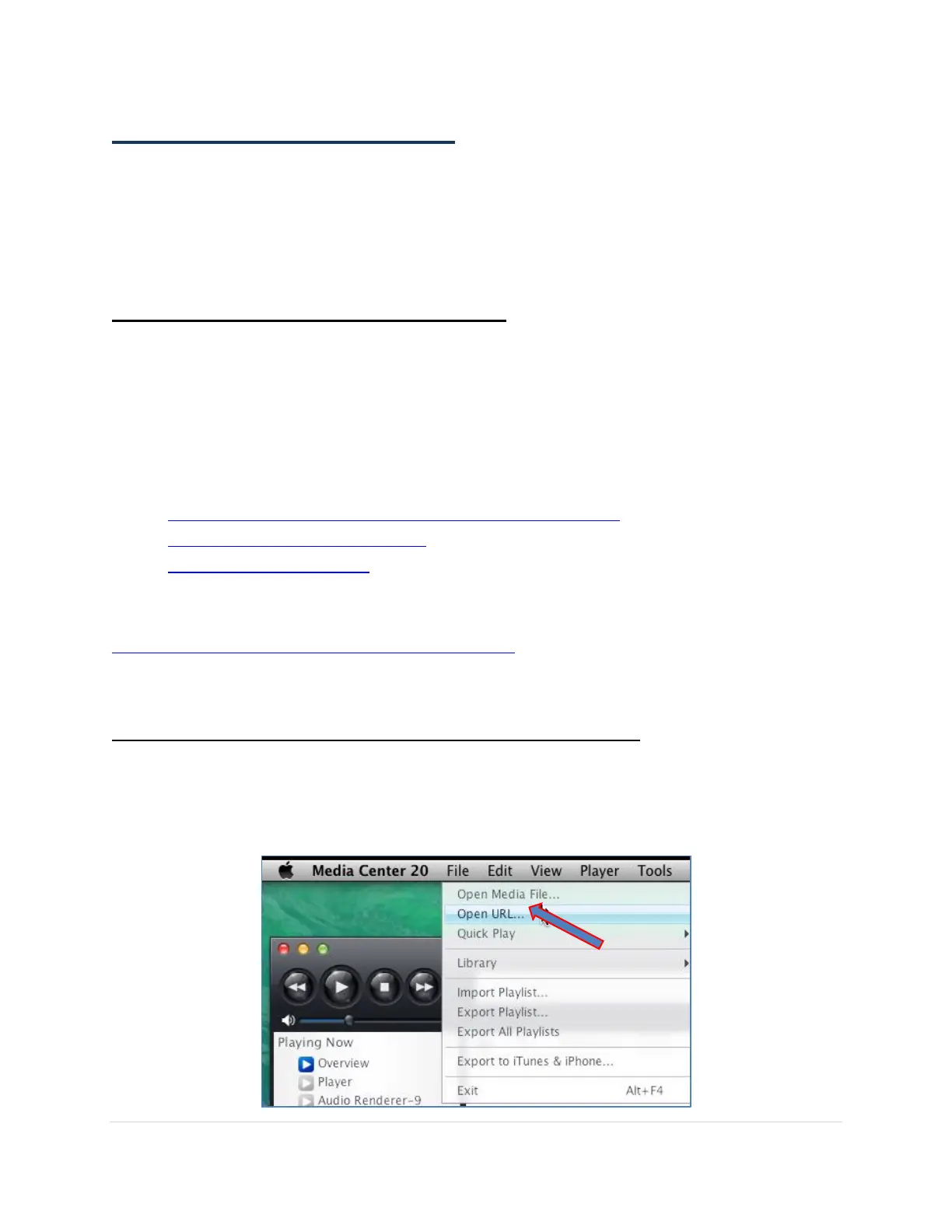
Step 2. Open the Internet Radio Station’s URL in JRMC
1. Make sure the MSB Renderer is selected by clicking on once on the name within the Playing
Now section in the top left hand corner
2. Navigate to the menu bar and select File Open URL



 To Next Page