PAGE 68 — GENERATOR SERVICE AND TROUBLESHOOTING MANUAL — REV. #0 (08/29/23)
MAGNETIC PICKUP UNIT
MPU Installation And Adjustment
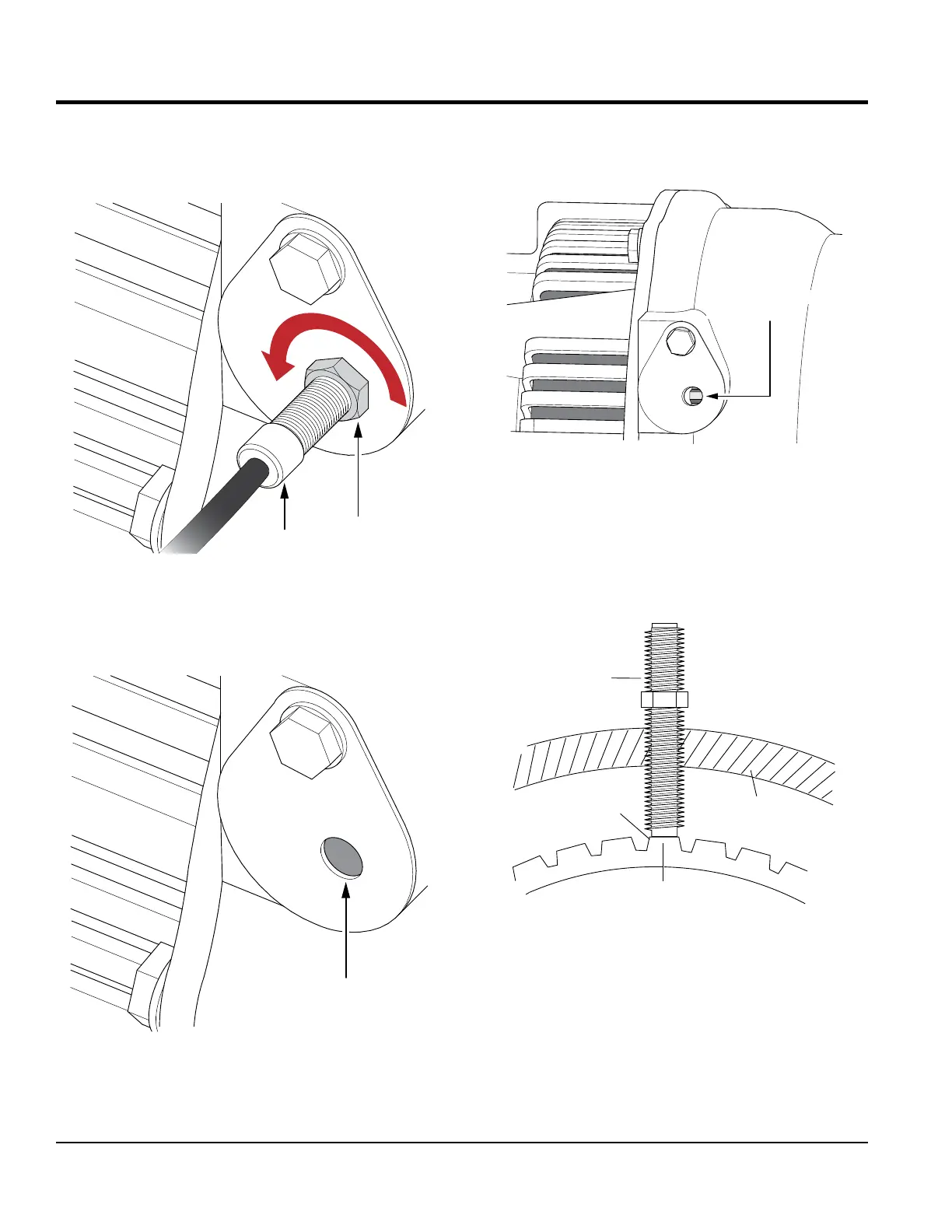
1. Loosen the jam nut that secures the MPU to the sensor
plate.
Figure 75. MPU Removal
2. Remove MPU.
3. Next, visually view the ywheel teeth through the hole
opening on the sensor plate.
Figure 76. Gear Teeth Access Hole
JAM NUT
MPU
SENSOR
PLATE
SENSOR
PLATE
FLYWHEEL GEAR TEETH
ACCESS HOLE
4. Attach a ratchet to the crankshaft pulley and rotate the
ywheel gear until the highest point of the ywheel
gear tooth is visible as shown in Figure 77.
Figure 77. Flywheel Gear Teeth Alignment
5. Reinstall the MPU sensor back into the sensor plate.
Continue screwing the MPU sensor clockwise until
contact is made with the ywheel gear tooth (Figure 78).
Figure 78. Gear Tooth MPU Contact
FLYWHEEL GEAR
ACCESS HOLE
SENSOR
PLATE
FLYWHEEL
GEAR TOOTH
CASING
MPU
FLYWHEEL
GEAR TOOTH





 To Next Page