Video Grabber DGR-1000 User Manual - v. 1.4 (FW 1.9)
3. Device installation
3.1. Introduction
Video Grabber DGR-1000 is designed to capture and process video signal from DisplayPort 1.2
interface. While by default it is assumed that DGR-1000 is installed between the computer and its
monitor – pass-through – it can also be installed independently as an emulated monitor. See the
following sections for instructions on both approaches.
Regardless of the approach chosen it is advised to turn off all equipment involved in cable
connections (display, recorded computer and Video Grabber) for the time of the installation.
3.2. Pass-through
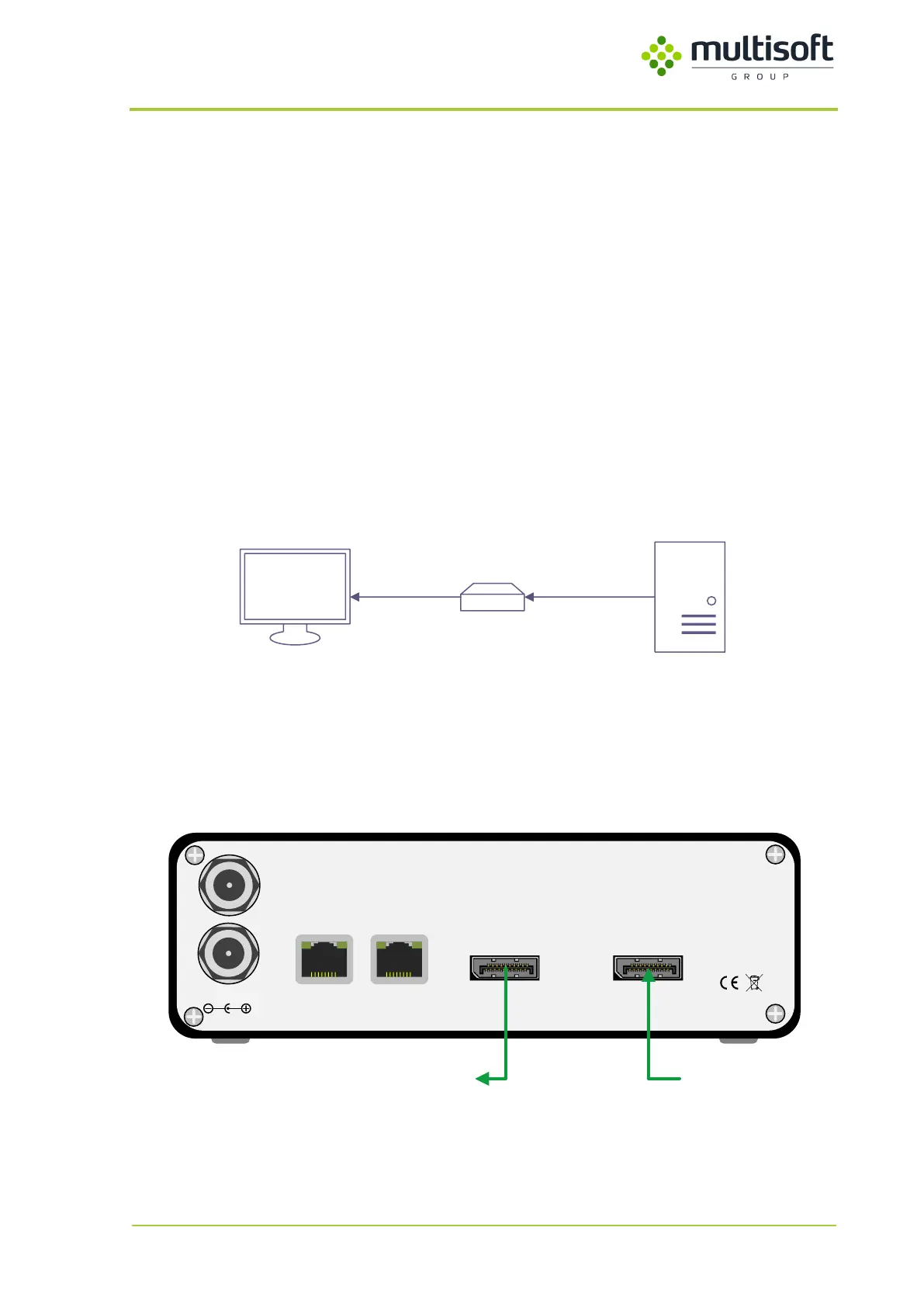
By default Video Grabber captures the video data that is sent by the computer to the display. It is
connected between those two devices (see figure below).
Figure 5: Pass-through connection schema
Computer is connected to the DGR-1000’s video input port, and the monitor is connected to the Video
Grabber’s video output port. As a result Video Grabber effectively captures the video signal that is
being sent by the computer to the monitor.
12V/1.5A DC
LAN 1
Made in EU
LAN 2
VIDEO OUTPUT VIDEO INPUT
PWR1
PWR2
ComputerMonitor
Figure 6: Video cable connections required for pass-through
It is advised to use the same types of cables for input and output



 To Next Page