ValueCut User Manual
Installation 2-6
2.3 Desktop Flexible Media Support System (For VC-600 only)
Step 1
Please examine the following items in stand carton’s accessory box:
1 set of Roll Media Flange (2 pieces)
1 set of Roll Holder (2 pieces)
1 set of Roll Holder Guide Bushes (4 pieces)
1 set of Roll Holder Support (2 pieces)
1 set of Desktop Support Bracket (2 pieces)
4 pieces of Plastic Foot
4 pieces of M4 screws
12 pieces of M6 screws
1 piece of M4 L-shape hexagon screw driver
1 piece of M5 L-shape hexagon screw driver
1 piece of M6 L-shape hexagon screw driver (for adjusting the screws of Roll Holders)
1 piece of Installation Guide for Roll Holder
Step 2
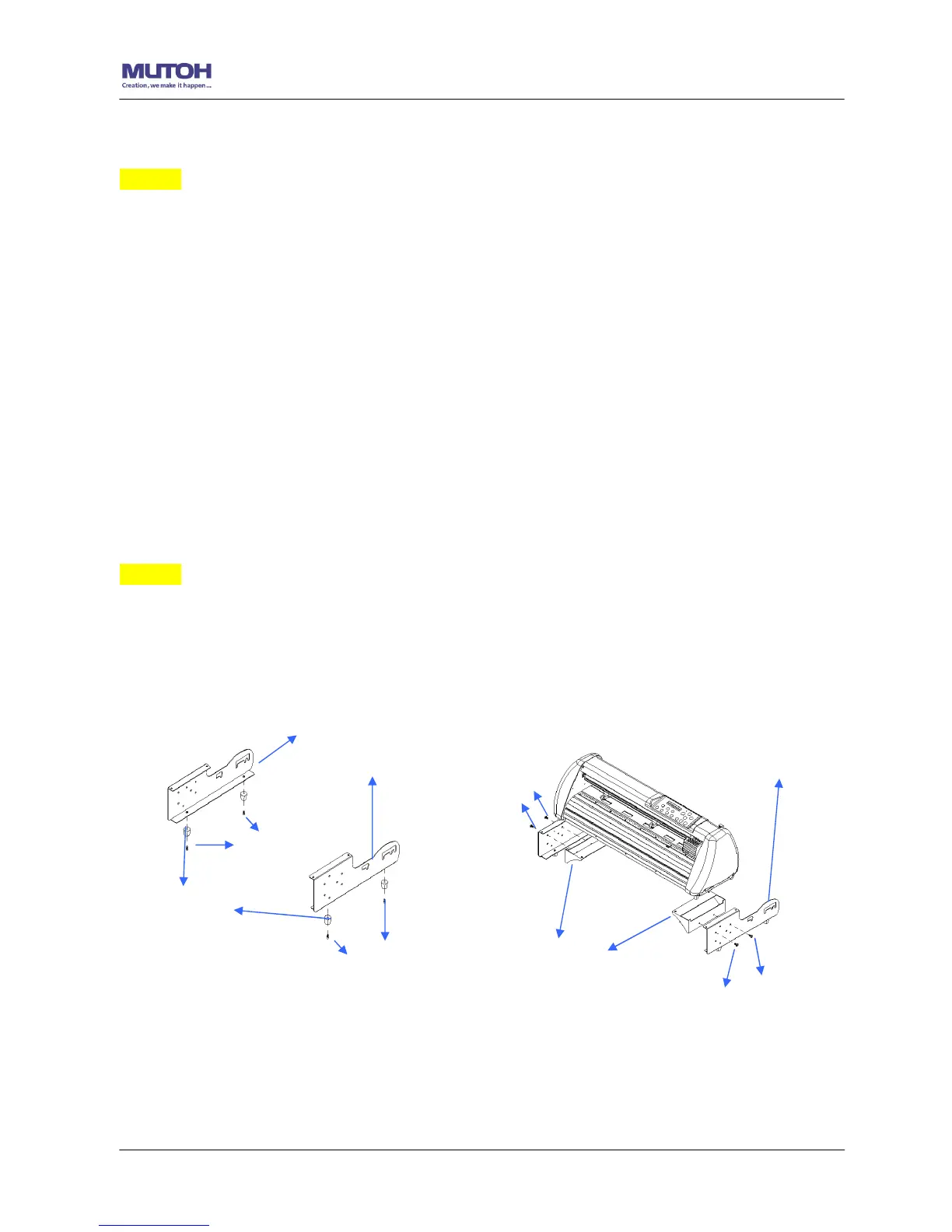
Put the 4 Plastic Foot under the Roll Holder Support and insert the M4 screw into the hole of
Plastic Foot and tighten them with the M4 L-shape screw driver. (Figure 2-7










 To Next Page