W415-4121 / B / 04.20.23
EN
34
electrical information
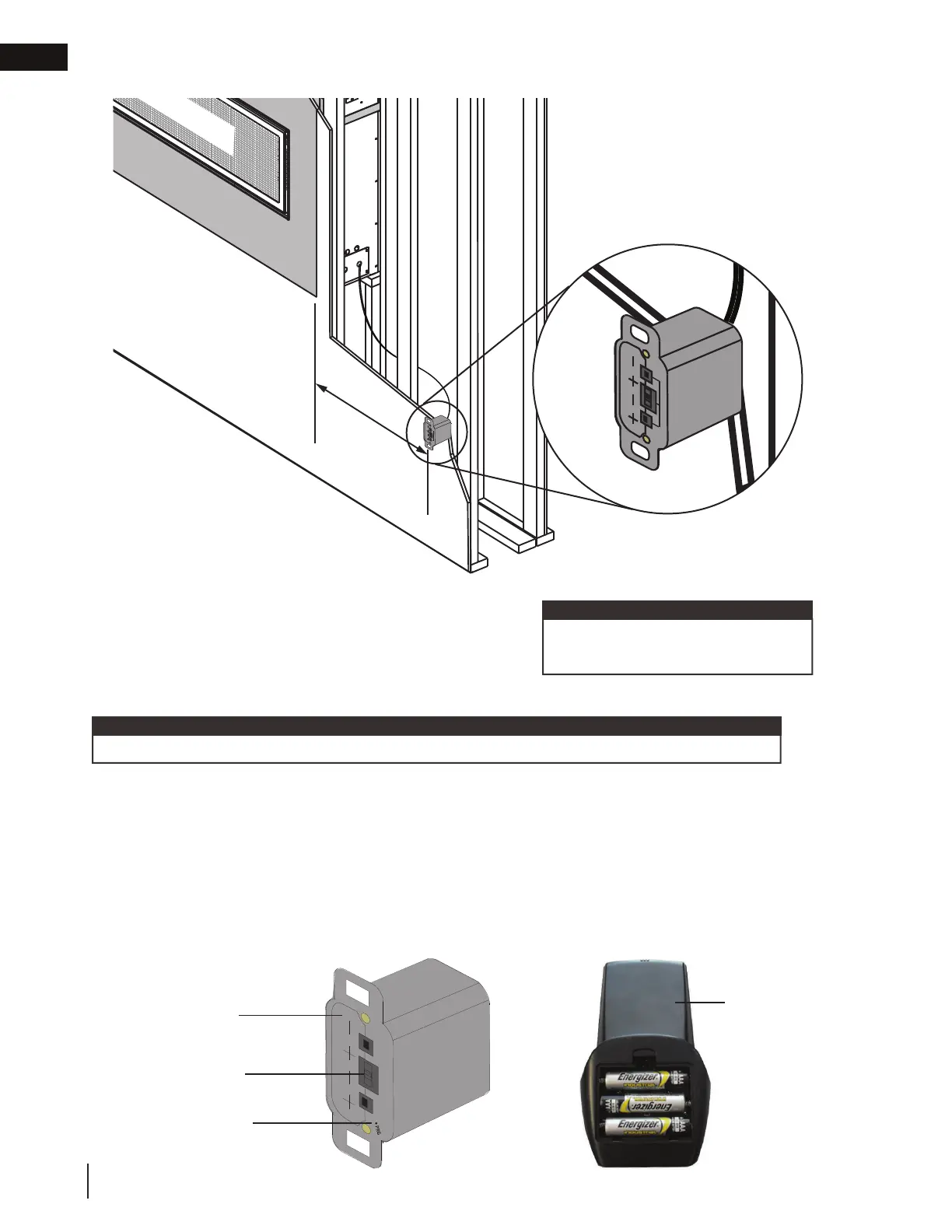
Install the battery holder/switch into
a standard electrical switch box.
Determine an appropriate location and
install the electrical box.
(4) AA Batteries
ON REMOTE OFF
Y BARRIER
8 feet maximum
to the side of
the appliance
(must be accessible for
programming the remote)
(4) AA Batteries
ON REMOTE OFF
6.4 battery holder/switch installation
Ensure the 3 position slider switch is
in the “REMOTE” position (middle).
note:
6.5 initializing the battery holder/switch for the fi rst time
(4) AA Batteries
A. Install the 4 AA batteries into the battery holder, note the polarity of the batteries and insert as indicated
on the cover (+/-).
B. Ensure the 3 position slider switch is switched to the “REMOTE” position (middle position).
C. Press the reset/programming button, use a small object such as a paper clip in order to reach the button
marked PRG, as shown in the illustration below.
D. The battery holder will beep 3 times to indicate that it’s ready to synchronize with the remote.
E. Install the 3 AAA batteries into the remote, as shown in the photograph below, then press the ON button,
The battery holder will beep 4 times to indicate that the remote’s command is accepted.
Remote
Reset / Program
Button (PRG)
Battery Holder
Slider Switch
The initializing process must be completed within 10 seconds of pressing the reset / program (PRG).
note:







 To Next Page