3.3
and
= 80 %
5
and
= 90 %
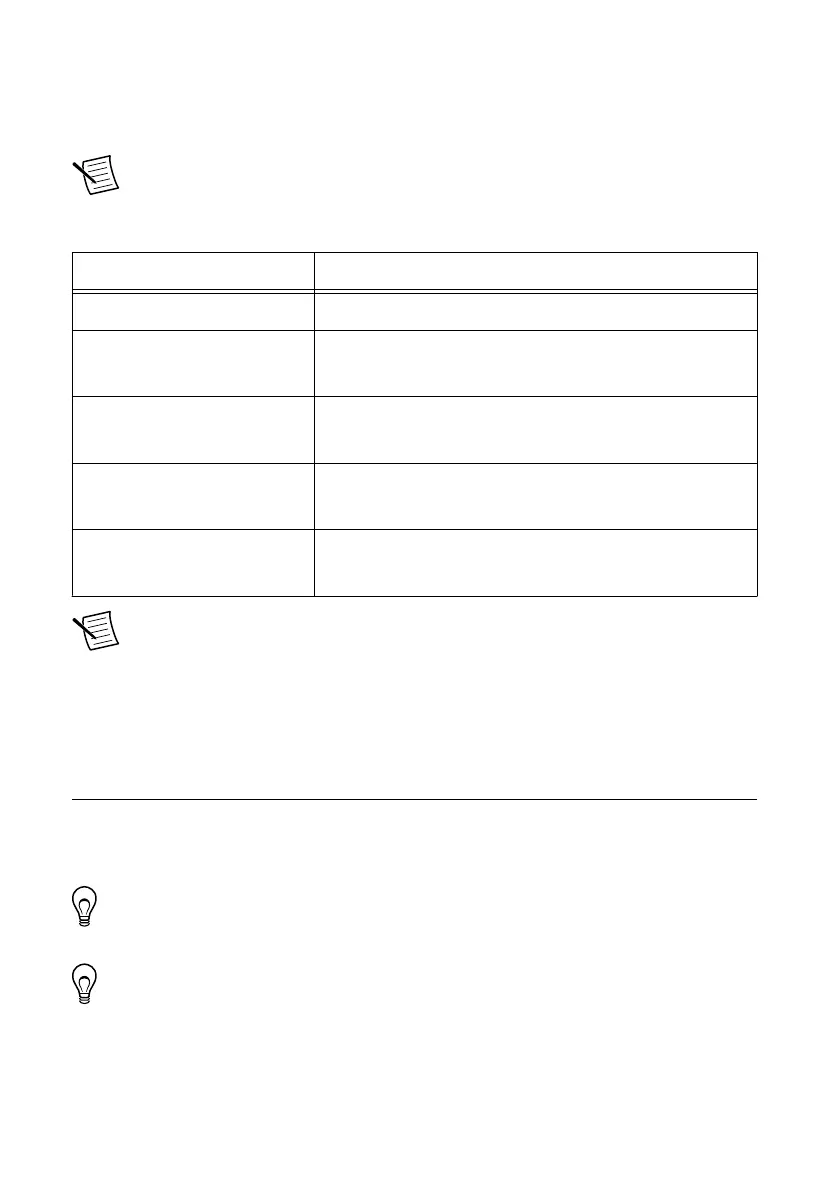
Note You must add 10% to the calculated or measured total power requirement to
account for transient and startup conditions.
Table 22. Approximate Maximum Power Requirement
Power Values and Calculations
Maximum P
int
11.36 W
Maximum P
DIO
Total DIO current × 3.3 /0.8
Maximum P
5V
Total 5 V current × 5 /0.9
Maximum P
3.3V
Total 3.3 V current × 3.3 /0.8
Maximum P
USB
Total USB current × 5 /0.9
Note These calculations are intended to approximate the maximum power
requirements for an NI sbRIO device system. For a more accurate estimate of the
power consumption of a specific application, NI recommends that you directly
measure a board running the application in an environment representative of the
intended use case.
Configuring the sbRIO-9607
You can connect the sbRIO-9607 to a host computer or network and configure the startup
options using the RJ-45 Gigabit Ethernet port. If a RIO Mezzanine Card is designed with a
device USB connector, the target can also be configured using the device USB port.
Tip Refer to the NI sbRIO-9607 Getting Started Guide on ni.com/manuals for basic
configuration instructions and information about connecting to a host computer
using the RJ-45 Gigabit Ethernet port.
Tip Refer to the NI sbRIO-9607/9627 RMC Design Guide on ni.com/manuals for
basic configuration instructions and information about connecting to a host computer
using the device USB port.
NI sbRIO-9607 User Manual | © National Instruments | 43








 To Next Page