KOMPLETEAUDIO6–Manual–25
ENGLISH
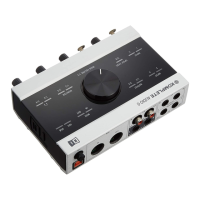
• MIDI:LightsgreenwhenaMIDIconnectionisdetectedandactive;asheson
incoming or outgoing MIDI data.
• 48V:Lightsorangewhenphantompowerisactivated.
• USB:LightsgreenwhentheUSBportisconnectedtoacomputer.Flashingindi-
catesaUSBconnectionproblem.
• Headphones1/2:Lightsorangewhenthereisoutgoingsignalontheheadphone
outputs1and2(see5.1forheadphonesourcesettings).
• Headphones3/4:Lightsorangewhenthereisoutgoingsignalontheheadphone
outputs3and4(see5.1forheadphonesourcesettings).
• MONITOR1/2:Lightsorangewhendirectmonitoringisactivatedwithoutputs1/2
selected(seeMONITORsectionofchapter5.1forfurtherinformationondirect
monitoring).
• MONITOR3/4:Lightsorangewhendirectmonitoringisactivatedwithoutputs3/4
selected(seeMONITORsectionofchapter5.1forfurtherinformationondirect
monitoring).
• SPDIFSYNC:LightsorangewhenExternalDigitalClockSyncisestablished;doesnot
lightwhentheinternalclockisused(seechapters6.1.1and6.2.1forfurtherinfor-
mationonsynchronizingtheKOMPLETEAUDIO6’sclocktoexternalequipment).


 To Next Page