4
1. Introduction
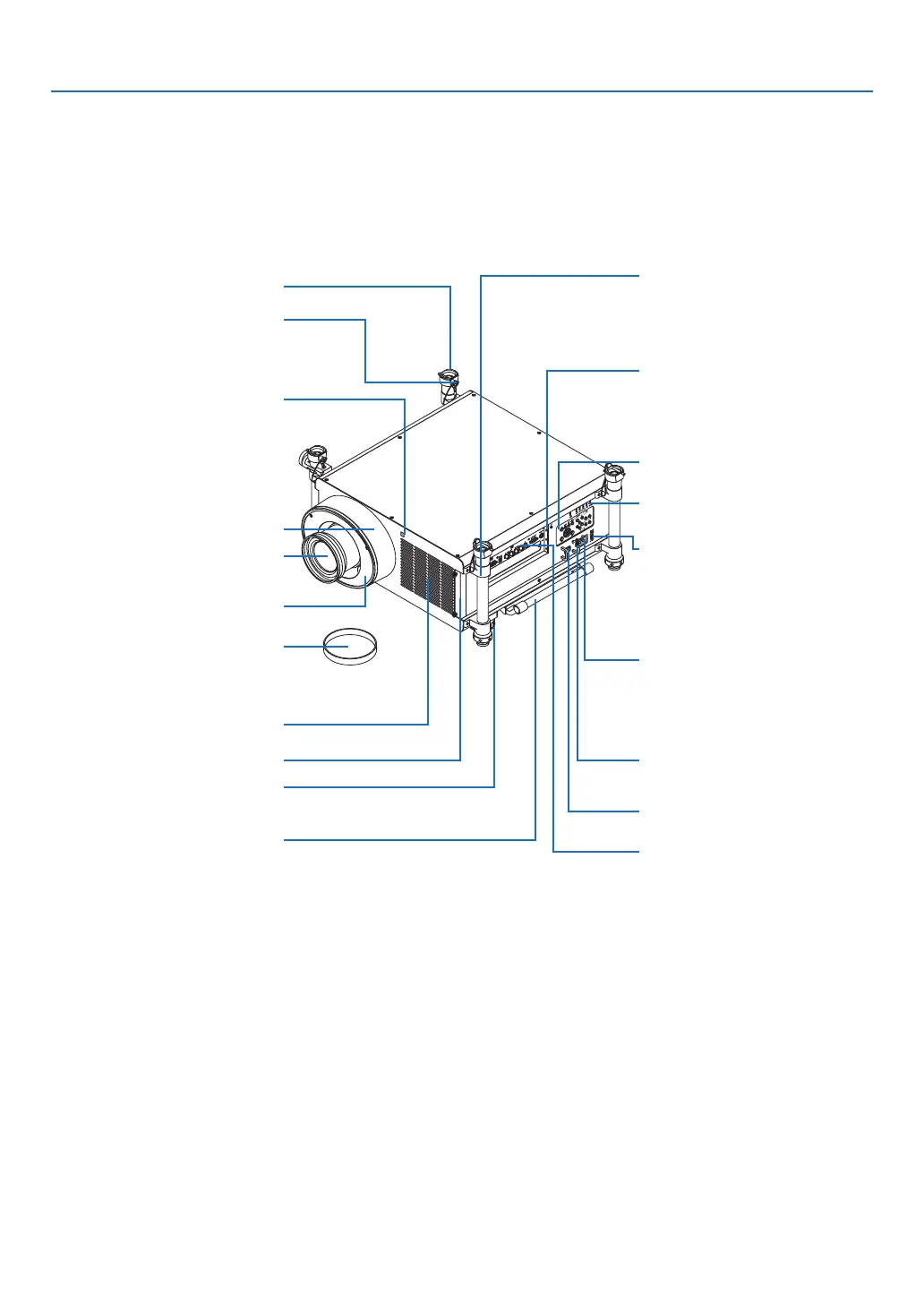
Part Names of the Projector
Front/Top
Thelensissoldseparately.ThedescriptionbelowisforwhentheNP27ZLlensismounted.
Control Panel
(→ page 6)
Lens
Ventilation(inlet)
Filter Cover
Handle
Lens Hood
SecurityLockingPin
StackingColumn
LensShroud
RemoteSensor(locatedonthe
front and the rear)
(→ page 9)
Terminal Panel
(→ page 7)
LED Lights (six locations)
IndicatorSection
(→ page 6)
LensReleaseLever/SafetyLever
(bothleversarelocatedinsidethe
lens shroud.)
(→ page 163)
ACInput
Connect the supplied power cord's
three-pin plug here, and plug the
other end into an active wall outlet.
(→ page 13)
MainPowerSwitch
USB(LAN)Port(foroptionalWire-
lessLANUnit)(→ page 174)
Lens Cap
(The lens cap is attached to the
lens.)
VOLTAGESELECTSwitch
Use this switch according to the
voltagebeingused.
(→ page 13)
AdjustableTiltFoot
(→ page 22)
SlotforPowerCordStopper(→
page 14)



 To Next Page