182
7. Maintenance
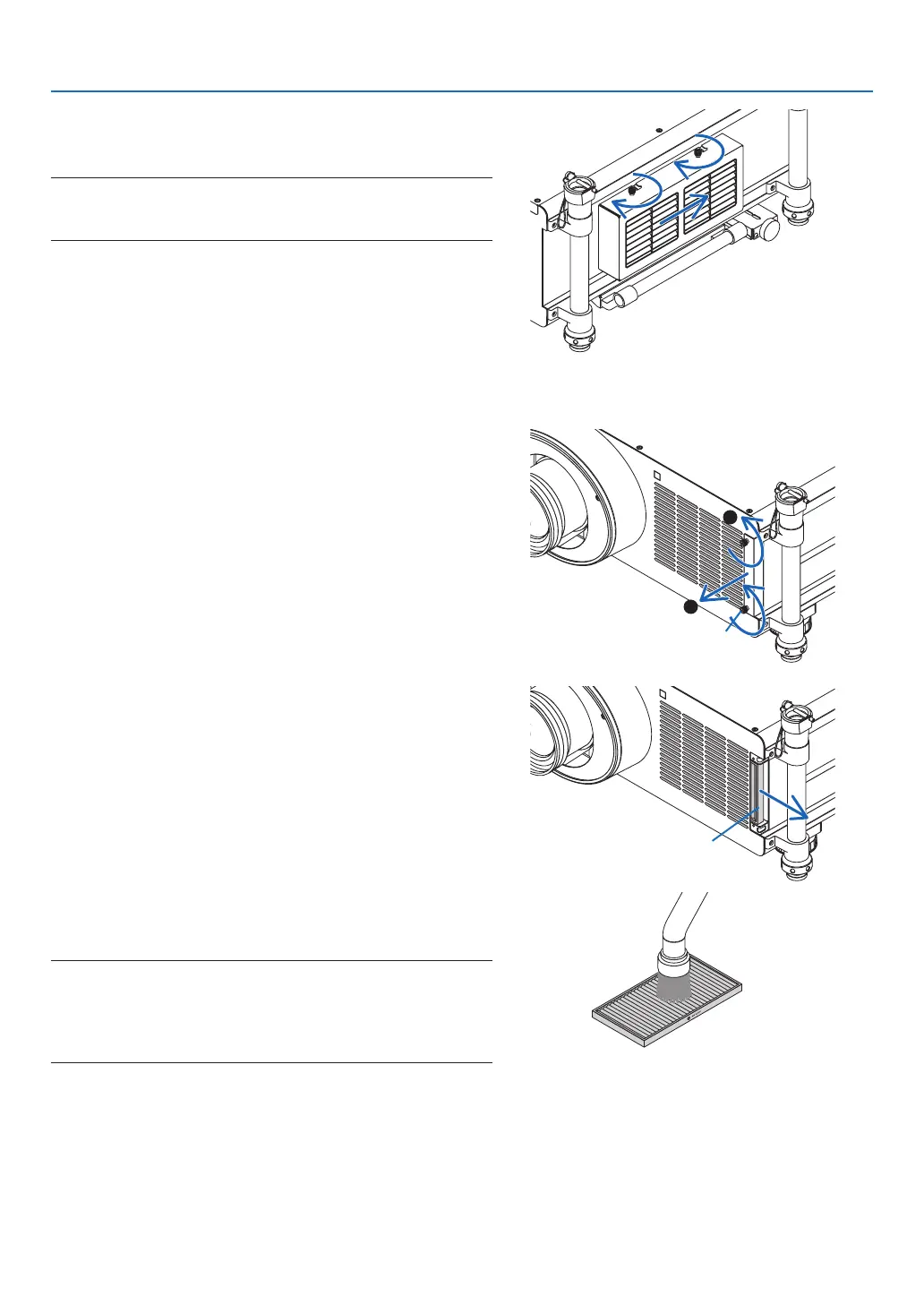
(2)Slidetheltercovertotherightandtighteneachofthe
twoknobsbyturningthemclockwise.
NOTE:
Besuretocleanbothlters(leftandfrontsides)todisplaythelter
usage hours as accurate as possible.
Cleaning the filter on the front side
1. Removetheltercover.
(1)Looseneachofthetwoknobsbyturningthemcounter-
clockwise.
•Theknobsarenotremovable.
•If the knob is too tight to turn, use a Phillips screw-
driver.
(2)Removetheltercoverbypullingitout.
Knob
2. Removethelter.
Removethelterbypullingittotheright.
Filter
3. Useavacuumcleanertovacuumallthedustfromthe
insideofthelter.
Getridofdustintheaccordionlter.
NOTE:
• Wheneveryouvacuumthelter,usethesoftbrushattachmentto
vacuum.Thisistoavoiddamagetothelter.
• Donotwashthelterwithwater.Doingsocanresultindamageto
theltermembraneandalsocauseclogging.



 To Next Page