208
8. User Supportware
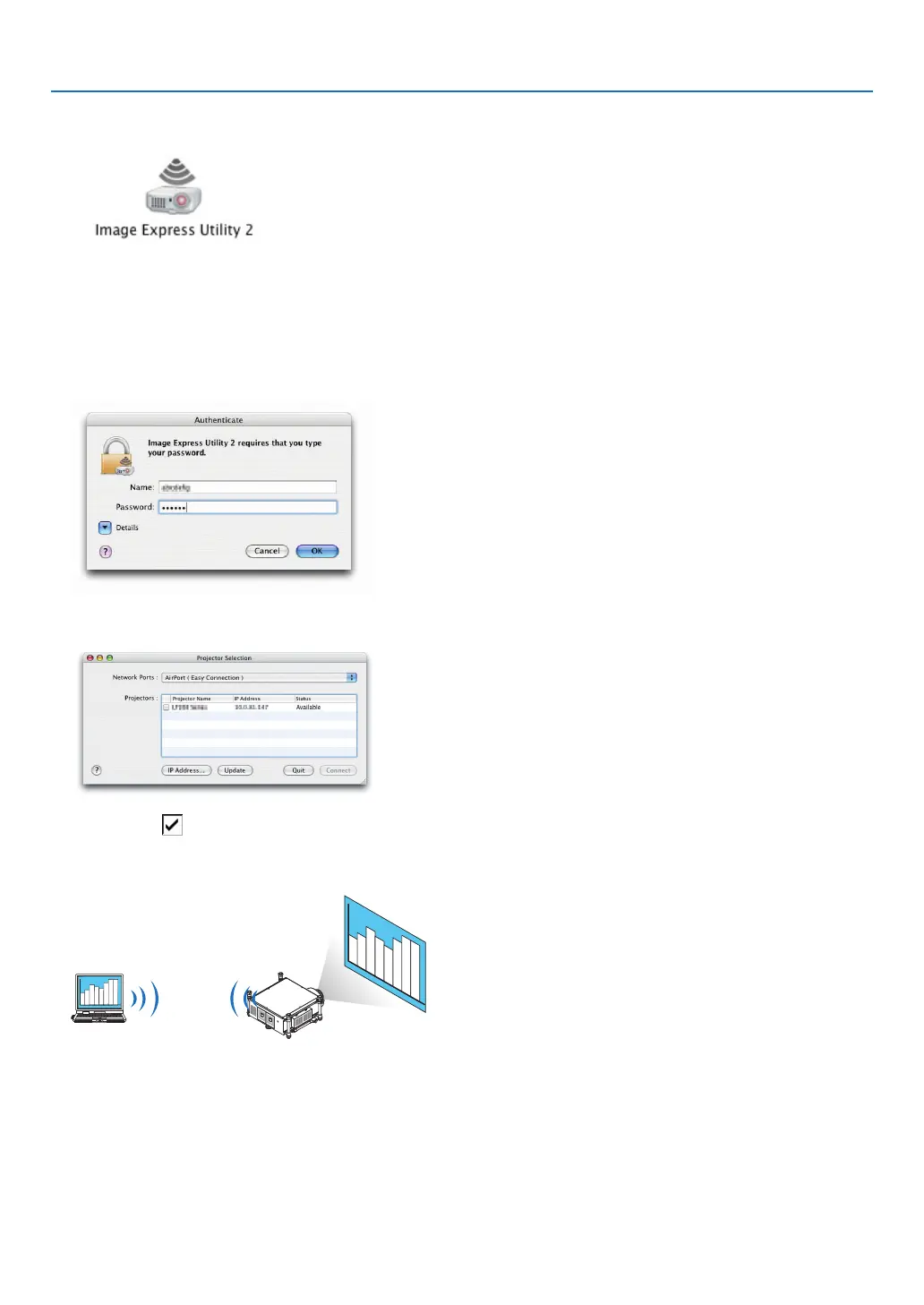
3 Double-clickthe“ImageExpressUtility2”iconinthe“ImageExpressUtility2”folder.
• Attheinitialstart,the“LicenseAgreement”windowisdisplayed.
Thoroughlyreadtheagreementshownonthescreen,andclick“Iacceptthetermsinthelicenseagreement”
andthe[OK]button.
Next,the“Authenticate”windowwillbedisplayed.
4 EntertheadministratornameandpasswordofyourMacintoshcomputer,andclickthe[OK]button.
The[ProjectorSelection]windowwillbedisplayed.
5 Checkthe( )checkboxtotheleftoftheprojectornametoconnectandclick[Connect].
TheMacintoshcomputerandtheprojectorareconnectedviawirelessLAN,andimagesontheMacintoshscreen
are projected from the projector.



 To Next Page