8
2.5 Network Communication Interfaces
2.5.1 10Base-T RJ-45 Pinout
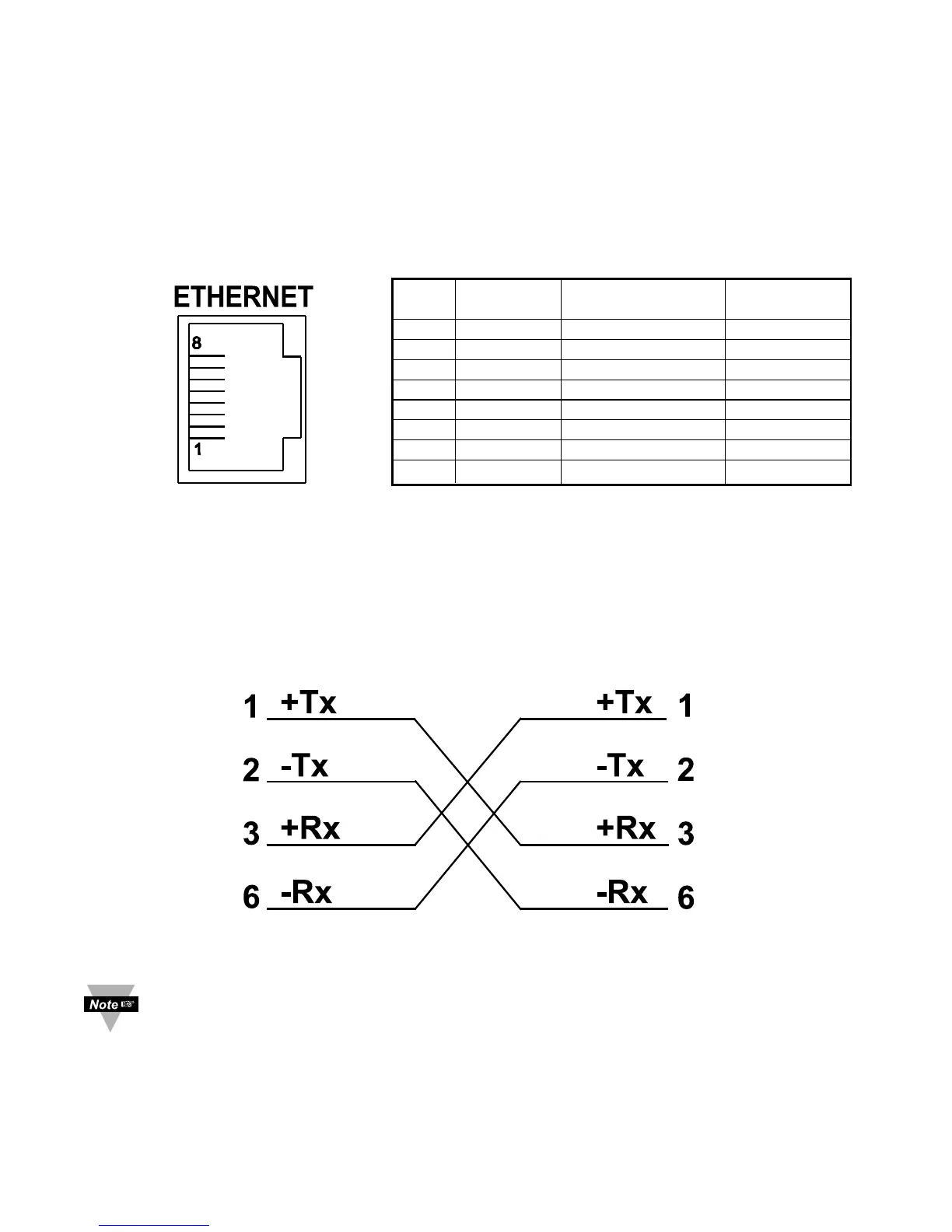
The 10BASE-T Ethernet network (RJ-45) system is used in the iServer for network
connectivity. The 10 Mbps twisted-pair Ethernet system operates over two pairs of wires.
One pair is used for receiving data signals and the other pair is used for transmitting data
signals. This means that four pins of the eight-pin connector are used.
Figure 2.6 RJ45 Pinout
2.5.2 10Base-T Crossover Wiring
When connecting the iServer directly to the computer, the transmit data pins of the
computer should be wired to the receive data pins of the iServer, and vice versa. The
10Base-T crossover cable with pin connection assignments are shown on Figure 2.7.
Figure 2.7 10Base-T Crossover Cable Wiring
Use straight through cable for connecting the iServer to an Ethernet hub. The
ports on the hub are already crossed.
Pin# Name Description Pin# J17
RJ45 Remote
1 +Tx + Transmit Data 4
2 -Tx - Transmit Data 3
3 +RX + Receive Data 2
4 N/C Not Connected -
5 N/C Not Connected -
6 -Rx - Receive Data 1
7 N/C Not Connected -
8 N/C Not Connected -



 To Next Page