4.9 ARP Protocol
ARP is the Internet layer protocol responsible for determining the MAC (hardware)
address that corresponds to a particular IP address. The ARP command allows the user
to view the current contents of the ARP cache of the local computer (residing on the
same network) or remote computer (residing on the different network) through a router.
Microsoft includes the ARP.EXE utility for viewing and modifying the ARP cache with its
Windows products. The following ARP commands can be used to view cache entries:
• arp –a ➞ Use this command to view all ARP cache entries.
• arp –a plus IP address ➞ Use this command to view ARP cache entries associated
with one particular interface on a network with multiple adapters.
• arp –g ➞ Same as arp –a.
• arp –N ➞ Use this command to display ARP entries for specific network interface.
• arp – s plus IP address plus Physical address ➞ Use this command to manually add
a permanent static entry to the ARP cache.
• arp –d ➞ Use this command to manually delete a static entry.
Ping the destination computer using IP address first before using the arp -a
command.
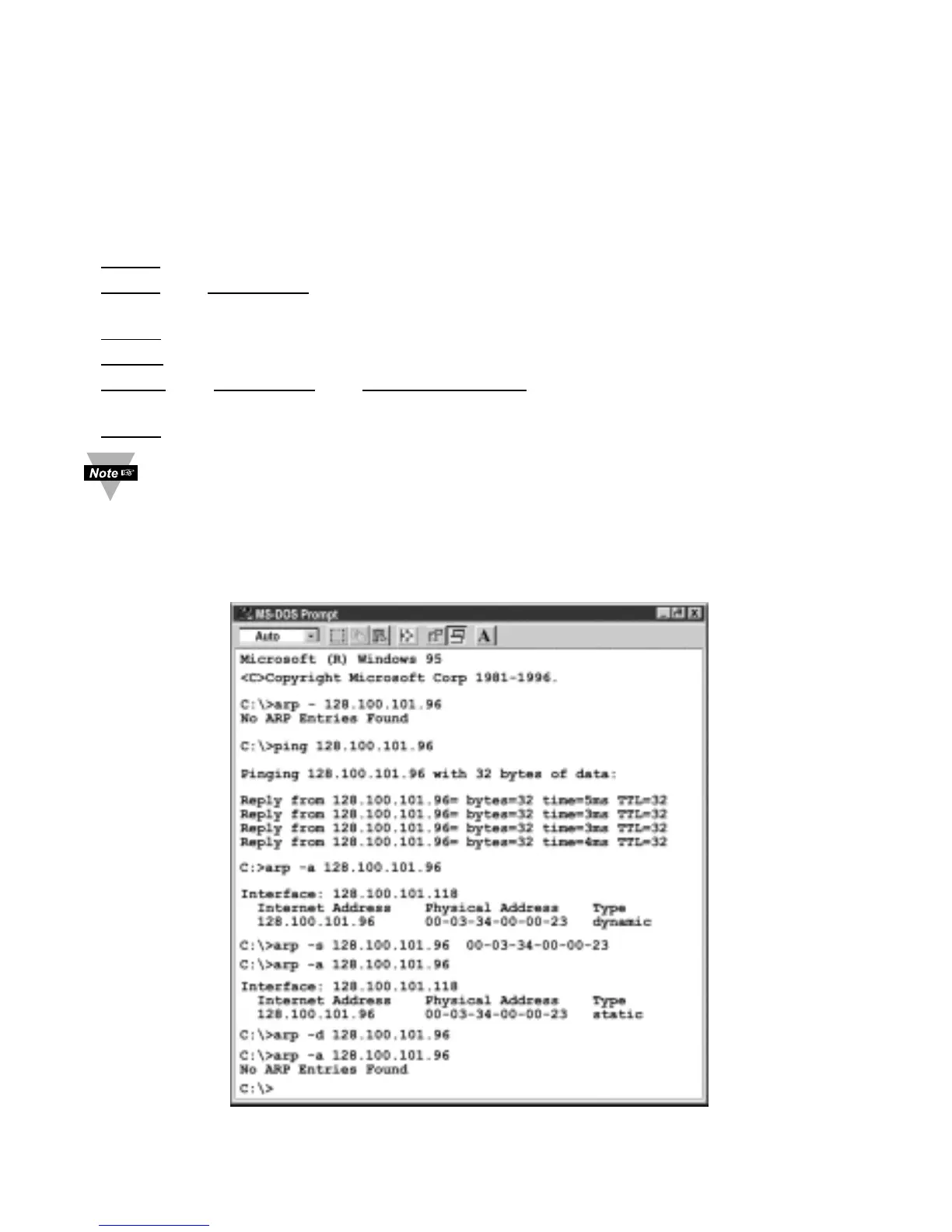
The following window shows examples of arp commands and responses.
• Your computer has an IP address of 128.100.101.118
• The destination computer has an IP address of 128.100.101.96
Figure 4.22 ARP Commands and Responses
30



 To Next Page