Menu2-HOTWATER
Overview
2.1 - temporary lux2-HOTWATER
2.2 - comfort mode
2.3 - scheduling
2.9.2 - hot water recirc.2.9 - advanced
Sub-menus
For the menu HOT WATER there are several sub-
menus. Status information for the relevant menu can
be found on the display to the right of the menus.
temporary lux Activation of temporary increase in the
hot water temperature. Status information displays
“off" or what length of time of the temporary temper-
ature increase remains.
comfort mode Setting hot water comfort. The status
information displays what mode is selected, "economy",
"normal" or "luxury".
scheduling Scheduling hot water comfort. Status in-
formation "set" displays if any part of the schedule is
active at present, "holiday setting" displays if vacation
setting is in progress (menu 4.7), otherwise it displays
"off".
advanced Setting hot water circulation (accessory is
required)
Menu 2.1 - temporary lux
Setting range: 3, 6 and 12 hours and mode "off"
Default value: "off"
When hot water requirement has temporarily increased
this menu can be used to select an increase in the hot
water temperature to lux mode for a selectable time.
Caution
If comfort mode "luxury" is selected in menu
2.2 no further increase can be carried out.
The function is activated immediately when a time
period is selected and confirmed using the OK button.
The remaining time for the selected setting is shown
to the right.
When the time has run out VVM 310 returns to the
mode set in menu 2.2.
Select “off" to switch off temporary lux .
Menu 2.2 - comfort mode
Setting range: economy, normal, luxury
Default value: normal
The difference between the selectable modes is the
temperature of the hot tap water. Higher temperature
means that the hot water lasts longer.
economy: This mode gives less hot water than the
other, but is more economical. This mode can be used
in smaller households with a small hot water require-
ment.
normal: Normal mode gives a larger amount of hot
water and is suitable for most households.
luxury: Lux mode gives the greatest possible amount
of hot water. In this mode, the immersion heater, as
well as the compressor, is used to heat hot water, which
may increase operating costs.
Menu 2.3 - scheduling
What hot water comfort the indoor module is to work
with can be scheduled here for up to two different time
periods per day.
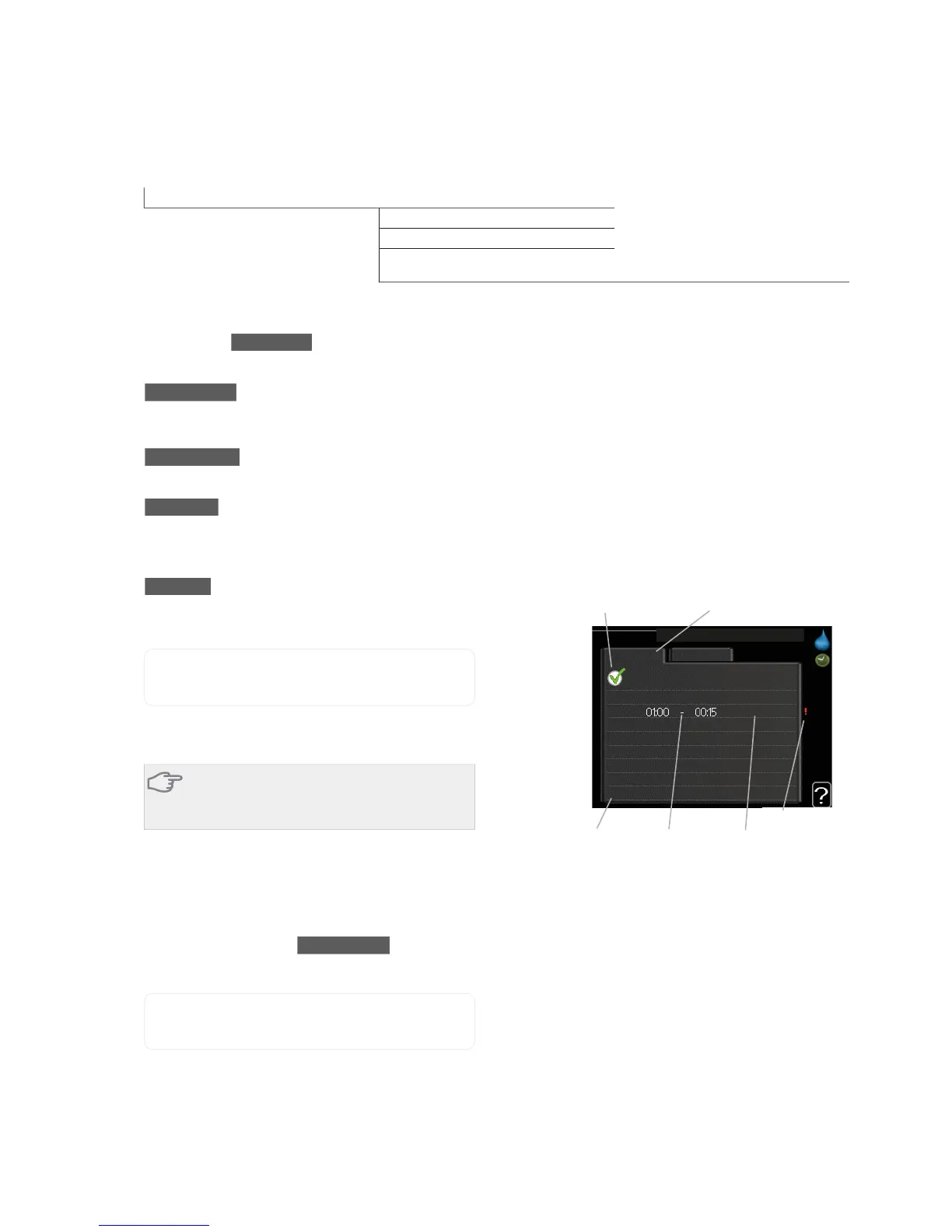
Scheduling is activated/deactivated by ticking/untick-
ing"activated". Set times are not affected at deactiva-
tion.
all
mon
tues
we
thur
fri
sat
sun
activated
schedule 2schedule 1
SCHEDULING HOT WATER 2.3
normal
Time period AdjustingDay
Activated
Schedule
Conflict
Schedule: The schedule to be changed is selected here.
Activated: Scheduling for the selected period is activ-
ated here. Set times are not affected at deactivation.
Day: Select which day or days of the week the schedule
is to apply to here. To remove the scheduling for a
particular day, the time for that day must be reset by
setting the start time to the same as the stop time. If
the line "all" is used, all days in the period are set for
these times.
Time period: The start and stop time for the selected
day for scheduling are selected here.
Adjusting: Set the hot water comfort that is to apply
during scheduling here.
Conflict: If two settings conflict with each other a red
exclamation mark is displayed.
NIBE™ VVM 310Chapter 8 | Control - Menus42



 To Next Page