162
Playing Images Back—Basic Playback
Photo Information
Photo information is shown superimposed on images displayed in single-image
playback. There are five pages of photo information for each photo.
Rotate the command dial to cycle through photo information as follows:
Page 1 ⇔ Page 2 ⇔ Page 3 ⇔ Page 4 ⇔ Page 5 ⇔ Page 1.
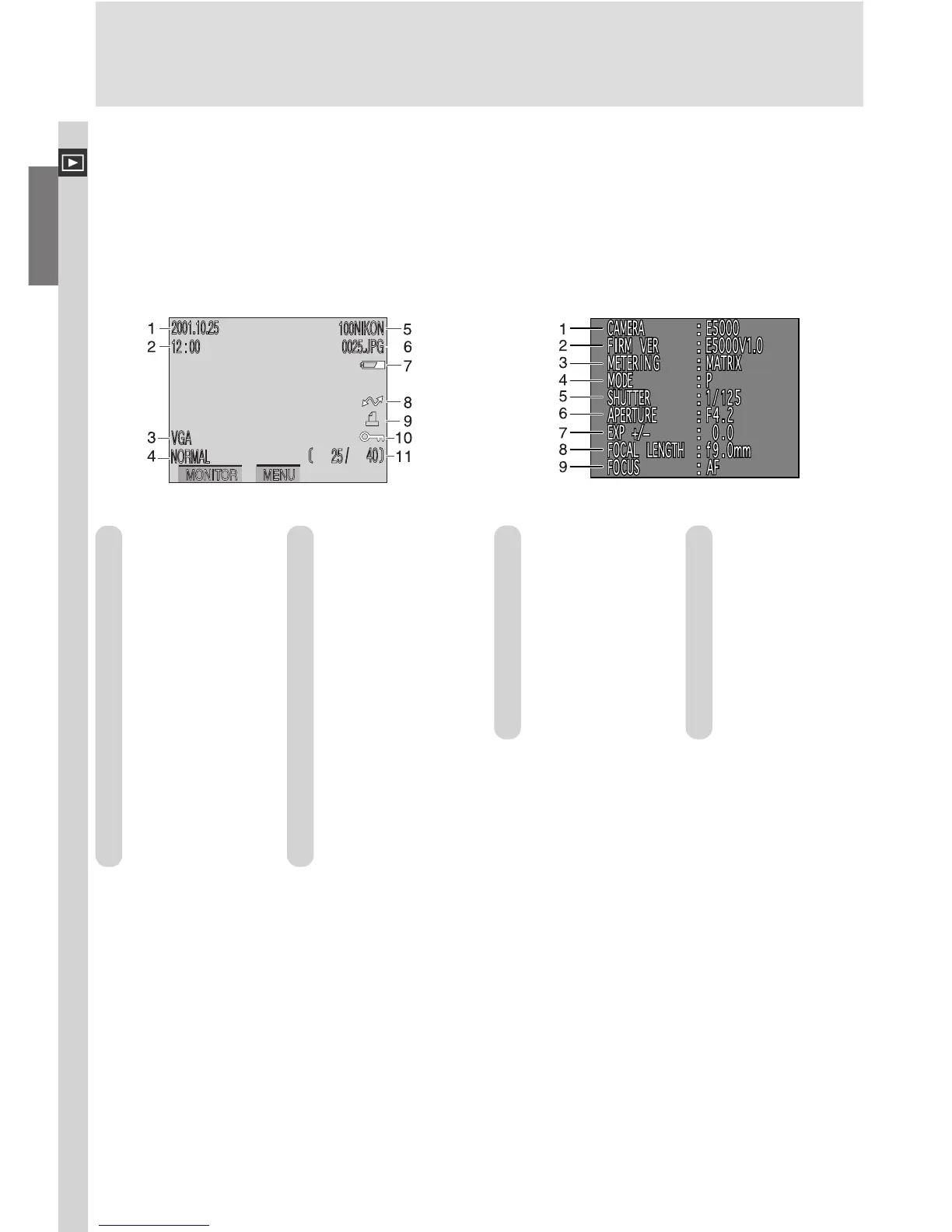
Page 1
1 Date of
recording
2 Time of
recording
3 Image size
4 Image quality
5 Folder
6 File number
and type
7 Battery level
indicator
8 Transfer icon
9 Print-order
icon
10 Protect icon
11 Current frame
number/total
number of
frames visible
in current
folder
1 Camera type
2 Firmware
version
3 Metering
method
4 Exposure mode
5 Shutter speed
6 Aperture
7 Exposure
compensation
8 Focal length
9 Focus mode or
manual focus
distance
Page 2 (Shooting Information)







 To Next Page