22
First Steps
Basic Setup
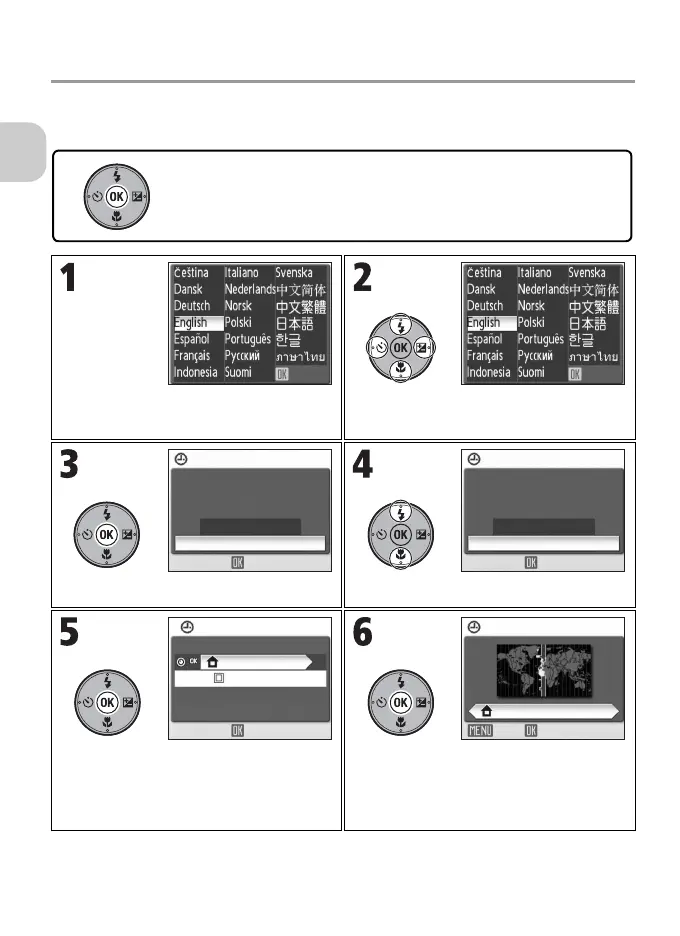
A language-selection dialog is displayed the first time the camera is turned
on. Select a language and set the time and date as described below.
Confirm that screen above is displayed
on monitor.
Highlight language.
Confirmation dialog is displayed. Highlight Yes.
TIME ZONE menu is displayed.
• To turn daylight saving time on or off, see
“Note on Daylight Saving Time” (P.23)
for details.
Display map of world time zones.
The multi selector is used in the following steps. The buttons needed to
perform a task in each step are shown in white. For example, “Press d”
is shown at left.
OK OK
DATE
Set time and date?
No
Yes
OK
DATE
Set time and date?
No
Yes
OK
TIME ZONE
London,Casablanca
DaylightSaving
OK
London,Casablanca
HOME TIME ZONE
OKBack



 To Next Page
 Loading...










