55
Viewing Pictures on the Camera
Voice Memos
A voice memo can be recorded using the built-in microphone and appended
to any picture marked with the N:O (voice memo recording guide) icon in
Full-screen playback mode (P.49).
Recording Voice Memos
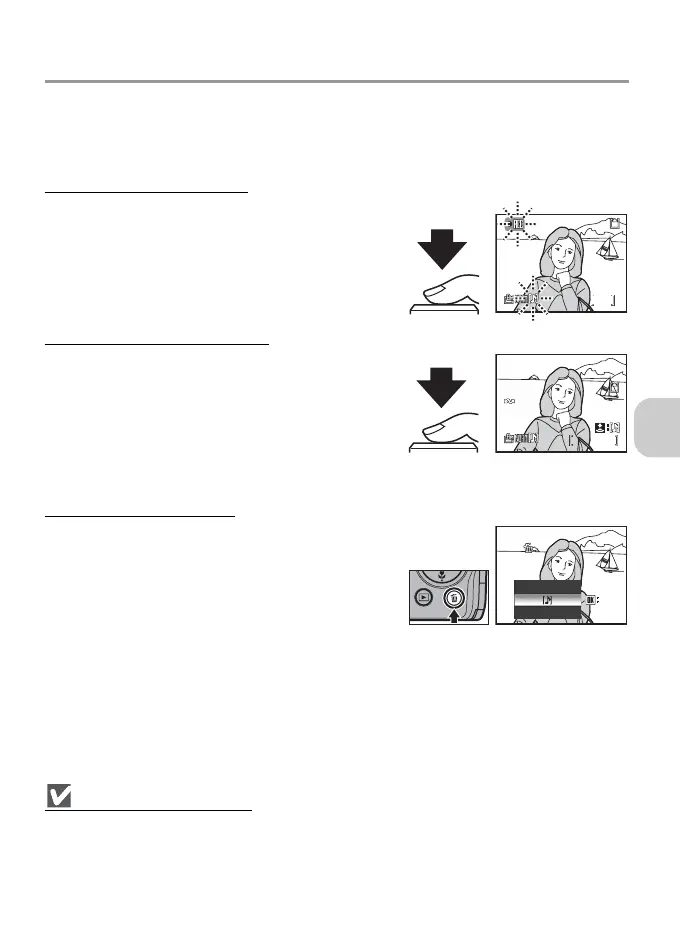
Press and hold the shutter-release button to record
a voice memo. Recording ends after approximately
20 seconds or when the button is released.
• Do not touch the microphone during recording.
•The y icon blinks during recording.
Playing Back Voice Memos
Select a picture with a recorded voice memo and
press the shutter-release button to play it back. Play-
back ends when the voice memo ends or the shut-
ter-release button is pressed again.
• Pictures with voice memos are marked with the
N:P icon in Full-screen playback mode.
• Press j (t) or k (v) to adjust the volume.
Deleting Voice Memos
Select a picture with a recorded voice memo and
press T. Highlight P and press d to delete the
voice memo only.
Notes on Voice Memos
• Voice memo file names are the same as those of the images they attach to except that the ex-
tension is “.WAV”.
• If a voice memo is already appended to the current picture, delete the memo first to record a
new voice memo.
17s
17s
1
1
100NIKON
0001.JPG
2006.05.15
15:30
2006.05.15
15:30
100NIKON
0001.JPG
1/
1/
Erase 1 image (s)?
Erase 1 image (s)?
OK
OK
No
No
Yes
Yes



 To Next Page
 Loading...










