54
Viewing Pictures on the Camera
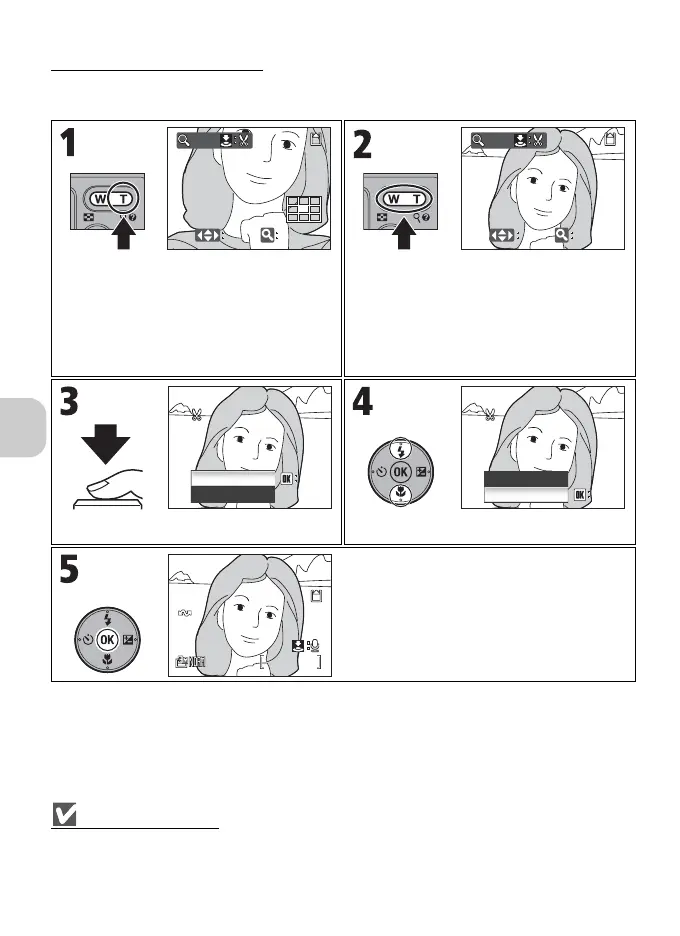
Creating a Cropped Copy
When the N:u icon is displayed in Quick playback zoom (P.52) or Playback zoom
mode (P.53), you can crop part of a picture and save it as a separate file.
Cropping pictures
Depending on the size of the original picture and the zoom ratio at the time the copy was created,
copies will be c 3,264 × 2,448, d 2,592 × 1,944, e 2,048 × 1,536, f 1,600 × 1,200,
g 1,280 × 960, h 1,024 × 768, i 640 × 480, J 320 × 240, or K 160 × 120 pixels in size.
Zoom in on picture.
Press k (v) to activate Quick playback
zoom.
Display desired portion of image.
• Press k (v) or j (t) to zoom the pic-
ture in and out.
• Use the multi selector to scroll the picture
until the desired portion of the image is
displayed.
Confirmation dialog is displayed. Highlight Yes.
Cropped copy is created.
x
3.0
x
3.0
ZOOM
SCROLL
ZOOM
SCROLL
x
2.0
x
2.0
ZOOM
SCROLL
ZOOM
SCROLL
OK
Save this image
No
Yes
OK
Yes
as displayed?
Save this image
as displayed?
OK
Yes
OK
No
No
Save this image
as displayed?
Save this image
as displayed?
22
100NIKON
0002.JPG
2006.05.15
15:30
2006.05.15
15:30
100NIKON
0002.JPG
2/
2/















 To Next Page