- D ・ -
VBA18001-R.3719.A
logo�Q0440�forGraphic
070518�Gdesign�ito
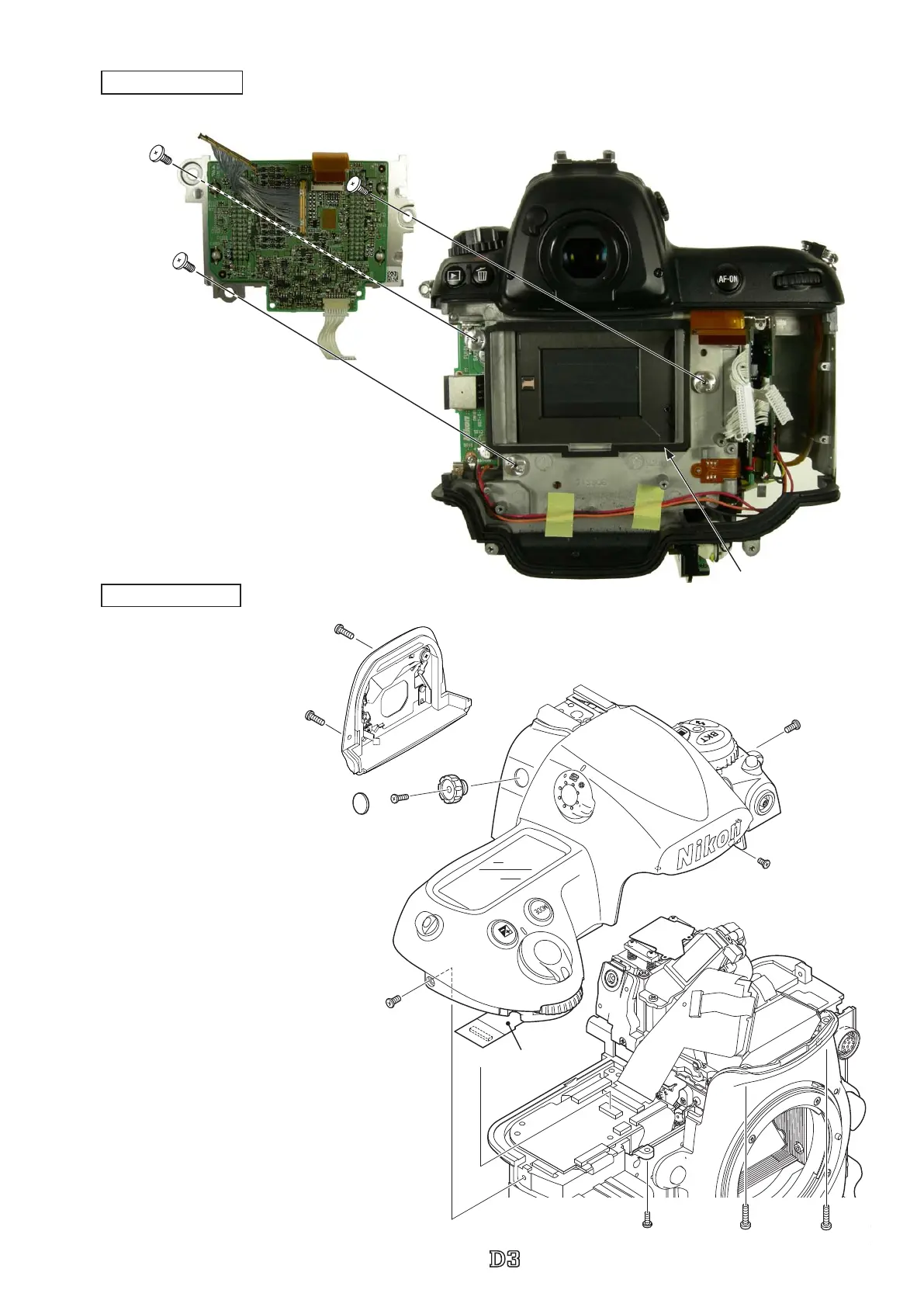
Image sensor unit
・
Remove the cover (#1130), screw
(#1568), and diopter adjustment knob
(#1121).
・
Take out each screw (#1543, #1538,
#1519, #1510) and two screws (#1518).
・
Take out the two screws (#1137) and
remove eyepiece block unit (#B1137).
・
Disconnect the top cover FPC from the
connector.
・
Remove the top cover section.
Top cover section
#525×3
#B20521
Dust-prevent spacer
Caution:
Some bodies have already washer(s) attached
on the mounting surface of the image sensor
unit (#B20521).
#1130
#1568
#1121
#1519
#1510
#1543
#1538 #1518×2
#1137×2
Eyepiece block unit (#B1137)
Top cover FPC



 To Next Page
 Loading...







