- D ・ -
VBA18001-R.3719.A
logo�Q0440�forGraphic
070518�Gdesign�ito
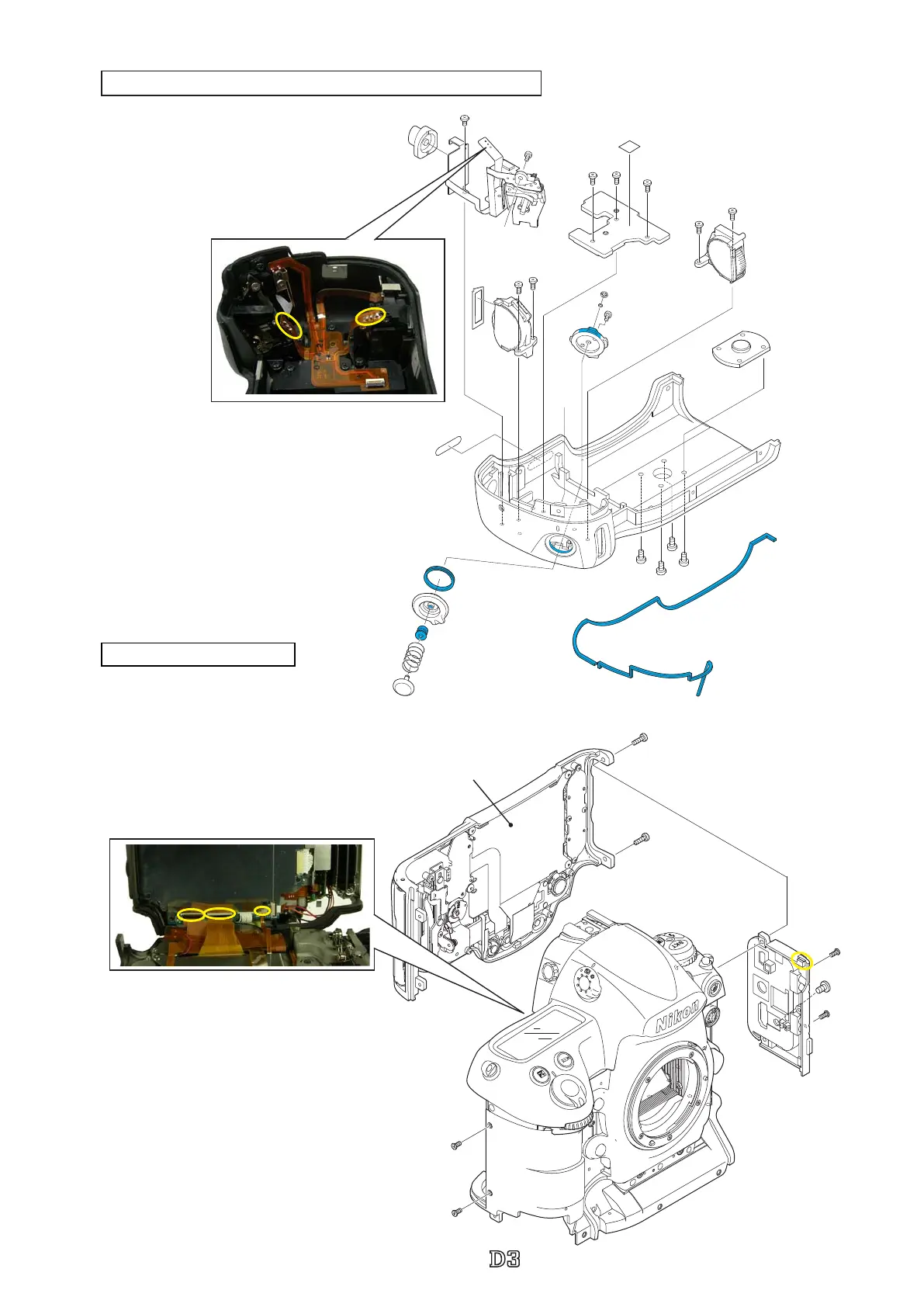
Rear cover unit\ I/F cover
・
Take out the two screws (#1512)
and two screws (#1524).
・
Detach the rear cover unit, and
remove the three FPCs.
※
The convex portion is placed under
the top cover, so remove the I/F block
unit by pulling its lower side.
※
Be careful of the connection-FPC when removing.
#1524×2
#1589×2
#1548
#391
#1512×2
Rear cover unit
Vertical main-command dial\Vertical sub-command dial\others
・
Take out the two screws (#1589) and
one screw (#1548).
・
Remove the IF cover (#391).
#926
#B923
#25
#B28
#27
#912
#1604
#1591
#925
#918
#932
#1546
#1570
#903
#911
#733
#734
#901
#936
#937
#1567×2
#1567×3
#1567×2
#1598×4
#933
#B910
#921



 To Next Page
 Loading...







