- D ・ -
VBA18001-R.3719.A
logo�Q0440�forGraphic
070518�Gdesign�ito
・
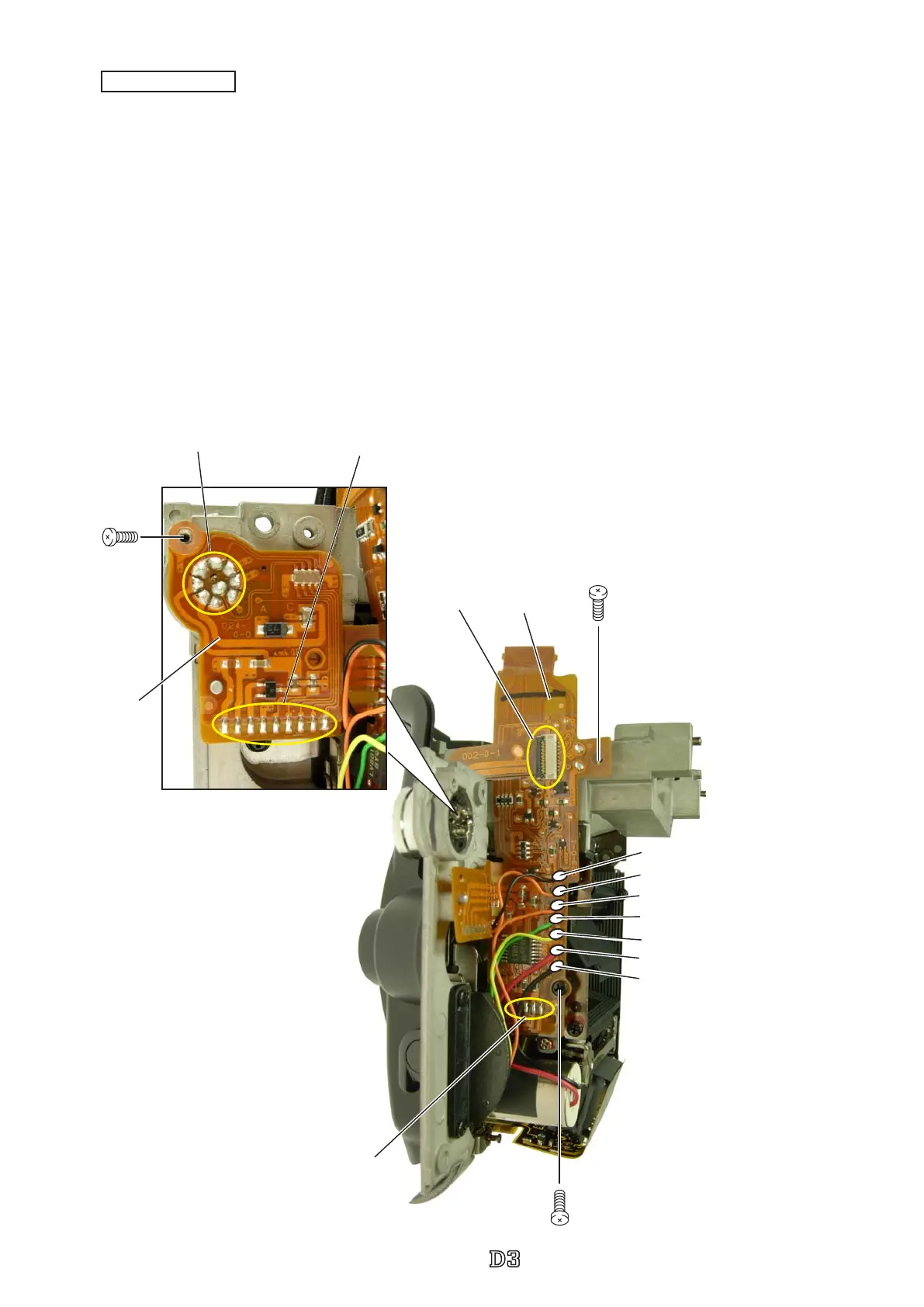
Unsolder the seven wires (that are connected as below).
・
Remove the four soldering bridges.
・
Remove nine each of soldering bridges at two places.
・
Take out the screw (#1503).
・
Remove the remote terminal FPC (#5032).
・
Take out the screws (#1525 and #1565).
・
Disconnect the FPC from the connector.
・
Remove the connection-FPC (#5031).
#5031
#1525
Soldering bridge×4
Black: Lens release SW unit
Orange: Lens release SW unit
Black: AF driving base plate unit
Red: AF driving base plate unit
Yellow: AF mode change base plate unit
Green: AF mode change base plate unit
Orange: AF mode change base plate unit
#1565
FPC
Connection-FPC
Soldering bridge ×9
#1503
#5032
Soldering bridge ×9



 To Next Page
 Loading...







