- D ・ -
VBA18001-R.3719.A
logo�Q0440�forGraphic
070518�Gdesign�ito
#1536×2
#818
BATTERY BOX UNIT
#1533
#1533×5
#1530
#1530
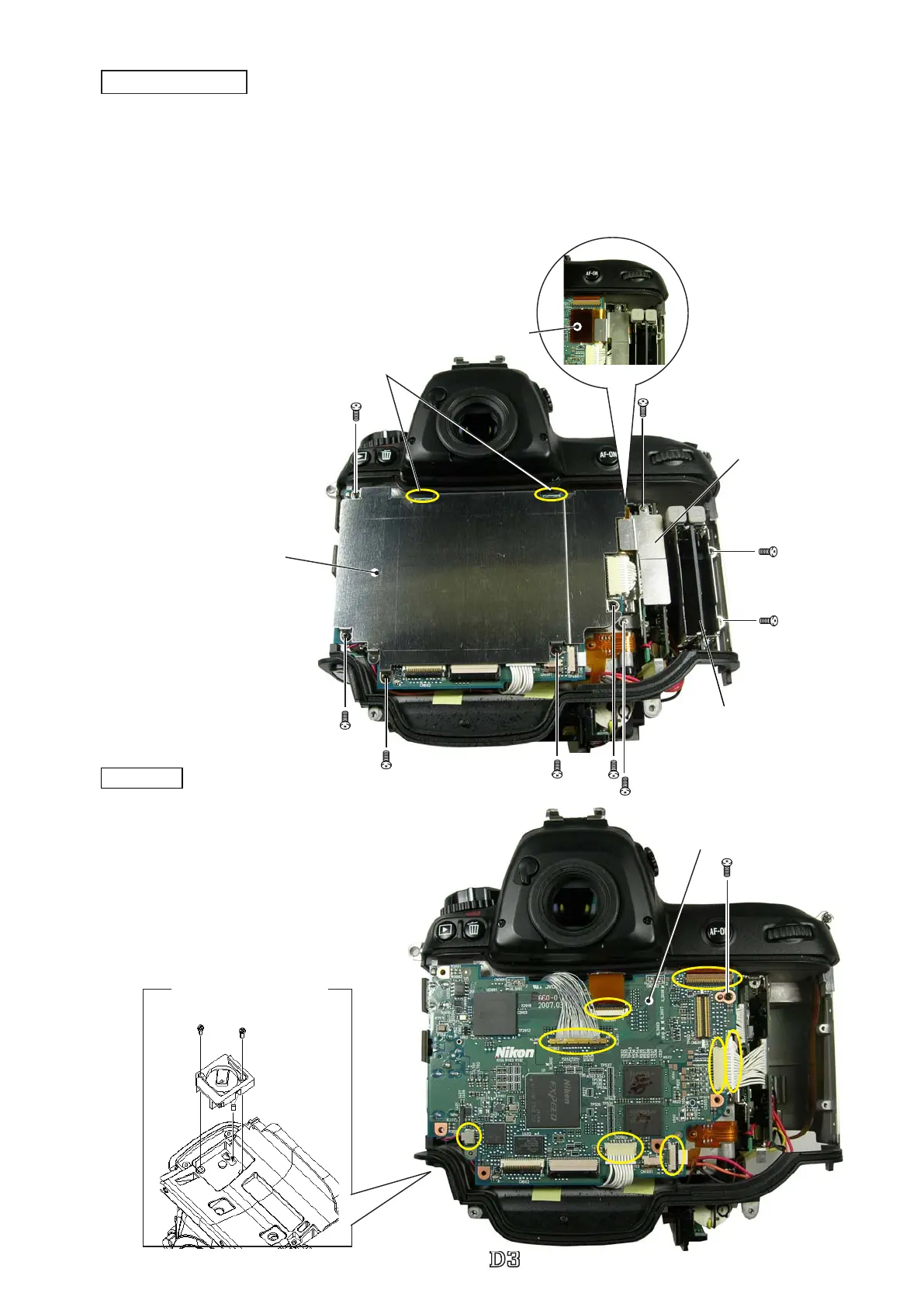
Shield lock
Shield plate
#531
FPC #5049
#70
#1532×2
DG-PCB unit (#B5022RP)
DG-PCB
・
Take out the screw (#1533).
・
Remove the four harnesses, three FPCs,
and battery box wire.
・
Remove the DG-PCB unit (#B5022RP).
・
Take out the two screws (#1536).
・
Remove battery box unit (#818).
Shield plate/CF PCB
・
Take out the ve screws (#1533).
・
Remove the shield plate (#B531).
Caution: Be careful NOT to deform the shield plate, because it is assembled in the two shield locks.
・
Take out the two screws (#1530), and remove the plate (#70).
・
Remove the connection-FPC (#5049).
・
Take out the two screws (#1532), and remove the CF PCB
(#5023).
CF PCB
#5023



 To Next Page
 Loading...







