213
t
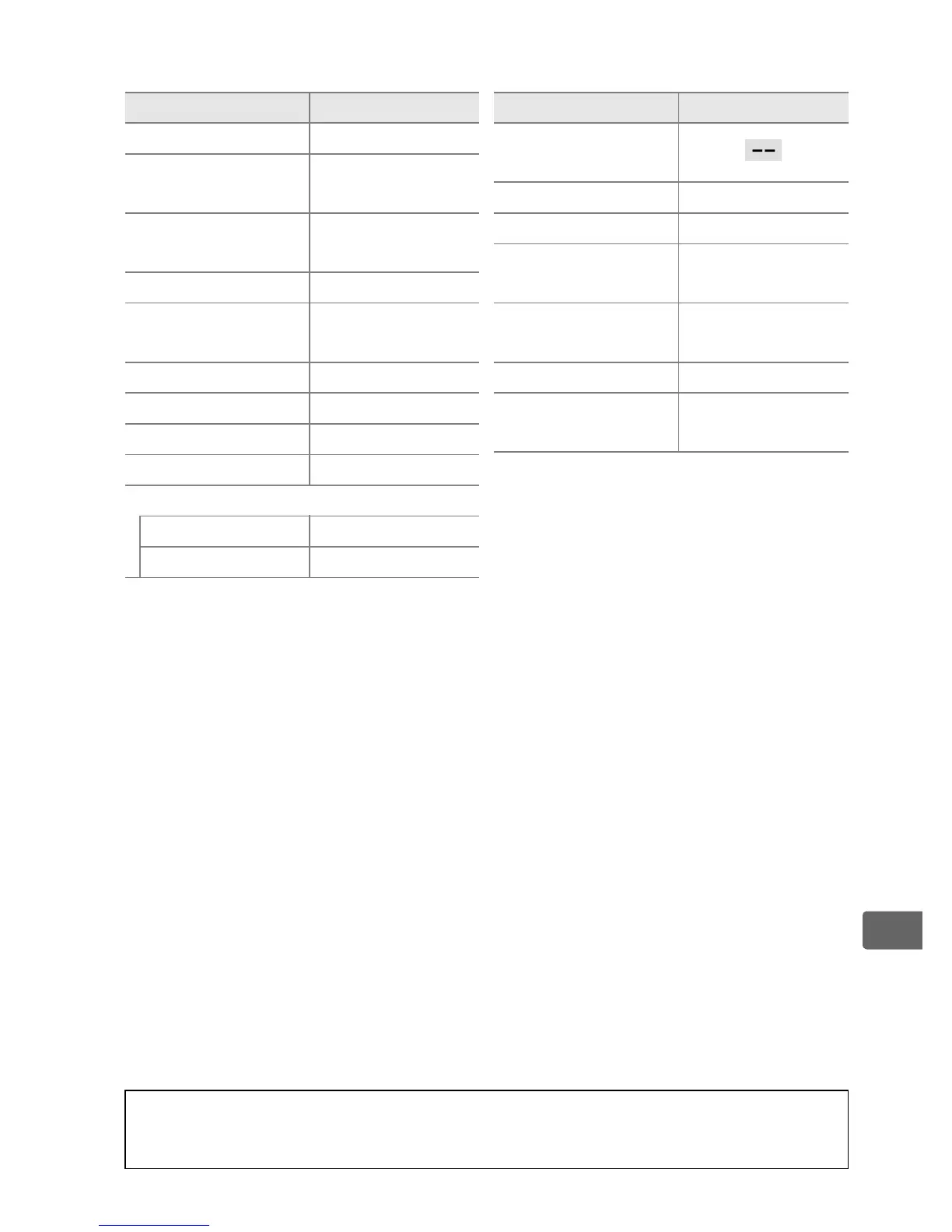
❚❚ Other Settings
1 Focus point not displayed if auto-area AF is selected for AF-area mode.
2 Number of shots is reset to zero.
Bracketing increment is reset to 1EV
(exposure/flash bracketing) or 1 (white balance bracketing).
Y Auto is
selected for the second shot of two-shot ADL bracketing programs.
3 Only settings in the bank currently selected using the Custom settings
bank option will be reset (0 311).
Settings in the remaining banks are
unaffected.
Option Default
Focus point
1
Center
Preset focus
point
Center
Exposure mode
Programmed
auto
Flexible program Off
Exposure
compensation
Off
AE lock hold Off
Aperture lock Off
Shutter speed lock Off
Autofocus mode AF-S
AF-area mode
Viewfinder Single-point AF
Live view/movie Normal-area AF
Live view
monitor hue
Metering Matrix metering
Bracketing Off
2
Flash mode
Front-curtain
sync
Flash
compensation
Off
FV lock Off
Exposure delay
mode
Off
3
Option Default
A See Also
See page 430 for a list of default settings.



 To Next Page