- A ・ -
logo_Q0650_forGraphic
071004_Gdesign_ito
VBA21001-R.3753.A
A
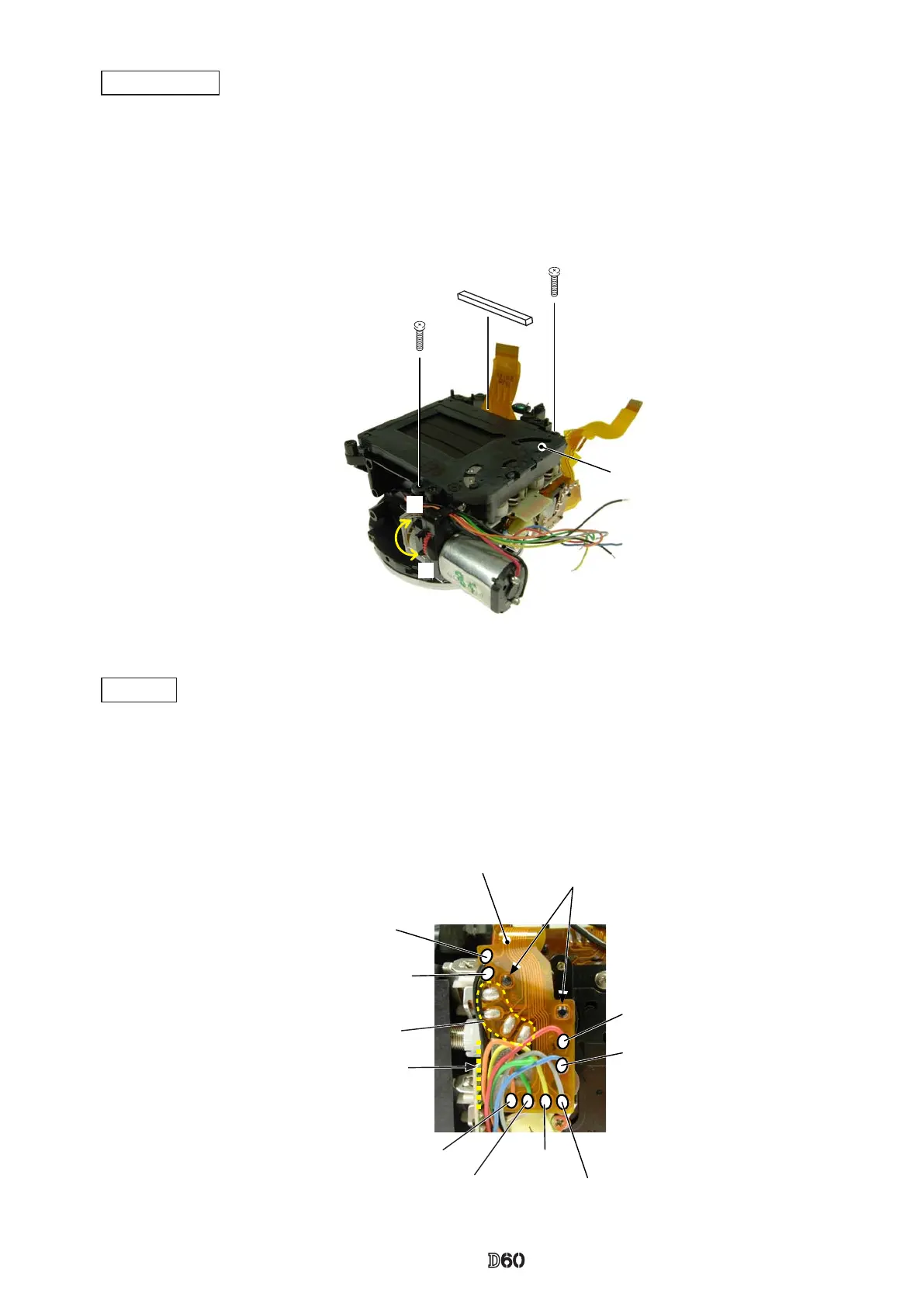
#635×2
Shutter (#31)
B
#757
・
Turn the white gear in the direction of "A", and raise the mirror.
・
Mount the shutter unit (#31), and x it with two screws (#635).
・
Turn the white gear in the direction of "B", and let the mirror down.
・
Attach [#757].
Shutter unit
・
Attach the SQ FPC (#1014) by tting the bosses of the SQ-PCB unit in the holes.
・
Make four solder bridges.
・
Solder the eight wires (connected from SQ, Fmin, and Mg).
SQ FPC
Orange:Fmin
Green:SQ Gray:SQ
Yellow:SQ
Red:Mg
Blue:Mg
Black:Fmin
Black:SQ
SQ FPC#1014
Boss×2
Solder bridge×4
Wire arrangement:
Keep all the wires rightwards
within this line.



 To Next Page