3 Operation of Each Part
19
IC Inspection Microscope ECLIPSE L200ND / L200N Instructions
3.7 Changing the illumination
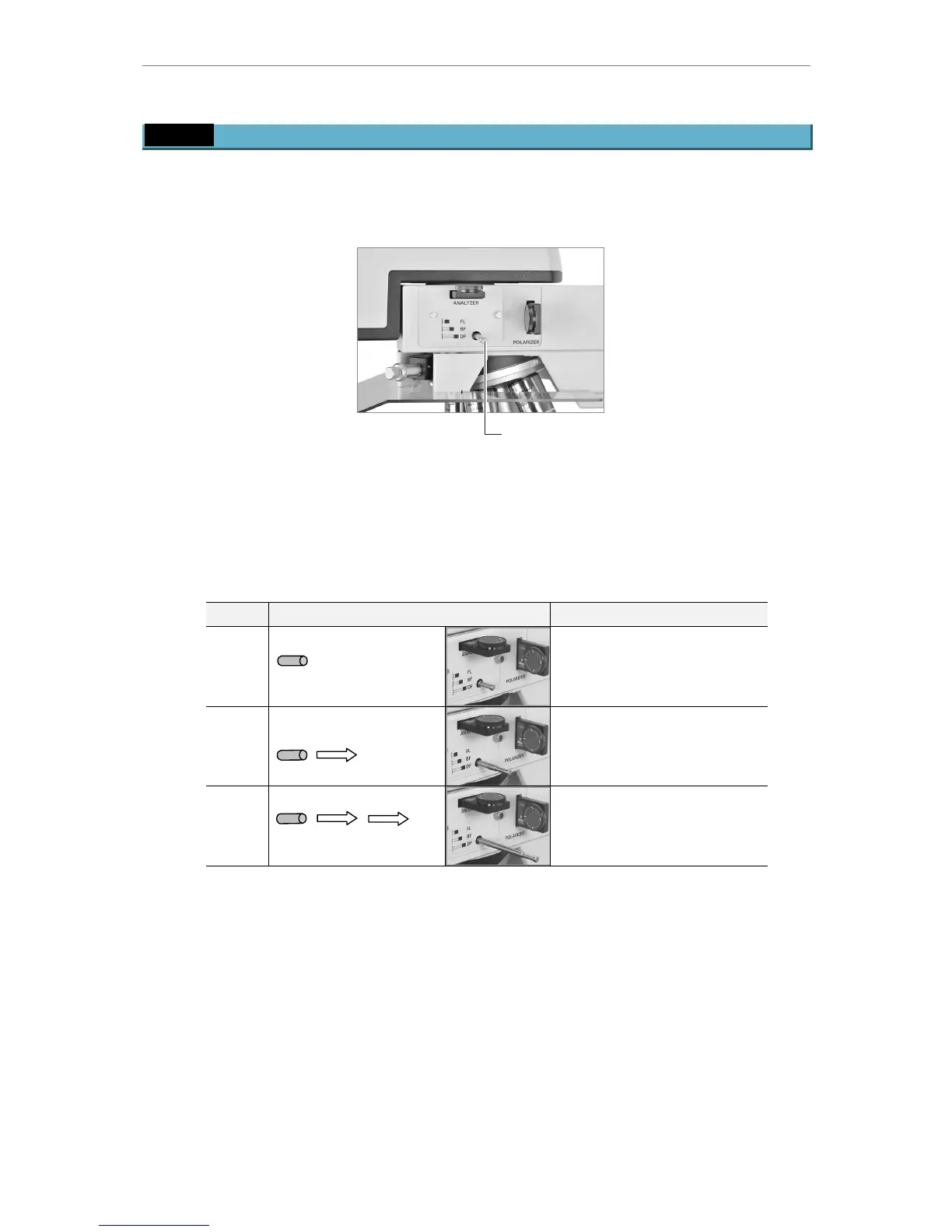
You can change illumination with the selection lever on the arm. To change illumination,
push/pull the dark-field/bright-field/fluorescent selection lever for the L200ND or the
dark-field/bright-field selection lever for the L200N.
Dark-field/bright-field/fluorescent
selection lever (for L200ND only)
(Dark-field/bright-field selection
lever provided for the L200N)
Figure-21 Changing the illumination
For fluorescent illumination on the L200ND, attach the filter block inside the microscope arm.
(See “4.9 Installing the filter block (for fluorescent illumination only)”.)
Table-4 Changing the illumination
Lever position Type of illumination
FL Fully push in.
Fluorescent illumination
(for L200ND only)
* only when the filter block is
attached
BF Pull out to the next
click-stop position.
Bright-field illumination
DF Fully pull out.
Dark-field illumination







 To Next Page