OCM Pro CF
page 56 OCM Pro CF - Rev. 09 as of 07.06.2016
7.6.2 Communication Options
There are several different options available for communication with the
OCM Pro CF. These options are:
- direct Ethernet connection between PC/Laptop and OCM Pro CF using a
cross-link cable
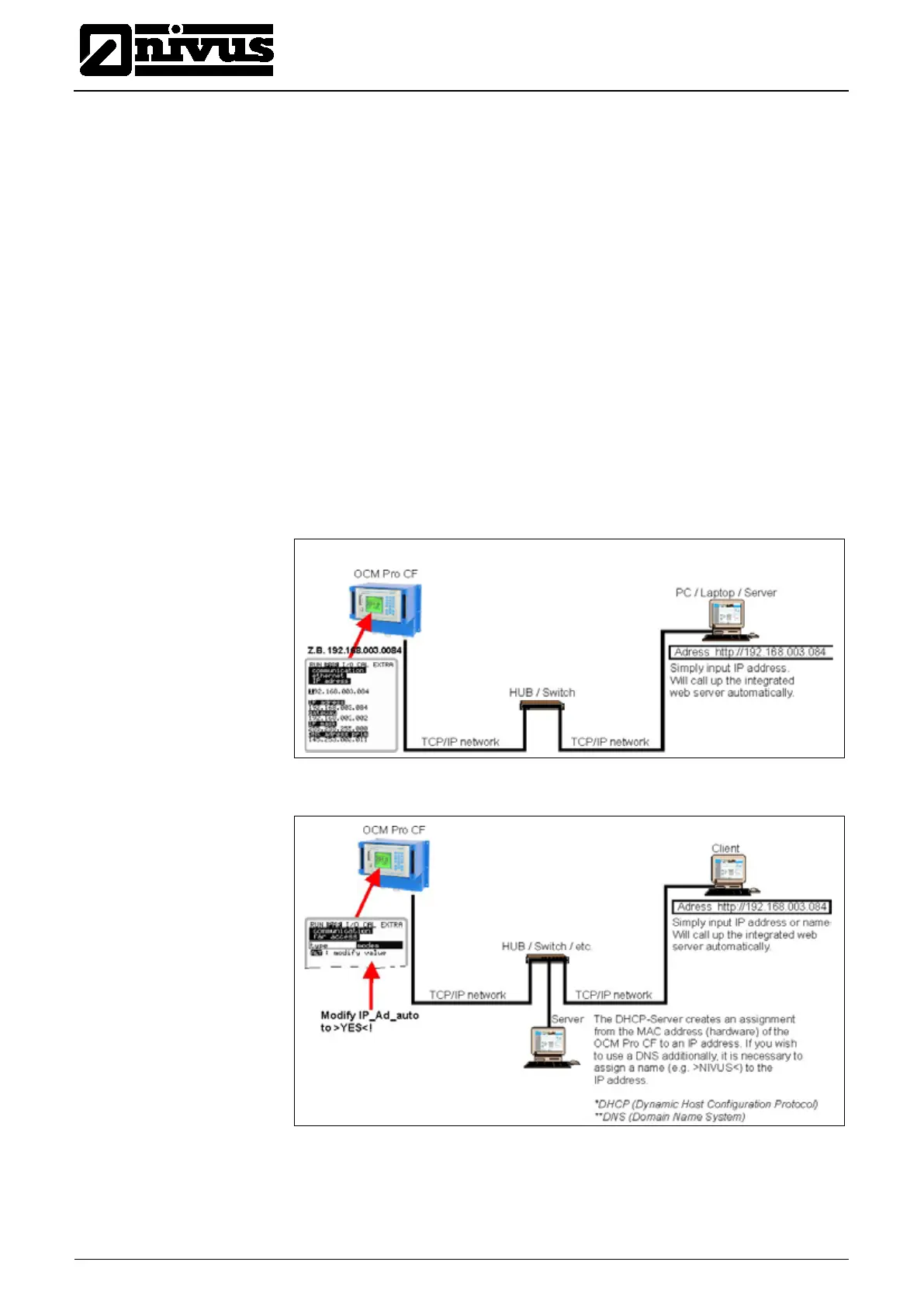
- Ethernet level connection via TCP/IP, network connection via Ethernet hub
or switch (see Fig. 7-40) It is necessary to use patch cables.
- Connection via network server using DHCP (Dynamic Host Configuration
Protocol) and/or DNS (Domain Name Server).
This setup is depicted in Fig. 7-41.
- Internet connection via access portal (see Fig. 7-42)
It is required to use an OCM Pro CF equipped with according hardware such
as analog modem, ISDN modem or GPRS to set up such a connection.
The setup is described in Chapter 7.6.3.
- connection to SCADA systems via Modbus TCP (Ethernet)
- data and alarm transmission via E-mail or FTP server
Fig. 7-40 Communication without server
Fig. 7-41 Communication with server



 To Next Page