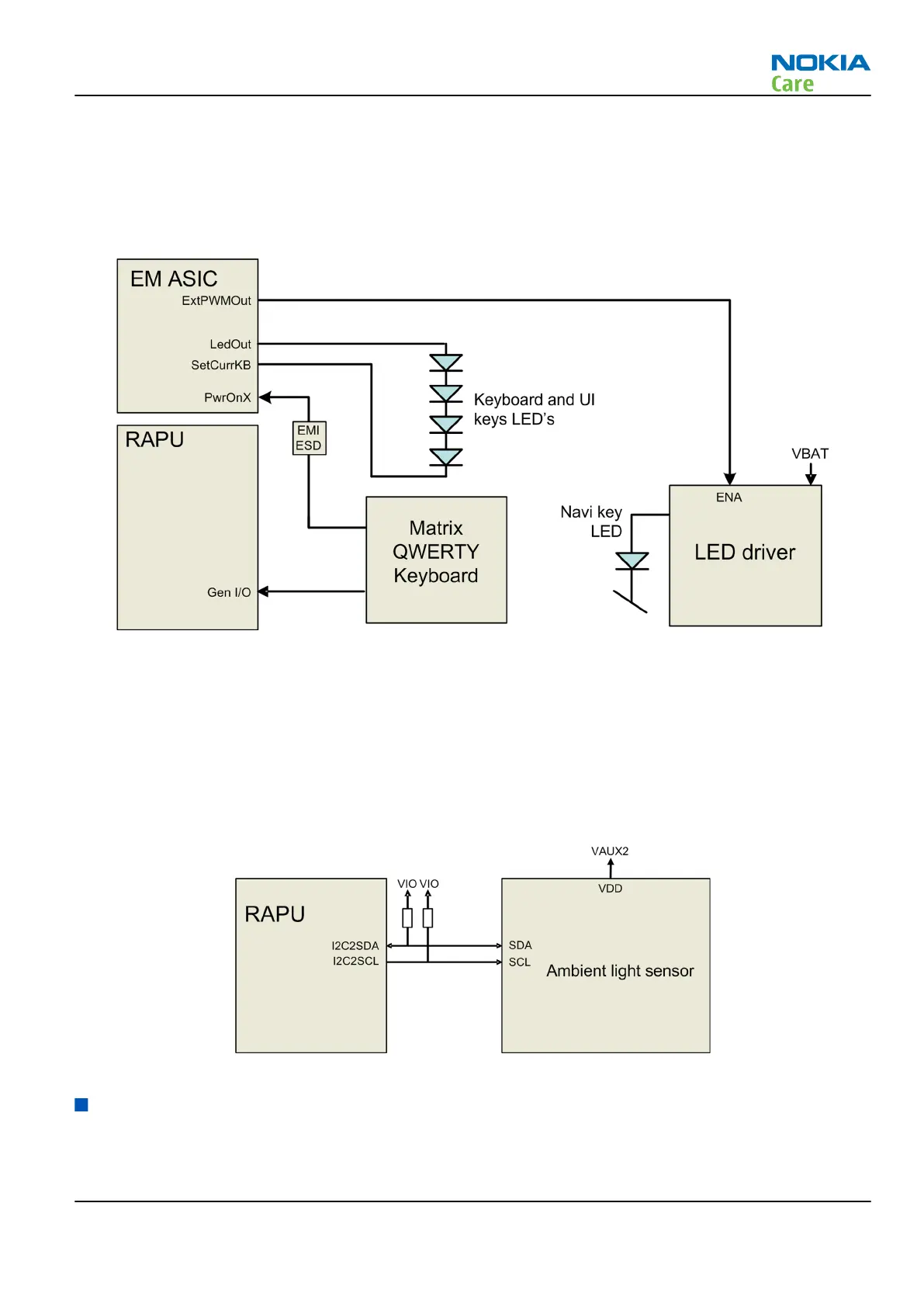
The following block diagram shows the keyboard interface.
The keyboard interface is implemented with RAPU’s GENIOs.
The LED's at the UI keys are controlled by a LED driver. The driver is controlled by a PWM signal from EM ASIC
Gazoo.
The keyboard LED's are controlled directly by EM ASIC Gazoo.
Figure 36 Keyboard interface
Ambient light sensor (ALS) interface
Ambient light sensor information is used to control keyboard and display brightness.
•
Keyboard backlight is turned OFF, when it is not needed.
•
Display brightness is dimmed, when environment lighting is dark.
The ambient light sensor is calibrated in production and can be re-tuned in service points, though not
recommended unless calibration coefficient is lost for some reason
Figure 37 Ambient light sensor (ALS) interface
GPS interface
The phone includes a built in GPS receiver and could operate as a stand-alone positioning device. The antenna
for GPS is located at the top of the A-cover, see section GPS antenna (page 5– 0 ) .
The GPS receiver is connected to RAPU ASIC.
RM-632; RM-634; RM-699
System Module
Issue 3 COMPANY CONFIDENTIAL Page 5 – 15
Copyright © 2010 Nokia. All rights reserved.


 To Next Page