6 Installing the SYSTEM PROGRAM
47
This completes installing the SYSTEM PROGRAM.
Example: If LS-600 SYSTEM PROGRAM was
installed
Example: If LS-600 SYSTEM PROGRAM was
installed
Example: If LS-600 SYSTEM PROGRAM was
installed
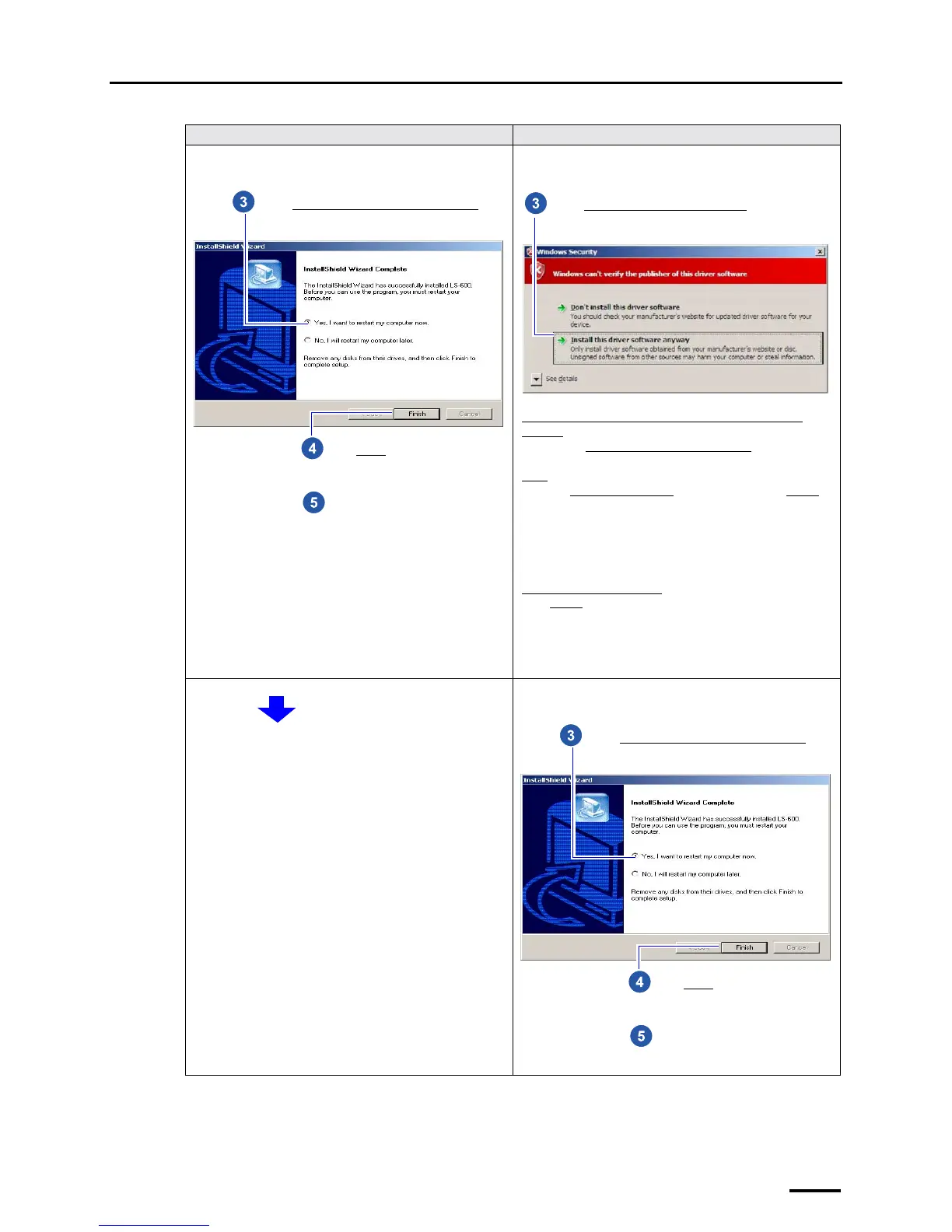
For Windows XP For Windows Vista
Click Finish.
Select Yes, I want to restart my computer now
.
Remove the CD-ROM.
Select Install this driver software anyway.
If the scanner power cord and USB cable are not connected
correctly
The message Connect the device. - USB Scanner is shown.
Reconnect the scanner power cord and USB cable and click
Retry
.
When the Found New Hardware
display is shown, click Cancel.
If the message is shown again
Click Cancel and install the SYSTEM PROGRAM again.
Click Finish.
Select Yes, I want to restart my computer now
.
Remove the CD-ROM.



 To Next Page