35
Appendix Communication HARDWARE - “LOG USB” Module
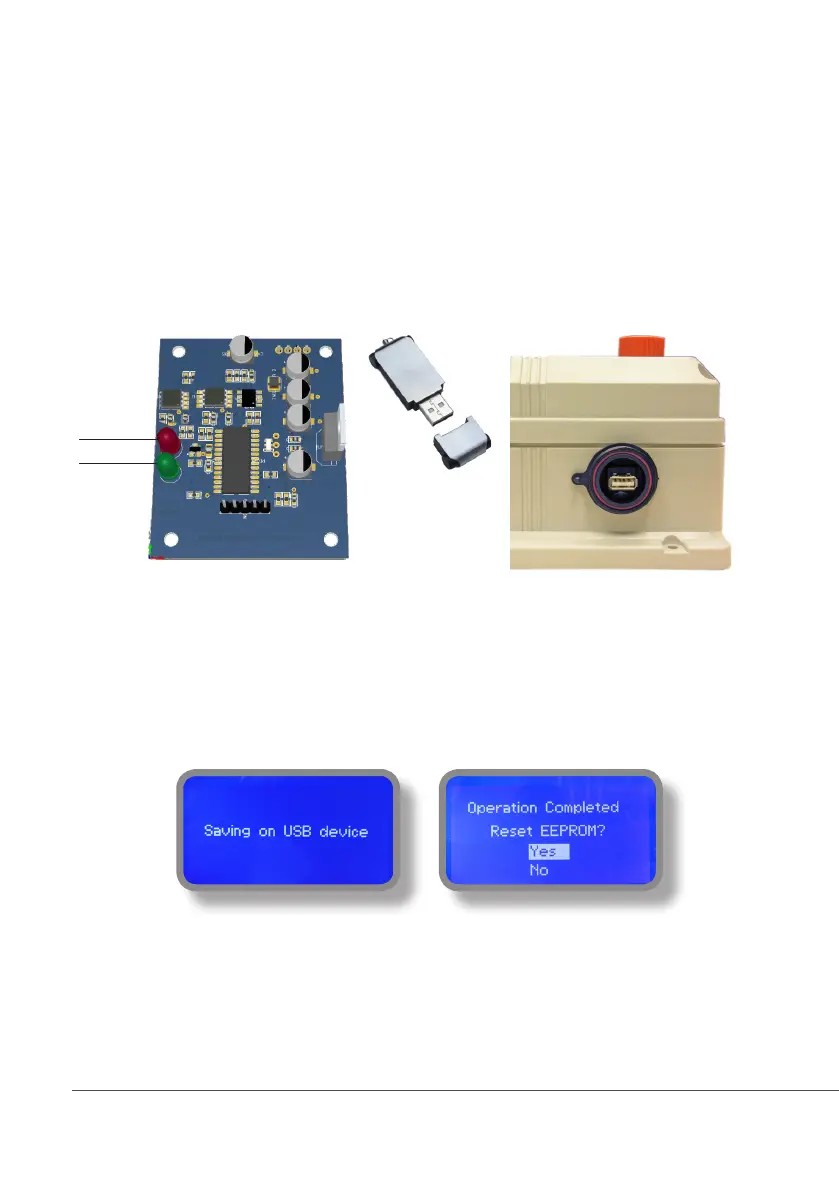
Located under mainboard cover there is a four pins connector that can be used to install “USB data log module”
or “SMS module”. Modules come pre-installed upon request and may appear different as shown (different
configurations).
“USB data log module” records instrument activities. These information can be permanently stored into a standard
USB pendrive. Pendrive can be connected to a PC using “ERMES” web www.ermes-server.com to review and print
instrument’s activities. To obtain reliable results with this feature please set instrument ID and NAME from
“RS485 Setup” menu and activate log recording from “LOG SETUP” menu.
HOW TO RECORD INSTRUMENT’S ACTIVITIES INTO USB PENDRIVE ?
Insert USB pendrive into USB connector (located on the right side of instrument). Instrument will save data log on
USB pendrive. After succeded in saving data it will ask if delete instrument’s log or not (anyway USB pendrive will
not be formatted). Move wheel on “YES” to delete log info from instrument and return to main screen or “NO”
to leave log info on instrument and return to main screen. Wait about 30 seconds to safety remove the USB
pendrive.
HOW TO REVIEW INSTRUMENT’S ACTIVITIES RECORDED INTO USB PENDRIVE ?
It’s necessary to connect to web “ERMES” www.ermes-server.com to review USB pendrive info on a PC.
Activity LED
Power LED
Standard USB pendrive
(not included)
Insert USB pendrive here
(right side of instrument)
After usage put back USB cap



 To Next Page