5
4. Main Screen
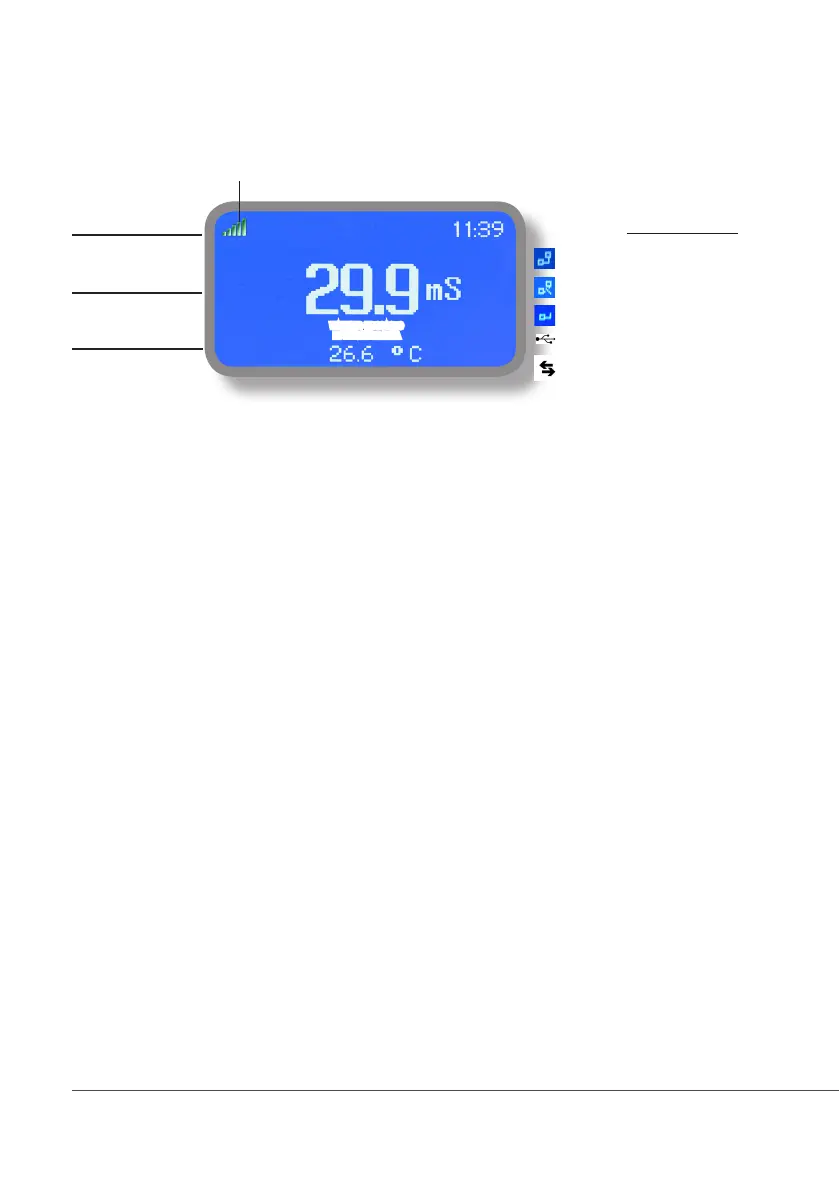
When into normal operating mode, LDSCD shows the following main screen:
UNIT (1)
VALUES (2)
OUTPUTS STATUS (3)
Main screen zones:
(1) UNIT Values read by the probe. “mS” - “uS” - “PPM/TDS”* are the measuring unit
for Conductivity probe. To change unit refer to “International” menu.
(2) VALUES These numbers are values read by the probes.
According to selected probe, this field may appear different.
(3) OUTPUTS STATUS These fields are related to current outputs status and instrument activity.
For more information rotate the wheel when into main screen. (see next page)
During critical situations a warning / alarm message may appear. To
in-depth explanation completely rotate clockwise the wheel to review main
instrument parameters and current outputs status.
*sold as option
*PPM / TDS unit is based on 1mS = 640 PPM of TDS (total dissolved solids)
Note: the word “PUMP” as shown into this manual refers to a “dosing device” connected to the instrument!
WARNING MESSAGES
NOTIFICATION AREA
WARNING MESSAGE
NOTIFICATION AREA
LAN CONNECTION OK - ERMES CONNECTION OK
LAN CABLE DISCONNECTED
LAN CABLE CONNECTED - ERMES NOT AVAILABLE
Connection Status
CONNECTED TO USB PEN-DRIVE
ERMES OK
GSM Signal*



 To Next Page