VX600 All-in-One Controller User Manual
The output image status
: The output image is displayed.
: The output is black.
: The output image is frozen.
: The test pattern is shown.
: The device is connected to the control PC via an Ethernet port.
: The device is not connected to the control PC.
: The device is connected to the control PC via a USB port.
: The device is in cascading mode via a USB port.
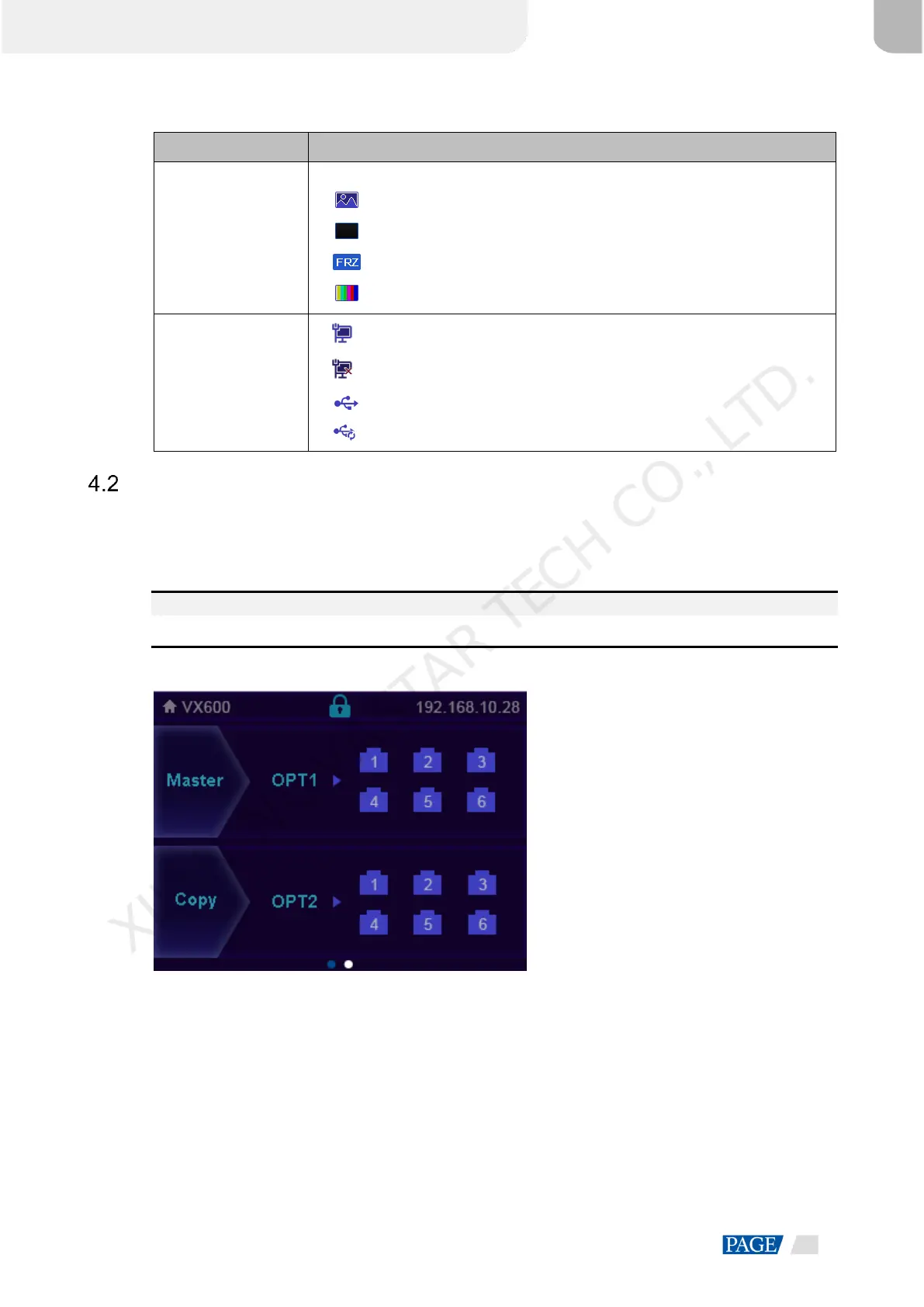
Second Home Screen
The second home screen page displays the working and connection statuses of the OPT ports and the
working and connection statuses of the Ethernet ports on the fiber converter connected to the VX600. On the
home screen, rotate the knob to access the second home screen page.
This page may vary slightly according to the different working modes of OPT 2.
Note:
This page is available when the OPT ports are connected.
Figure 4-2 OPT 2 copy mode
Master>Port: Display the connection and backup statuses of the Ethernet ports of the VX600.
Copy>OPT2: OPT 2 works in Copy mode. Display the connection and backup statuses of the Ethernet
ports on the fiber converter connected to the VX600.
XI'AN NOVASTAR TECH CO., LTD.



 To Next Page