VX600 All-in-One Controller User Manual
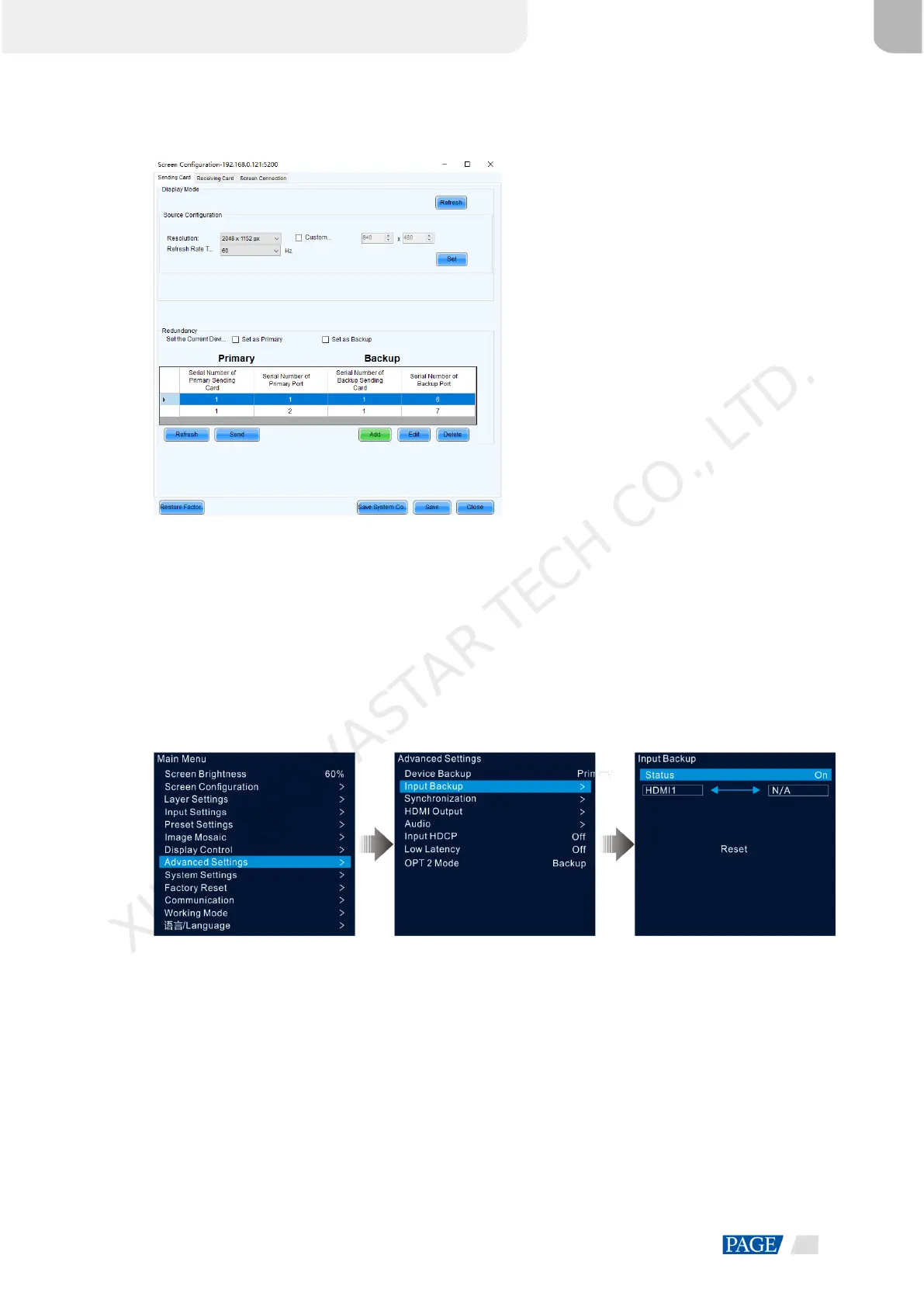
Figure 5-30 Primary Ethernet ports
Step 8 Repeat Step 6 and Step 7 to complete the backup settings for other Ethernet ports.
5.8.2 Input Backup
Input backup allows you to set the backup relationship between two input sources. When one input source has
a problem or the input connector fails, the backup source will be used seamlessly and continue to work well to
ensure the LED screen will not go black.
Step 1 On the main menu screen, go to Advanced Settings > Input Backup to enter the input backup settings
screen.
Figure 5-31 Input source backup
Step 2 Rotate the knob to select Status and press the knob to confirm. Rotate the knob again to select On and press
the knob to confirm.
Step 3 Rotate the knob to select the desired input source on the right side.
Input backup rules:
In the backup group, two HDMI sources serve as the backup for each other.
Restrictions on input backup functions:
HDMI 1 and HDMI 2 form a hot backup group. The current input source of the layer is HDMI 1.
− HDMI 1: No signal. HDMI 2: Signal
XI'AN NOVASTAR TECH CO., LTD.



 To Next Page