VX600 All-in-One Controller User Manual
Note:
If the freeze or FTB function is turned on, the test pattern function is unavailable.
Advanced Settings
The advanced settings allow you to set the device backup, input source backup, synchronization, HDMI
output, audio, input source HDCP, low latency and OPT 2 working mode.
5.8.1 Device Backup
The VX600 supports both the backup between devices and Ethernet ports.
Backup Between Devices
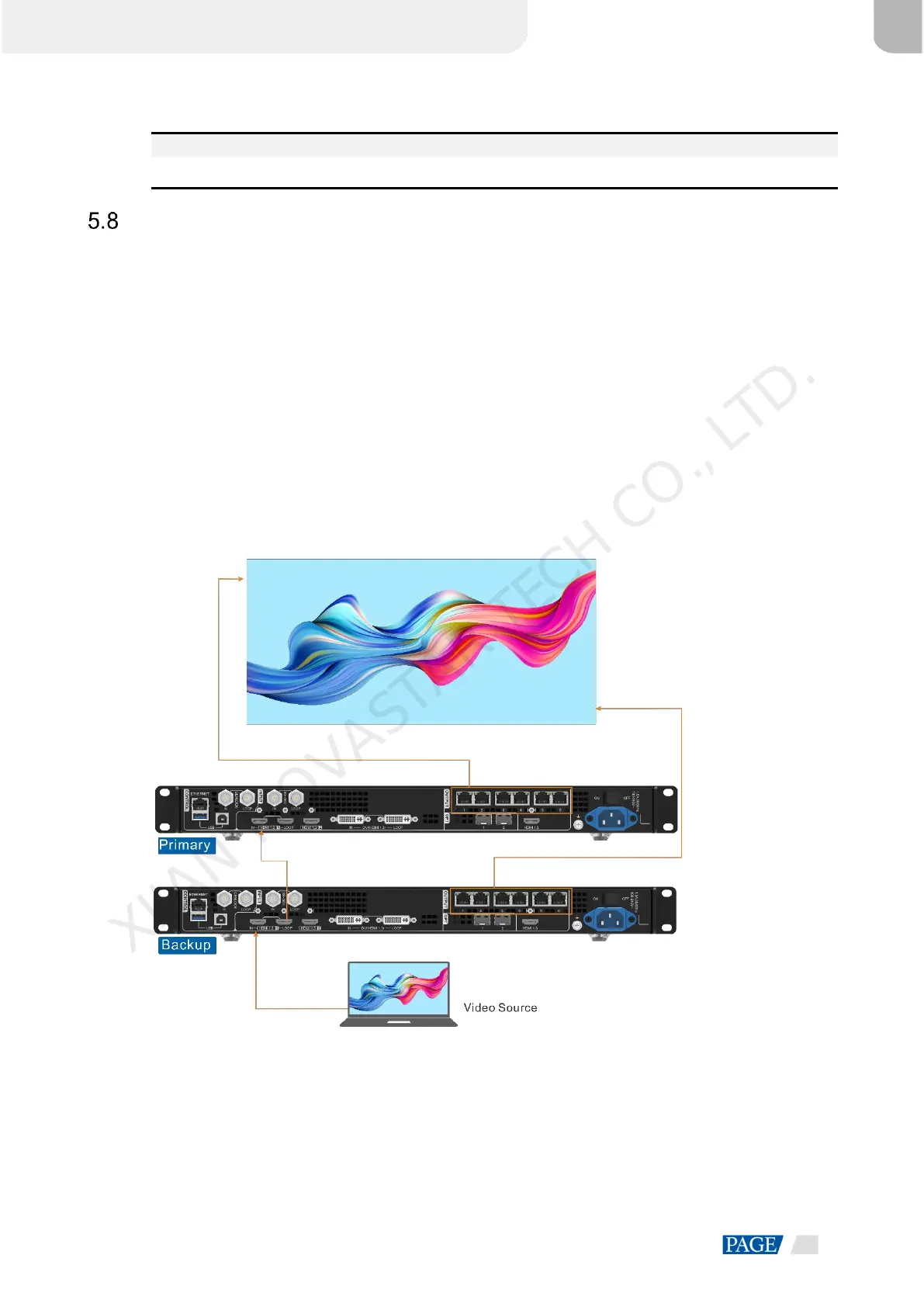
Device backup allows you to set the backup relationship between two devices. You can set one of the devices
as the primary device or the backup device. When the primary device has a problem or the primary device's
Ethernet cable fails, the backup device will take over the responsibilities of the primary device seamlessly and
continue to work well to ensure the LED screen will not go black.
The connection diagram for the device backup:
Figure 5-25 Device backup connection
The setting procedure for the device backup:
Step 1 On the main menu screen, go to Advanced Settings > Device Backup to enter the device backup screen.
XI'AN NOVASTAR TECH CO., LTD.



 To Next Page