VX600 All-in-One Controller User Manual
2 Appearance
Front Panel
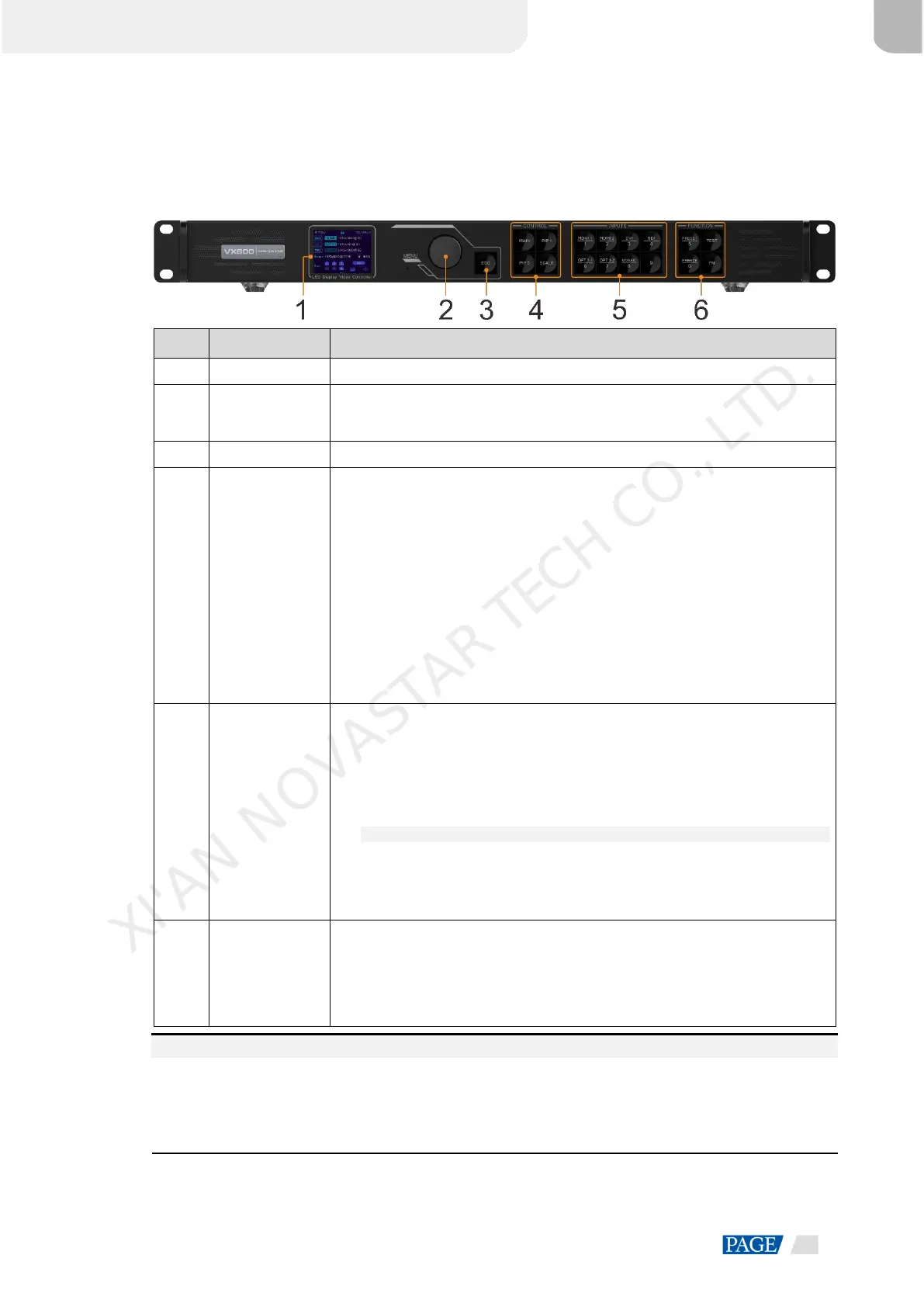
Display the device status, menus, submenus and messages.
Rotate the knob to select a menu item or adjust the parameter value.
Press the knob to confirm the setting or operation.
Exit the current menu or cancel an operation.
Open or close a layer (main layer and PIP layers), and show the layer status.
Status LEDs:
− On (blue): The layer is opened.
− Flashing (blue): The layer is being edited.
− On (white): The layer is closed.
SCALE: A shortcut button for the full screen function. Press the button to make
the layer of the lowest priority fill the entire screen.
Status LEDs:
− On (blue): Full screen scaling is turned on.
− On (white): Full screen scaling is turned off.
Show the input source status and switch the layer input source.
Status LEDs:
On (blue): An input source is accessed.
Flashing (blue): The input source is not accessed but used by the layer.
On (white): The input source is not accessed or the input source is abnormal.
Notes:
When a 4K video source is connected to OPT 1, OPT 1-1 has a signal but
OPT 1-2 does not have a signal.
When two 2K video sources are connected to OPT 1, OPT 1-1 and OPT 1-2
both have a 2K signal.
Shortcut function
buttons
PRESET: Access the preset settings menu.
TEST: Access the test pattern menu.
Freeze: Freeze the output image.
FN: A customizable button
Notes:
Hold down the knob and ESC button simultaneously for 3s or longer to lock or unlock the front panel
buttons.
This product can only be placed horizontally. Do not mount vertically or upside-down.
The product can be mounted in a standard 19-inch rack capable of withstanding at least four times the
total weight of the mounted equipment. Four M5 screws should be used to fix the product.
XI'AN NOVASTAR TECH CO., LTD.



 To Next Page