VX600 All-in-One Controller User Manual
Input Settings
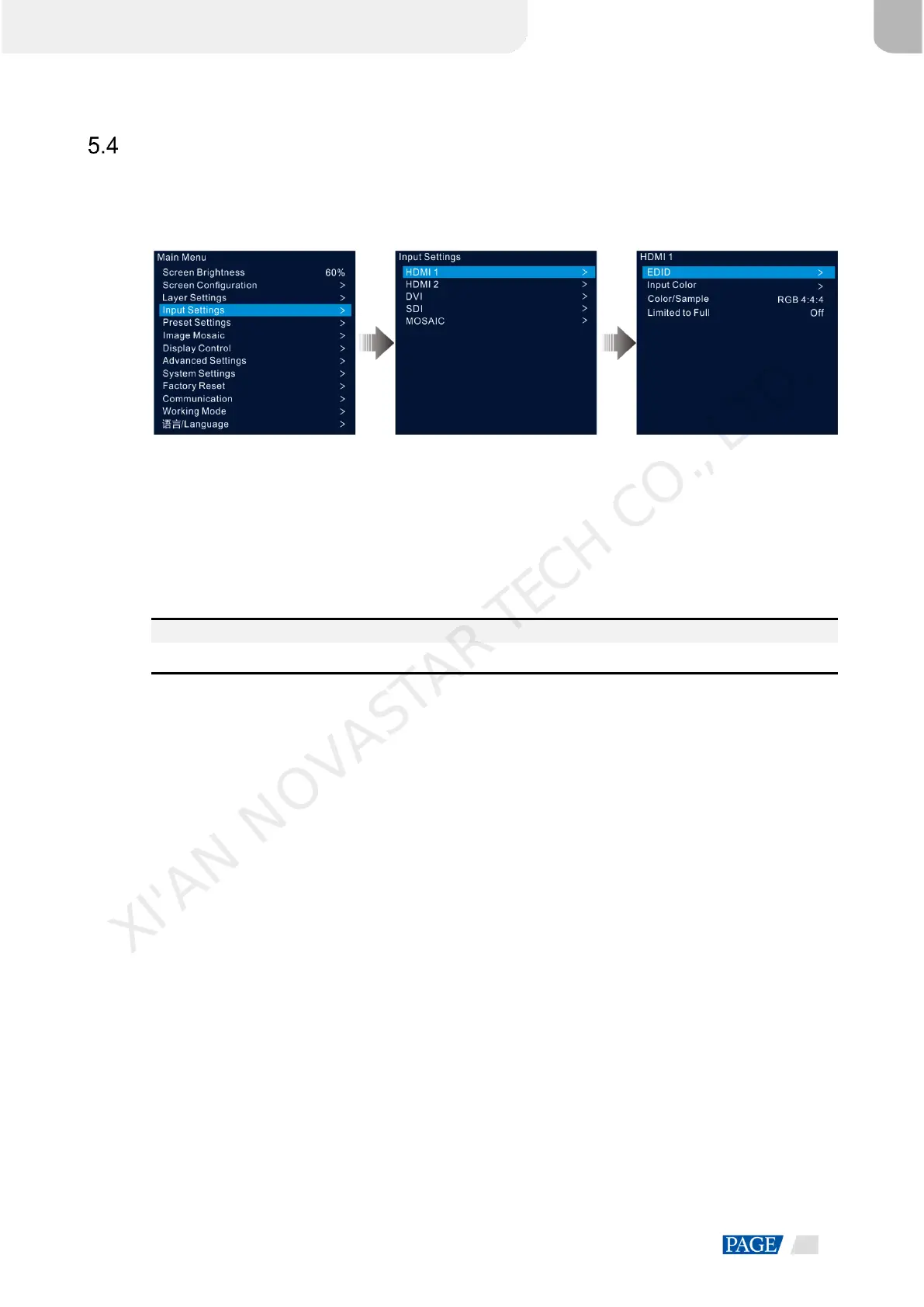
On the main menu screen, rotate the knob to select Input Settings and press the knob to enter the input
source screen.
Figure 5-16 Select input source
5.4.1 Set Input Resolution
The VX600 provides the HDMI, DVI and 3G-SDI (optional) input connectors.
When a DVI or HDMI input source is output by a graphics card, the resolution settings are supported. The
following two methods are provided to set the input resolution:
Standard resolution
Custom resolution
Note:
The SDI input source does not support resolution settings.
Standard Resolution
Step 1 On the input settings screen, select the desired input source and press the knob to enter the input resolution
settings screen.
Step 2 Select EDID and press the knob to enter the EDID settings screen.
Step 3 Set the EDID mode to Standard.
Step 4 Rotate the knob to select Resolution, and press the knob to show the resolution list.
Step 5 Rotate the knob to select the desired resolution from the list and then press the knob to confirm.
Step 6 Rotate the knob to select Frame Rate, and press the knob to show the frame rate list.
Step 7 Rotate the knob to select the desired frame rate from the list and then press the knob to confirm.
XI'AN NOVASTAR TECH CO., LTD.



 To Next Page