Instruction Manual CON 11/110
40
8.2.3 P1.3: Selection of Automatic or Manual Temperature Compensation
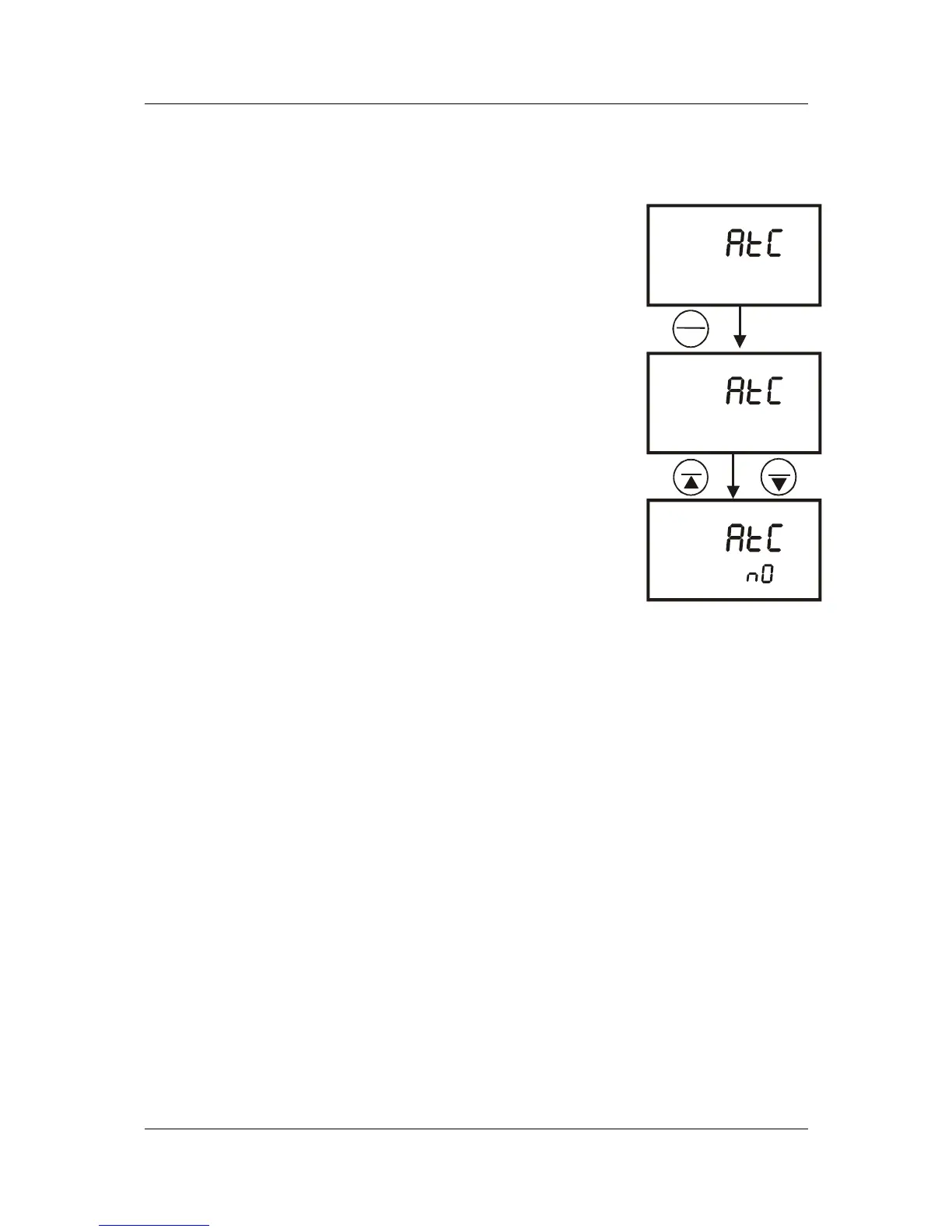
This feature lets you select between Automatic Temperature Compensation (ATC)
and Manual Temperature Compensation (MTC). Meter default is ATC.
From measurement mode
1 Press SETUP key to enter Set Up menu.
2 Press the HOLD/ENTER keys until you view
parameter P1.3.
3 Press the HOLD/ENTER key again. The upper display
shows “ATC” and the lower display shows “YES” or
“NO”.
4 Press MI/▲ or MR/▼ keys to select between
Automatic and Manual Temperature Compensation.
• “YES” activates the Automatic Temperature
Compensation function.
• “NO” activates the Manual Temperature
Compensation function.
5 Press the HOLD/ENTER key to confirm selection and
to return to the subgroup menu.
6 Press the CAL/MEAS key to return to measurement
mode.
SETUP
YES
°C
ATC
SETUP
P 1.3
°C
ATC
SETUP
°C
HOLD
ENTER
MI
MR
Figure 33: P1.3-
Select Automatic or
Manual Temperature
Compensation



 To Next Page