Instruction Manual CON 11/110
44
8.5 P4.0: Auto Off
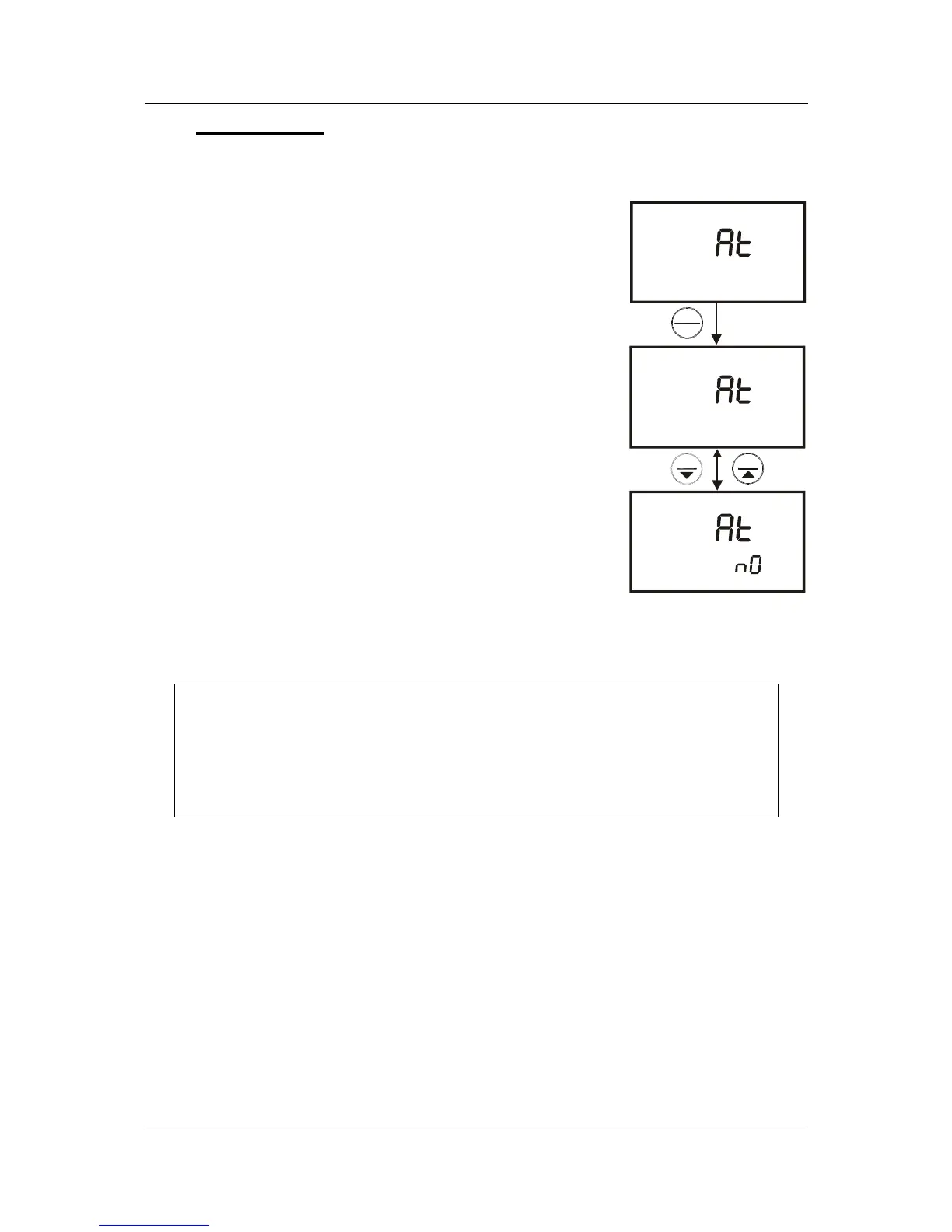
In Program P4.0 you can activate the Auto Off option to automatically switch off the
instrument 20 minutes after the last key selection. This feature is useful for
conserving battery power. Under default conditions, the
instrument has this option activated.
1. Press the SETUP key to enter Set Up mode.
2. Press the MI/▲ or MR/▼ keys until you view
parameter P4.0.
3. Press the HOLD/ENTER key. The upper display
shows “AtO” and the lower display shows “YES” or
“NO”.
4. Press MI/▲ or MR/▼ keys to select options
• YES – activates the Auto Off function
• NO - deactivates the Auto Off function
5. Press the HOLD/ENTER key to confirm and return
to subgroup menu.
6. Press the CAL/MEAS key to return to measurement
mode.
NOTE:
For datalogging using interval measurements, it is often desirable to use
an AC adapter and disable the auto-off feature.
ENTER
HOLD
SETUP
P 4.0
MR
MI
SETUP
SETUP
yes
O
O
O
Figure 37: P4.0-
Selection of Auto
Power Off function



 To Next Page