Instruction Manual CON 11/110
50
8.9 P8.0: Selection of cell constant
Your meter lets you select a cell constant of K = 1.0, 10, or 0.1.
Use a cell of K = 1.0 for midrange measurements
Use a cell of K = 10 for high range measurements (above 20 mS or 10 ppt).
Use a cell of K = 0.1 for low range measurements (below 20
µS or 10 ppm).
The cell included with your meter has a cell constant of K =
1.0.
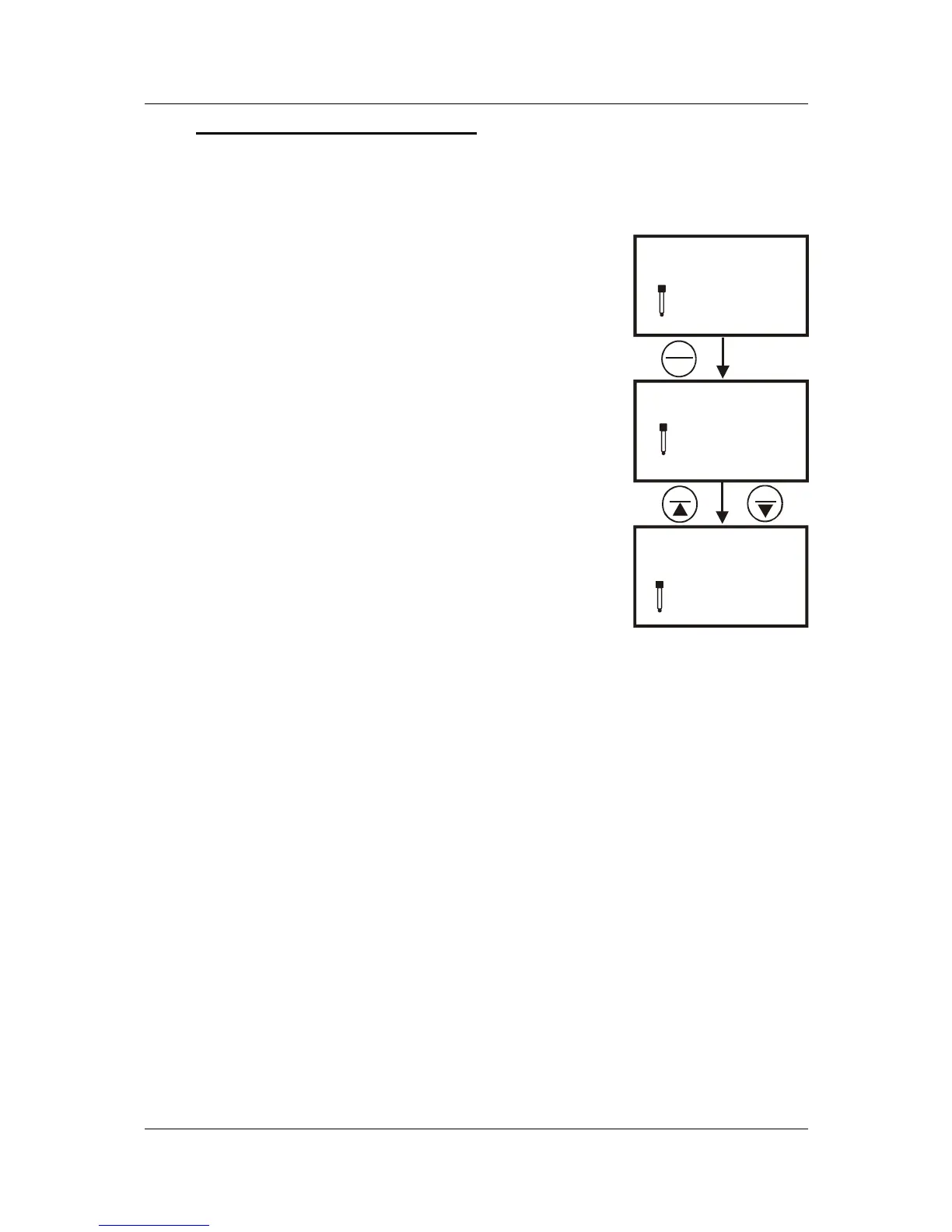
From measurement mode
1. Press SETUP key to enter Set Up menu.
2. Press the MI/▲ or MR/▼ keys until you view
parameter P8.0.
3. Press the HOLD/ENTER key to enter parameter
P8.0.
4. Press the MI/▲ or MR/▼ keys to select the cell
constant between K = 1.0, 0.1, or 10.
5. Press the HOLD/ENTER key to confirm selection
and to return to the subgroup menu.
6. Press the CAL/MEAS key to return to measurement
mode.
cel
1.0
SETUP
SETUP
p 8.0
p 8.0
p 8.0
10.0
SETUP
MI
MR
HOLD
ENTER
K =
K =
Figure 43: P8.0-
Selecting Cell Constant


 To Next Page