Instruction Manual CON 11/110
46
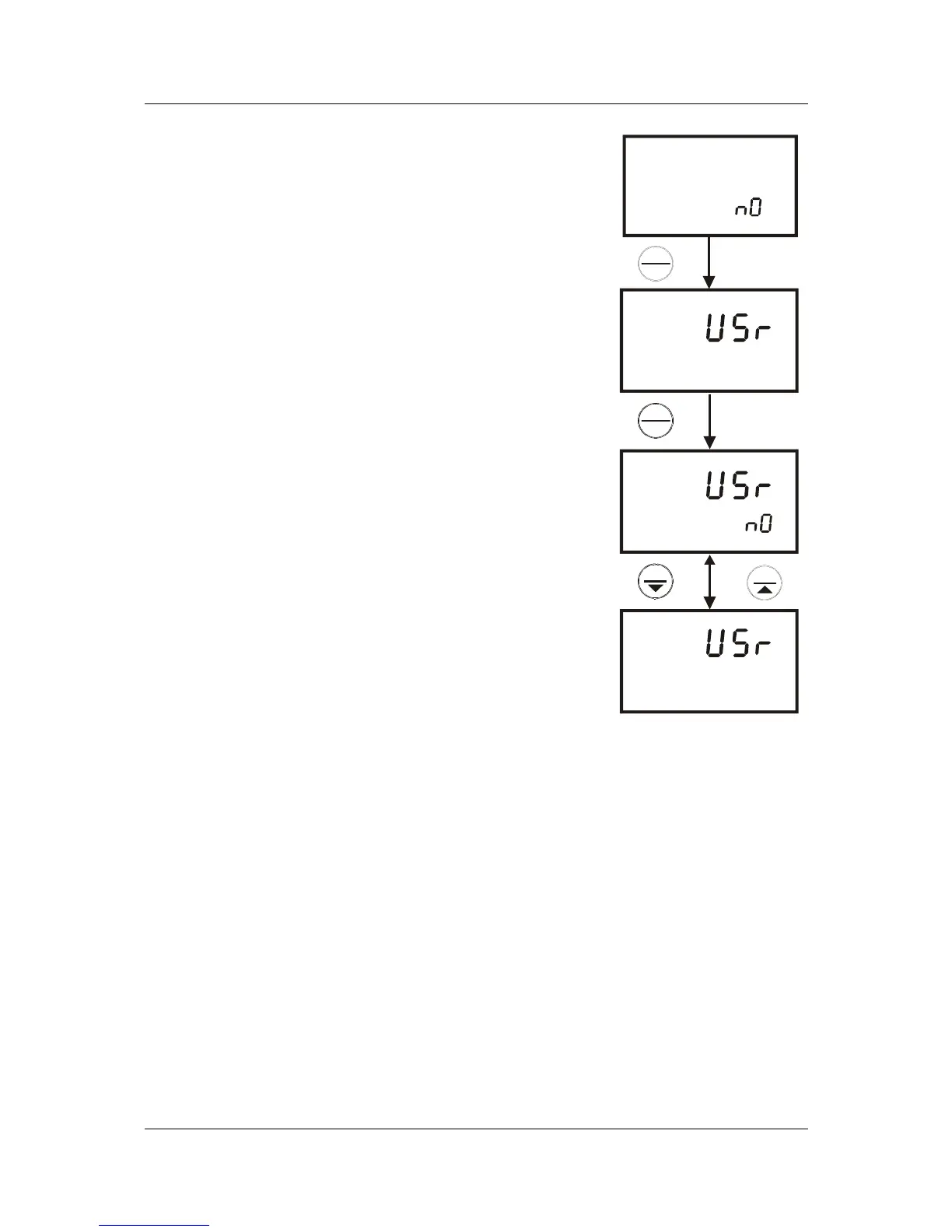
8.6.2 P5.2: User Reset
This reset function clears all the calibrations, memory and
all other setup parameters that you have changed back to
factory defaults condition.
From measurement mode
1. Repeat step 1 to 4 to enter the calibration reset
selection mode.
2. Press the MI/▲ or MR/▼ keys to select NO.
3. Press the HOLD/ENTER key to enter parameter
P5.2. The upper display will show “USr”.
4. Press the HOLD/ENTER key again to enter user
reset selection mode.
5. Press the MI/▲ or MR/▼ keys to toggle between
NO and YES.
• NO retains current settings
• YES resets to factory default settings.
6. Press the HOLD/ENTER key after confirming reset
selection and to return to the measurement mode.
Otherwise press CAL/MEAS key to return to
measurement mode without resetting to factory
default.
NOTE: See page 69 and 70 for Factory Default
Settings.
SETUP
cal
yes
SETUP
SETUP
SETUP
P 5.2
ENTER
HOLD
ENTER
HOLD
MI
MR
Figure 39: P5.2-Clear
all setups to factory
default



 To Next Page